Aug 19

Frustrating User Experiences: Wordpress Categories

Tech with tags: , 5 Comments »

I use Wordpress a lot, and love the product. But, when you are working with something every day, you see its quirks too, such as the Wordpress Media Upload.

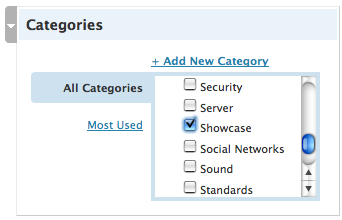
This time though, I have to mention the categories system. In the latest and greatest 2.6.x branch, the admin console got rev’d quite a bit again, and the categories system now has this:

Wordpress Categories

There is some good thinking in here, such as having the “popular categories” filter, but having a huge list of check boxes in a very small area is painful indeed. Scrolling through the list to find the categories that you want it ugly.

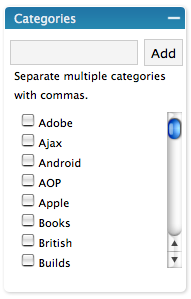
The older version actually suited me quite a bit better:

Wordpress Categories Old

At least here you had the input text box on the top, so you could type in the items, and then you would see them selected and thrown at the top just to let you know. This was much better. The problem was the fact that a Google Suggest-like auto select wasn’t implemented, so you could get the category wrong… ending up with a new one being created. So close. If you were filtered as you typed I would be happy!

Tag, you’re it!

It turns out that the tag support does all of this. It auto completes for you, and works well enough indeed. I know that there are plugins that munge categories and tags, but maybe it is time for Wordpress to nuke one of them and just unify.

Aug 18

Frustrating User Experiences: Boulder Parking Tickets

Tech with tags: 3 Comments »

When I started the Frustrating User Experiences I should have guessed that it would be like shooting fish in a barrel, as it is hard to be anal and get it right. Hell, I could take a look at this blog and find a million things too!

But, this next one is quite funny. I stupidly didn’t put enough money on the meter in Boulder the other day, and came back to a ticket. One cool think about the parking ticket meters in Boulder is that you can pay for them with a credit card which is nice. I wish they could have auto-incremented the fee on there!

A quick aside: A colleague pointed out that while having access to pay with a credit card is great, it means that you can’t use time from the person who left before his ran out! This means that even with the credit card processing fees, the tolls end up being a lot more due to double-dipping!

Anyway, I get a ticket, and I immediately look for a URL to pay (right after I curse). First blunder, it is nowhere to be seen. It just talks about sending in checks and such. Ugh. Luckily, on the back of the envelope rather than the ticket, there is a link to bouldercolorado.gov which does indeed have a way to pay online.

This is what you see when you get there:

Getting started with ticket paying

Notice the lovely contrast on the buttons with text and background.

After putting in my license info I get the following:

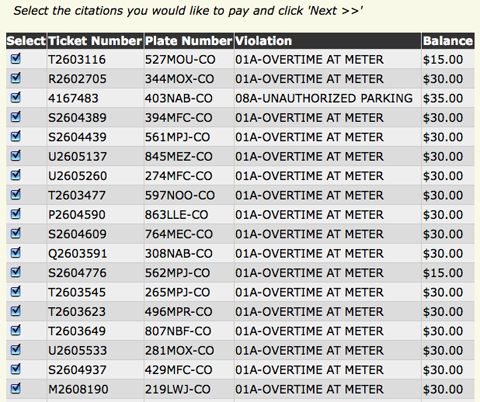
Holy checkboxes batman!

Wooah, this is just a subset of the pages of information on tickets to pay! Oh, I should have said, this is a rental car :)

It appears that people don’t pay for any kind of fines on rental cars. There was over $10k on this puppy. I want to do the right thing though, so I hunt for my issue to pay it. You can see all of the checkboxes though right? Oh, there isn’t a “deselect all” option, so I jump on the TAB + SPACE routine… singing a song to keep the rhythm up. After manually deselecting hundreds of these things. I reselect mine, and click on next, only to see:

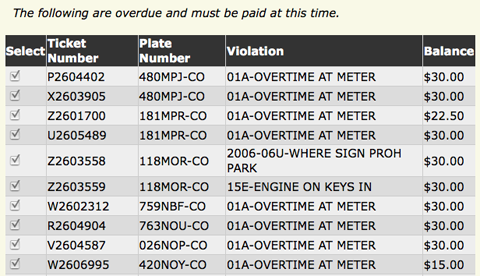
Pay for them all??

Oh man. I have to pay $6k for the issues that are “over due”. I don’t think so Sherlock!

After all that, I guess it is time to go manual :(

What would I have loved to see?

  • After entering the ticket number and license plate information, “do you just want to pay for this one? or the other 10000?”
  • A de-select all
  • Buttons where the text color and background color aren’t the same

Other Frustrating User Experiences

Aug 15

Optional typing and dynamic languages

JavaScript, Tech with tags: , , 16 Comments »

After listening to Brendan talk about typing on the latest Open Web Podcast episode on ECMAScript Harmony it got me thinking again about optional typing.

It has always bugged me a little to think of type information in my nice clean dynamic languages (Ruby, JavaScript, Python, Perl, etc.).

Looking at even the simplest of code like this (taken from Mike Chamber’s XMPP server in ActionScript 3)

var room:Room = new Room(connection);

It irks me. Just work out that it is a room already won’t you? I know you can do it? You CAN do it. So, leave it out in this case.

Although the type information is optional, it seems that a lot of the code that I have seen in AS3 puts types in all over the place. I somewhat like the idea of using types when you really need them, such as for clear documentation of a core library, or some performance issue that you find is an issue (note: that becomes an issue, not one that is assumed!)

Once you open the door though, can people play that way? Is giving the programmer a bit switch of “shall I put the type in here?” every few seconds a good thing? Especially when the tools try to put the type in all the time?

I also found it very interesting when Brendan talked about how adding type information can actually hurt performance, sharing an example of when var foo:int doesn’t do what you actually need. For me, performance is pretty much out of the window, now, and definitely in the future.

So, I lean towards not needing it. But then I flip over the cards and see stuff like this (note: a mock example):

/**
 * @type Room
 */
var room = new Room(connection);

Ugh. Now we have the worst of all words. We are documenting the code out of band. This is often done for some jsdoc-like tool that will generate docs for you. The problems are:

  • The language itself has no idea about this information. The compiler. Nor, runtime. If there was something that could be done for performance, it couldn’t be
  • How easy would it be to get this out of date. If you change the type no one is going to complain. There is no validation here.
  • Way more verbose!

This alone makes me think that I would rather have optional types just to avoid any hacks like this.

You?

Aug 15

Frustrating User Experiences: Wordpress Media Upload

Tech with tags: , 6 Comments »

There is a feature that changes every Wordpress release, that always has me wanting to patch. The way media is uploaded never suits my needs. It wasn’t built for me. Back in the day, the upload used to happen on a separate admin page, and then it became inline to the post page itself.

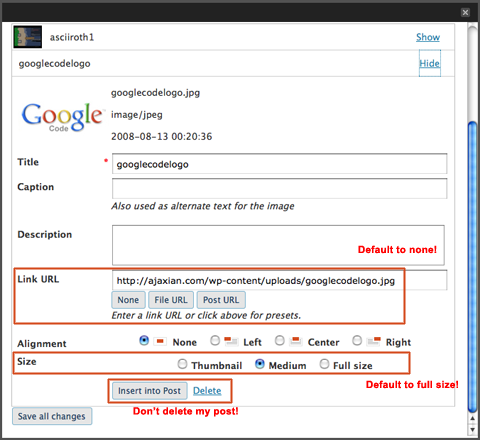
The latest version drives me the most nuts. The problems that I have are frustrating as they take a two click scenario and make it a 10 click one!

My issues:

  • When you click on the media upload it flashes between the browser upload and the Flash one
  • The link URL is to the image itself, when I never want this. I want to link to either none, or to a Web page (the use case shown is for posting a small thumbnail that links to the full size picture)
  • The size defaults to medium, but I always want full size!
  • Insert into post doesn’t do what Blogger does (put it at the top), but rather nukes anything that you have written in your post and replaces it with the image. I have to remember to select-all and copy, then insert, and then copy back in. How often do you want to nuke content in there??
  • Weird classnames applied. I just want a border="0" and a href to the page of my choice.

If I could change the defaults I would be a lot happier. Having to hack the code (which gets more spaghetti each release in this area) is a pain, and a plugin can’t hook in there.

Wordpress Media Upload

Aug 14

Custom events and Key bindings = Match made in heaven?

Tech with tags: , 7 Comments »

On the back of my example enjoying the Observer pattern with custom events I have started to play with a pet project also involving custom events.

I love keyboard shortcuts. I hate the mouse. I wish that Web applications would offer more keyboard shortcuts a la Gmail, and wondered if there could be a generic way to tie keys to actions in an app. There are things such as accessKey, but we need more.

If you start to follow the pattern of creating named events for public integration points, then how about tieing in keys? I implemented this on the quote example, where you can now use up and down arrows, and N and P, to move through the list of names.

To use the system you declare the keys and tie them to events:

KeyBindings.add({
   eventname: 'action:move-up',
   // keys: KeyBindings.caseInsensitive('p'),
   keys: ['p', Key.ARROW_UP ],
   description: "Move up the stack"
});

KeyBindings.add({
   eventname: 'action:move-down',
   keys: ['n', Key.ARROW_DOWN ],
   description: "Move down the stack"
});

This code ties the keys to the actions, and thus fires those actions when pressed. Next, you need to capture those events to do the work when the key is fired:

document.observe('action:move-up', function(e) {
    Selection.moveUp();
});

document.observe('action:move-down', function(e) {
    Selection.moveDown();
});

With a standardized way of annotating events, interesting side effects appear. You can hit the ‘?’ key to bring down a heads up display sharing what keys do. You could imagine a Greasemonkey script, or browser plugin, that loads the keybindings.js code, and looks for the key binding definitions. The declaration could be done in HTML too, which could be found by the plugin and tied into the system. What do you think?

Aug 14

Life before and after kids: Amazon Recommendations

Tech with tags: 2 Comments »

There is nothing in life that changes your direction as much as having kids. Getting married is nothing in comparison :)

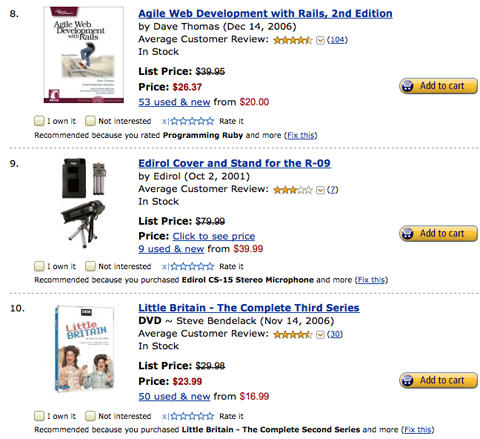
I keep running up against symbols of my two lives, so I will contrast them here. Today’s episode is simple. This is what Amazon thinks of me before I had Sam:

Amazon Before Kids

And, this is what it thinks I should be buying now:

Amazon After Kids

Do you have any symbols like this?

Aug 13

Frustrating User Experiences: Red Carpet Club

Tech, UI / UX with tags: 2 Comments »

I am going to start posting some frustrating user experiences as I come across them. Them seem to have happened a lot recently. Maybe it is my mood :)

I was at the United Red Carpet club and a nice lady couldn’t work out why she couldn’t login to the (now) free WiFi. She put in her mileage plus number, and this came up:

Red Carpet Club Error

The solution didn’t take long. I scrolled down the page, which then showed a “Terms and Conditions” area that you had to check. This was awful as the flow is all wrong. You see the area you need to fill in (mileage plus number) and then you see the other option, the complimentary access that doesn’t apply to you. You stop, and you submit the form.

Since you can only submit one of the areas, you could do several things such as:

  • Put the damn terms on top
  • As you fill in one of the forms, the terms popup close by

Here is the full form that makes it obvious:

Red Carpet Club In Full

Aug 08

JavaScript 2: A Perl 6 disaster, that matters so much more, but wait…

Ajax, JavaScript, Tech with tags: 10 Comments »

I had a post in my queue relating JavaScript 2 to Perl 6. They are both in very rough spots indeed, yet JavaScript 2 has a couple of features that have me a lot more worried than I am about Perl 6:

  • No offense to Perl (a language I really love, and I have code in CPAN) but JavaScript is an immensely important tool on the Web
  • Unlike Perl, there are no dictator groups who can clean up. The politics are politics. If a certain someone doesn’t implement, you are in big trouble.

I have been hacking more and more on JavaScript (1.0, Brendans toy!) recently, and the more I do so, the more I like it. I worked out some years ago that it was the DOM and cross browser issues that I didn’t like, not the language.

I do wish that there was a standard library for JavaScript (Dojo does a good job). I do find myself reinventing the wheel a lot when it comes to the Object world. This week I will be in a Class.create() kinda mood. Other times I would fancy some new function() magic, and other times a bit of (function() { functions; return { ... } })(). Now I try to use the right tool for the job, but the problem is reading other peoples code.

Take a peek at the Firebug source and you will see the following at the top of each module:

FBL.ns(function() { with (FBL) {

Joe Hewitt likes with() :)

This is where it starts to feel a lot like Perl. Many ways to do one thing, and when that one thing is so core as packaging and modularization, it shows through. This is also a reason why we are in pain with components. If someone writes a great component for Dojo but you are using Prototype, you curse. What is the real difference? The darn packaging! dojo.hitch() versus function.bind(). These changes go so deep though, that it would be quicker to write from scratch.

I would love an import/include statement. Finding myself dynamically creating script elements to do a script src is starting to get a little silly. The language itself should just support that.

JavaScript 2 is helping us with packaging, but in my opinion, it used to have too much in it. Programming units, packages, namespaces, that is just too much to wrap your head around.

I am also not a fan of the optional static typing. That is fine for ActionScript, but I don’t think JavaScript needs it. This is a scripting language, something that can fit in a onclick="..." and I think the world is moving more towards the dynamic world (there is still a place for static). How about just allowing ActionScript to be written in the browser? Why try to boil the ocean with JavaScript, as Java has tried to do in the past. Work on the runtime, and allow multiple languages. This is already being done with IronMonkey and the like…. and Microsoft is doing a great job with that tactic in Silverlight. Work on an object model that can be shared, and then we can all go to town.

var self = this;

I see that too much too, even with the binders and the hitchers. The magic of var foo jumping to the top of the scope is weird too. But, all in all, JavaScript is pretty damn good! In fact, JavaScript 1.8, and what I hear about 1.9 is really nice too. I am all for cleaning up what needs to be cleaned up, and working on other stuff.

At this point in my draft I sat in the corner and cried, as I thought JS2 was in epic trouble, and that the walls were going to fall down. I didn’t know what to do. We had Brendan++ on one side, and Doug/Microsoft on the other (simplified version). I sit in between. Without some Harmony, what would happen to the Web?

Well, the reason that I can post this is because I heard that the ECMAScript meeting in Oslo was very promising indeed, and some Harmony may come out of it. Hopefully the news will get through the official process, and out in public as soon as possible, as there is new hope for us. I am sure there is still a long road, but with great people working together, we’ll get ‘er done.
Aug 06

Enjoying the Observer pattern with custom events

Ajax, Tech with tags: , , 26 Comments »

I created an introductory example discussing custom events as an implementation of the Observer pattern.

The example dynamically adds functionality based on checkboxes to simulate events that could change processing and uses the fire() and observe() methods from Prototype.

I strap on behaviour to a list of names. When you click on the name, something can happen. To do this I could have done the following:

$$('ul#leftchoices li').each(function(el) {
    el.observe('click', function(e) {
        if ($('colorchange').checked) {
           changeColor();
        }

        if ($('contentchange').checked) {
           changeContent(el.id);
        }
    });
});

In the click event itself, I do various checks and kick off behaviour. That can be fine for small actions, but what if you want to do more? This is when I prefer to abstract out the action and just fire an event:

$$('ul#leftchoices li').each(function(el) {
    el.observe('click', function(e) {
        el.fire('selected:choice');
    });
});

At this point, this bit of code becomes dumb. It doesn’t know what to do when you select the item, and it just hopes that somewhere, someone is listening. That is where the observers come in, such as this one that changes the main content based on the selected name:

$('contentchange').onchange = function(e) {
    if (e.target.checked) {
        document.observe('selected:choice', changeContent);
    } else {
        document.stopObserving('selected:choice', changeContent);
    }
}

When someone clicks on the checkbox, this method is fired and an observer is either added, or taken away.

Once you start building applications with this in mind, you may find a bit of a sea change. You start to think about the various events as a public API that you can easily expose to observers. Gone is the simple ability to look at one method and see what is happening, but the loose coupling gives you the ability to easily layer in your architecture. Based on some settings, behaviour can be dynamically added. You could even expose these events in a way that makes it easier for Greasemonkey hackers to come in and work with your application. All in all, a win-win for anything more than a simple example.

Although this example uses Prototype, you could do the same with the other top class JavaScript libraries. In fact, if someone wants to port this example to Dojo, jQuery, Mootools, YUI, or anything else, send me the files and I will put them up so we can all compare how custom events are done in the various toolkits.

UPDATE: We now have Prototype, jQuery, DOMAssistant, and Appcelerator versions. Thanks Malte!

Aug 05

Tough Love: How Steve could make us all like Flash more

Adobe, Tech, iPhone 2 Comments »

I was reading Om Malik’s interview with Kevin Lynch of Adobe, and mulling over the mobile question.

After reading, I popped online to view the menu for the Tandoori Grill in Boulder (I love that place!). They use Flash for the menu, which doesn’t make the iPhone happy. I cursed again, as their is no work around until either:

  • It gets on the iPhone (and I think it will)
  • Someone does the crazy Flash on the server hacks

After cursing, I sat down and realized that the tough love that Steve Jobs is giving Adobe could actually be a good thing for everyone (including Adobe!). You have to bet that the Adobe Flash / mobile teams are working their arse off getting Flash small and compact in a way they never have had to before. I am sure they will get there, and the day that Steve can pop open the debug Safari build and see that it runs Flash nicely without sucking the battery life, he will give it the OK. When that happens, we will not only have Flash on the iPhone, but also a much leaner and meaner Flash that can run on the desktop. A true win-win?