May 24

Chrome Web Store; the opportunity for breaking out of silos with experience

Tech, Web Browsing with tags: , 2 Comments »

silo

I am sure that we are going to see an explosion of people learning how you can create Chrome apps simply by creating a manifest and building a .crx as they rush to get their web apps into the Chrome Web Store.

This is a huge advantage of adding an “app” model on top of Web technology. We have been creating Web apps all along, and now we are getting to the packaging layer of the stack as we turn the Web inside out. Instead of hosting our apps on our own URLs, we are now packaging them up and putting them in external app catalogs for extra distribution. Kinda weird in many ways huh? ;)

Moving past simply wrapping up your Website so throw it in a store, I think we have an opportunity to do much more here.

With Greasemonkey user scripts, I am able to both personalize my experience across the Web, and pull in experiences.

I was just chatting with Phil Windley about Kynetx, his company that is doing interesting things in the “professional Greasemonkey” / enterprise client side mashup space. He showed me some of this in action. What if you are a member of AAA. By installing an app/add-on you get to carry that information around the Web with you. AAA has a ton of discounts that you never really know about. What if when you went to purchase something at coolwidgets.com it told you that you can get 10% off with a given AAA code? coolwidgets.com could choose to display all of the affiliates that it has, but that doesn’t scale. Instead, show me the affiliates that I have a relationship with!

Here Phil walks through a Twitter mashup example:

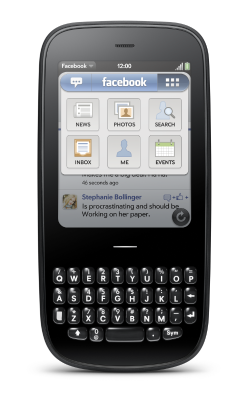
I want to break out of the app silo. I was drawn to webOS synergy because it allowed me to do just that. Our Facebook app is only part of the Facebook story. A bulk of the Facebook functionality is spread across the entire device. If a user enters their Facebook account, that follows them. Want to share a photo? Now you have a Facebook option. If users choose another social network, that can follow them instead. I don’t want to have to open an app to do everything.

This is where the trojan opportunity of the Chrome Web Store comes into play. Being able to package the Web application with extension like ability is key. Like Gmail? Download the app and:

  • Works offline
  • Nice big icon to click on
  • Permissions problem “solved”
  • Takes the Gmail experience throughout your browsing (mailto: goes to gmail, input type="email" auto completes on Gmail)

One great advantage of the Web is the mashup potential. There are a huge number of Web experiences that are vertical (go to a Web page to experience) as well as horizontal (having a favourite mapping service). The browser itself can add hooks (e.g. map: hooks into GMaps or Ovi Maps or MapQuest or …), but the browser is always behind the times. We can allow extensions to do this work. We can install a local library “web app” that means that wherever you see book information (e.g. Amazon, BN) you also get info about whether the book is available at the library. Right in the page.

I hope that the Chrome Web App store doesn’t become just wrapped Web pages, but we move the state of the art and break out of the silo.

May 19

What should the future of Web App Stores be?

Google, Tech with tags: 2 Comments »

NOTE: These are my random thoughts on Web App Stores and do not necessarily reflect the thoughts of Palm. Don’t read anything into this :)

App Stores. Catalogs. Markets. Gardens. They have been an incredibly hot topic ever since the success of the iPhone App Store. Everyone has wanted to own and control an app store ever since, for many different reasons. Not all of them are good. Not all of them can extract from the App Store experience.

With that, today Google unveiled a Chrome Web Store. Many folks have talked about how the Web, and the Open Web, could benefit from an app store. At a high level, the Web should give developers great options to distribute and monetize (if they so wish) their products, projects, and abilities.

There was a phase where people assumed that Internet meant “everything would be driven to be ‘free’”, and the model to make money is ads. Ads can potentially be a great avenue depending on your product, but people have always been willing to part with money to get value (or perceived value) back… and it shouldn’t be too shocking to have see that play out again via app stores. Deliver great experiences and they may come. There is a lot to be said about “expectations” though, and I feel for some of the business models that are in trouble (media etc).

So, it would be nice if a developer could build something useful, stick a price tag on it, and sell it… using great distribution channels. One model for this is to package the application in a way that works in the distribution channels (e.g. PhoneGap, Titanium, or for us on webOS…. natively) but surely we can do better?

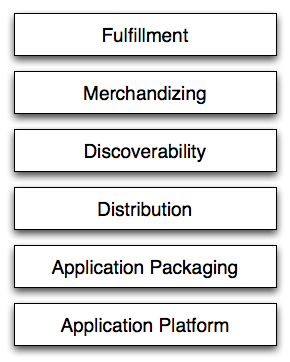
When you look at what an app store is, it consists of many pieces indeed.

For example,

appstorestack

Application Platform

This is the set of APIs and technology that you can use to build your applications. We feel strongly that having many fragmented devices with their own set of APIs, and thus their own platform, is a path to madness. To fix that, we need a unifying platform. We could unify on a proprietary platform (e.g. Flash, Cocoa, Silverlight/.NET, or what have you) or we could learn from history and honour the very lucky place that are in as an industry, and choose Open standards… and in concrete, the Web.

The Chrome Web Store very much honours this. Their apps are just Web apps. This is fantastic and a big step forward. The fact that you could take the same codebase and ship it in a store that runs in Chrome and other browsers (and web OS’s :) is great news.

But this is only one level of the stack.

Application Packaging

How do you package up your application to place in a store? Chrome has a prelim crack at this with their crx format that we have seen via Chrome Extensions. There are also others:

W3C widgets, Android, webOS, Nokia WRT, and more. Libraries like PhoneGap already have to deal with this world. We need scripts and tools to navigate this world. In the short term lets create and use those tools, but how about all getting together and making a format that we can all live with and extend in the right ways?

Distribution

How do you distribute your apps? Right now you either: a) put up a website and folks find you (via search {and thus SEO}, the social web, and links), b) put an application into a store itself.

The Web won on distribution. AOL couldn’t hold back the tide. Everything was Out There. Do we really want one or two companies in charge of what gets Out There? There is certainly value to curation, and finding applications via places you trust, but I personally want to see us solve the problem is a distributed open way. No entity should own the pipe. There should be no “right way” to censor or review applications. Different systems can choose values. Ideally they are transparent, and consumers can then choose where they want to look for the app content.

Discoverability

If we had a standard format for “installable web apps” a lot of good can happen. If we had a standard format, we could annotate the Web with it. Browsers could consume it (e.g. App Discover and the talk on just this.) and search engines could index it.

If I am on a Web site that has an application available, the browser should let me know. If I do a Google search, a one box should tell me about the matching apps for the platforms that I care about.

Anyone could create a merchandising experience and have access to apps to search for. We can go beyond that too of course. We can have web hooks that ping services with information about applications that have been created. A meta service would crop up that looks for the data and then pings the various Web app stores, just like we saw with trackbacks and the like.

There is still a ton of room to innovate in discoverability. Smarter searching that ties deeper than matching on the content will kick in.

Merchandising

Having access to the application data is important. The Palm ecosystem shares full feeds of the data from the catalog and this allows anyone to merchandize the content. They can be creative and present the right content to the user. There is a lot of innovation to be done here. Ideally, someone could create a great new social algorithm and have it run against all of the web apps out there. Right now, the stack is monolithic and we only have basic merchandising needs in most of the ecosystems. What about affiliate systems and the like which could enable innovation here?

Fulfillment

How do you pay for a good. How does the developer get paid for the good. This is an obviously crucial layer. Apple has done very well because people already had iTunes accounts coming into the world of the iPhone. In a distributed model, users could choose to fulfill via Amazon, or Paypal, or Checkout, or SimpleBank (one day right al3x? :)

And more….

We haven’t even gotten into identity, single sign-on, reputation systems, and how reviews can be shared on the same applications in different stores. There is so much to be done here.

Looking forward, where does this next step take us? Is there a path where web applications themselves are back to just being websites that can live in various stores, and a pay gate can be setup in an easy way?

I can’t wait to see how this plays out. We could all go off and build ivory towered app stores, or we could come together and work out a better way. Are you in?

May 15

Palm Developer Day: Walking through the announcements in our keynote

Palm, Tech, webOS 2 Comments »

Ben and I gave a keynote at the Palm Developer Day where we set up the event, and also shared some of the technology that we are working on for developers. There are a lot of fun APIs, such as:

  • Accelerated CSS transforms and animations
  • JavaScript Services: You have always been able to publish messages to the Palm service bus (e.g. launch an application) but how about being able to subscribe and run code on the flip side? You will be able to do just that with JavaScript Services. You will get access to a slew of libraries in that world (your own process too!):
    • Background asynchronous services
    • File I/O
    • Binary JavaScript types
    • Low-level network I/O
    • “Medium-level” HTTP via CURL
    • Fast XML streaming parser
  • db8: what if you had access to a fantastic performant native JSON store? That is where db8 comes in, our new open source JSON datastore that includes:
    • Native JSON storage with query mechanism
    • Built-in primitives for easy cloud syncing (Easily query changed / deleted data, Designed to sync with CouchDB in the cloud)
    • Fine-grained access control for apps
    • Mobile-optimized and fast (especially for updates)
    • Pluggable back-end
  • Audio / Video Recording
  • Media Indexer Access
  • Secure Key Manager + Crypto Libs
  • Bluetooth SPP
  • Bonjour / Zeroconf

We just had fun doing a podcast on this and more. Join us as we go through the tech, and we also hope you enjoy the sales pitch at the 41 minute mark (not what you may think ;)

May 07

Watching you Mum use the iPad is fascinating :)

Mobile, Tech, UI / UX 1 Comment »

I got my Mum an iPad. I wanted to get one for her more than me (even though I got one too of cos ;) as it seemed like a perfect tool for her to consume content. Finally, I get to hand her something that won’t just break. She doesn’t need to be scared to use the device. One button. So much simpler for her than a normal computer.

She has loved it. My Dad has told me that she is always on it. This week she flew in and stayed with us, and I got to watch her use it first hand, and it was fascinating.

I had my brother setup the device for her first time around. He installed a bunch of apps, and must have shown her how to add a bookmark to the home screen. I say this, because when I asked her whether she had the Foo app, and she said “Yup, here it is.” However, it wasn’t that app at all, but rather foo.com saved onto the home screen. She had no idea that there was a difference! Now, I personally believe that the world of URLs on the device vs. apps should entirely blur…. but it already had to her! I then had to show her the “App Store” and how to install apps.

This is when I learned how poor the UX is for downloading and installing apps. I have thought this before, but didn’t realise how bad it truly is until I watched my Mum.

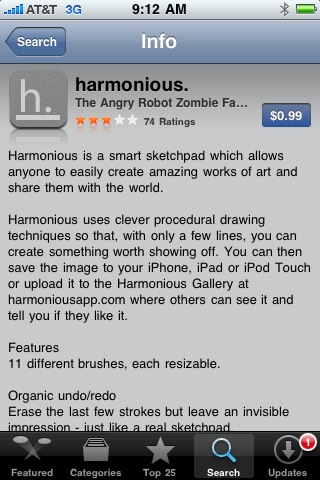
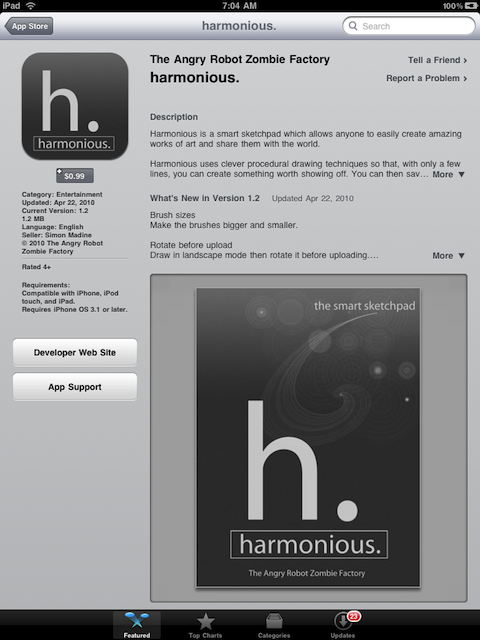
She had NO idea how to install an app. She could find them, but couldn’t install them. It turns out that the UI for doing an install is incredibly poor. You have to know to tap on a small [FREE] or [$1.99] button which then turns into the [INSTALL] button. It is small, and not obvious at all. I wonder why Apple hasn’t noticed this and made a more obvious [TAP HERE TO INSTALL THE APP] flashing green button?

This is bad on the iPhone:

iphonestore

But with large real estate on the iPad, it is really hard to find:

ipadstore

It is also hilarious when you see someone struggling on what to do with a device that has ONE button. I love you Mum. Thanks for letting me see a UI through different eyes this week. I hope you continue to enjoy the iPad!

Apr 30

More mobile UX; The power of dashboards, notifications and raw beauty

Mobile, Tech, webOS 3 Comments »

As webOS grows up, developers learn more about the platform, and together we build commonality into our apps. I have talked about various gestures and practices that are both built in, and have emerged.

I have seen some very interesting advanced uses of our notification system recently and wanted to share.

birdwatch

First up is birdwatch a “background app” that polls your Twitter account and when new tweets come along, they are shown in a dashboard component at the bottom of the screen. You can simply tap that area to move through your tweets. Very nice indeed, and something I would love to see in our email client, and in the Facebook app. The feature has been added to our list.

It is a great and simple example of how you don’t need a full app for every use case, and remember: those areas are DOM windows too so you can make them do a lot! We have seen other core examples such as the media player controls, and I also look forward to seeing the Facebook app be able to accept/deny friend requests right there. What would your users want to do rather than be sent into the main app indeed? That is the question.

jotit

Then we have Jot It, a note taking application. What makes it different is again in the dashboard area. When the dashboard is activated you see a bottom UI bar that gives you quick access to your documents. A creative way to add the UI.

It does have issues, in that you only really want this if you REALLY care about notes :)

tweetme

Back to Twitter. I have really been enjoying Tweet Me a new application that just got released into the catalog today.

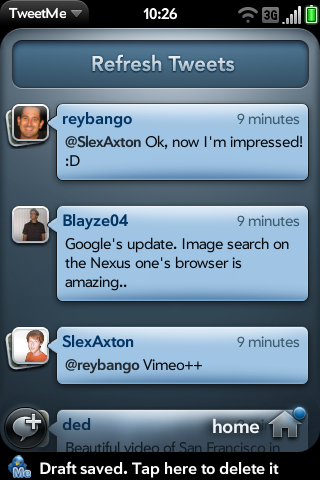
One feature that fits into the notifications meme is the banner notification UX flow. If you type in a tweet and back gesture away instead of a dialog “are you SURE you want to leave that info?” the app does something very nice indeed. It saves a draft AND gives you the option to delete that draft right in the banner. It’s a small thing… but one of those touches that shows that the developer really sweats the small stuff.

I am really excited about this application in general. It is beautiful and really showcases how webOS apps can be gorgeous. The technology is there, and this app raises the bar for all webOS applications.

Check out the splash screen, the favorite tweet star animation, picture thumbnails and more. Take a quick look at the flow below:

Man, we have an amazing set of Twitter apps now. They each have their own feel and niche too. Bad Kitty is fantastic. And then there are Tweed and Twee and Spaz (fully open source) ….. the list keeps growing. A strong bench.

What other mobile apps are inspiring to you? Other practices?

Apr 28

Just Type. One of my favourite platform metaphors.

Mobile, Tech, UI / UX, webOS 7 Comments »

type

In my feeling touch-y post on some of the fun usability issues and opportunities, I touched on shortcut keys.

As I have continued to learn more about the webOS platform, one of the biggest changes for me has been knowing that a physical keyboard is available.

gesture-facebook

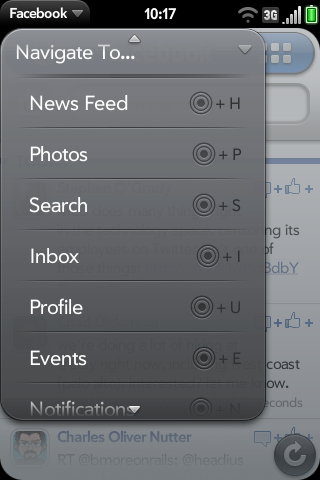
This is why we put in shortcut keys for the Facebook app. I can now very easily jump to an area of the application by touching the gesture area and pushing a key. I would love to see shortcuts available in many other webOS apps, and a “GreaseyPalm” (greasemonkey type system on webOS) would be awesome… enabling me to easily tie my own in… but that is another story :)

Other than shortcut keys though, I have found more and more applications using the “Just Type” metaphor. It turns out that many apps can be smart about what a user would want to do if they just type.

justtype-facebook

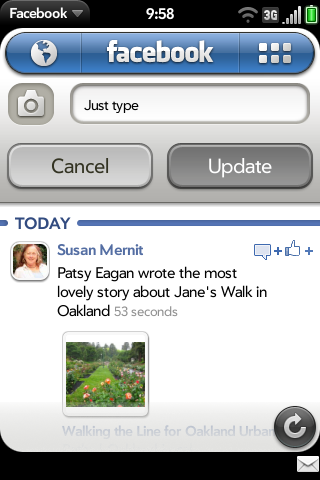
We implemented this on the Facebook app. If you are on the news feed and you start to type, assume that this is a status update, pull up that UI and put the content in there.

justtype-badkitty

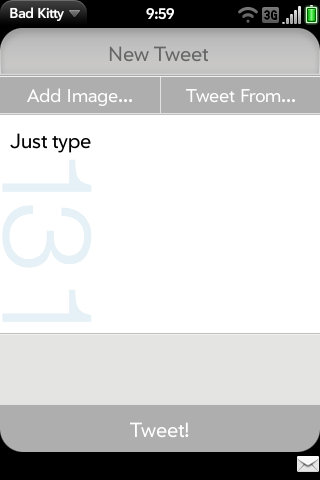
Bad Kitty and other Twitter clients do a similar thing for assuming that you want to Tweet something.

justtype-launch

My favourite example is in the core launcher itself. I remember being incredibly frustrated with home screen layout on the iPhone, and on webOS at first. Having to move icons around on the phone is a pain. I was excited when they added the ability to manage apps in iTunes, but the UI manages to be just about as frustrating in there.

It took me awhile to realise that I don’t need to use the launcher in this way at all. I can just type, and it will find the app I want. Hmm, where have I seen this before? Quicksilver! Ubiquity! Those examples go even further and offer actions that are even pluggable and scriptable… which would be awesome on a mobile device too.

This is yet another item on my checklist when I build an app. If the user started to type right now, could I do something smart that just works?

Just Type. Check!

Implementing Keyboard Shortcuts

A few folks asked about keyboard shortcuts. To implement them a la Facebook, you simply use the shortcut attribute for actions in the

        var appMenuModel = {
            items: [Mojo.Menu.editItem, {
                label: $L("Preferences & Accounts"),
                command: Mojo.Menu.prefsCmd
            },
            {
                label: $L("Navigate to..."),
                items: [
                {
                    label: $L("News Feed"),
                    command: "gotoNewsFeed",
                    shortcut: 'h' // H = home
                },
                // ...
                ]
            }
         }
Apr 22

Mike Hanson, Douglas Crockford, and Facebook; A tale of security, privacy, and performance

Facebook, Tech with tags: 2 Comments »

sayinglike

Facebook announced a lot of bold moves at f8 yesterday. It was exciting to see Bret Taylor (who I had the pleasure to work with at Google) do such a great job on stage, and with the platform. There are many implications that will ripple out from this news, and here are some of my thoughts:

Act One: Security

At JSConf, Doug Crockford came out in his talk, asking to do an ECMAScript 4 to HTML5. Stop it. Block it. Go back to the table and fix the Web security model.

He must have had a giggle when he saw the new Facebook “Like” button. It allows anyone to throw a Facebook like on any page. I quickly put it up on Ajaxian:

<iframe src="http://www.facebook.com/plugins/like.php?href=<?php echo urlencode(get_permalink()); ?>&amp;layout=standard&amp;show-faces=true&amp;width=450&amp;action=like&amp;colorscheme=dark" scrolling="no" frameborder="0" allowTransparency="true" style="border:none; overflow:hidden; width:450px; height:30px; padding-top:8px"></iframe>

Note how you pass in the href of what you want to like. I am getting the URL for each post and plugging it in. However, you could put any URL in there, as folks quickly discovered. Isn’t it fun to have a like button on content that actually likes some XXX porn. You like innocuous content X, and your wife looks at your stream to see that you are into a dirty movie.

As soon as you iframe in the world of Facebook, the page in question gets the power to get content into your graph and stream. Ouch. Not good.

The UI should at the very least see if it is liking a URL that isn’t the same as the main window.location. If it is exactly the same page, when you hover on “Like” it could say “this exact page”. If it is on the same domain it could say “a page on this site”, and if it isn’t on the domain…. ALERT ALERT ALERT. Since Facebook knows who you are, why not even let me set what I want to do here?

It is also frustrating that I couldn’t easily change the look and feel. Neither “light” or “dark” themes work on Ajaxian for example. I hope that power user features are added, so you can set the colors for various elements without having to go low level and do everything from scratch.

Act Two: Owning My Data

When I look at how we add the “Like” in the browser, we see the code smell of an iframe to an external site. We see this in other forms too, such as script tags pointing to Google to get a Google Map. This feels utterly wrong to me. Instead of a code snippet that points to a particular service, I want to declare what I want to see.

In the case of “like”, let me just say something such as:

<div class="data-like"></div>

Then some JavaScript could come in and augment this to be the iframe, OR the right thing could happen. The browser itself could take over and understand the semantic meaning here.

Imagine if around the Web we had:

<div class="map loc:xxx,yyy"></div>

Rather than the Google Maps, Bing Maps, Yahoo! Maps snippets. If a cool new maps startup came along, I could change my maps provider in my browser, and ALL maps would be shown using the provider of my choice. Much better.

I want to see the same for “Like” and other social data. The browser could then know what services to ping with the like. For example, perform a “like” on Facebook, a retweet on Twitter, and a bookmark. That data could be stored locally, and I am assured that I can always have it.

This leads me to Michael Hanson, principal engineer at Mozilla Labs. Mike and I didn’t even get a chance to really overlap at Mozilla, but I met him before I left. He is a killer engineer, and someone who is going to have a profound effect on the state of identity for us all.

His early work, in alpha-ish stage, is around the notion of contacts in the browser. This add-on is fantastic. Contacts are consumed from Yahoo!, Facebook, Google, etc (a la Palm webOS Synergy) and people are first class citizens (e.g. person:[email protected], person:http://facebook.com/btaylor). With type=”email” you can auto complete of your friends. He already uses the new Facebook Graph API which is a dream to use compared to the old REST/FQL. I hope it is more solid too. Anyway, these are just a few of Mike’s features. Firefox is about to get very social.

So, the browser should be the universal like machine. Not Facebook. Not a service owned by a company. You. Your browser. You own your data.

Facebook continues to change your privacy policy, and the EFF just spoke out again: Facebook Further Reduces Your Control Over Personal Information. Some claim that ad companies do this and more already, tying it together sneakily on the backend…. but changing your privacy and making it OPT-OUT is terrible.

Act Three: Performance

Alex Sexton pointed out the performance side of a like button:

From what i can tell, a single facebook like button requires at least 12 unique requests and ~1 second of load time.

The button adds ~161 new http requests to this page on Levis which is ~4sec

Compare the difference in when onload kicks in via iframe compared to via JS.

Time for Steve Souders to do a P3P? :)

Again, if the browser handled the notion of like, we wouldn’t have this issue. Also, what if instead of a million iframes, we all loaded one set of JavaScript from Facebook, and there was a JavaScript function that would let us put the like content into a div. To optimize, we could pass in the set of URLs to ONE JavaScript function and get one set of metadata back. Then we have a function that adds the right HTML to a div. No matter how many like buttons you have. One request.

We could go the OpenLike route, but we don’t want a huge list of buttons and another resource to deal with. Let the browser do it. We don’t need to see a world of this. It is broken. Time to wake up:

whatahack

Chris Messina has some words on the subject too:

When all likes lead to Facebook, and liking requires a Facebook account, and Facebook gets to hoard all of the metadata and likes around the interactions between people and content, it depletes the ecosystem of potential and chaos — those attributes which make the technology industry so interesting and competitive. It’s one thing for semantic and identity layers to emerge on the web, but it’s something else entirely for the all of the interactions on those layers to be piped through a single provider (and not just because that provider becomes a single point of failure).

I give Facebook credit for launching a compelling product, but it’s dishonest to think that the Facebook Open Graph Protocol benefits anyone more than Facebook — as it exists in its current incarnation, with Facebook accounts as the only valid participants.

As I and others have said before, your identity is too important to be owned by any one company.

Apr 21

Finally. The perfect iPad stand.

Apple, Tech 3 Comments »

mbpkeyboard

It has been a lot of fun to play with the iPad since it came out. I tried it out at work a bit, assumed the lean back position on the couch (its forte), and used it on the trip to JSConf. I think it is a fantastic device, and love the touch-y feel-y. I have gotten past the phase of “using it because I have it” and now actually make fun of myself when I use it in certain situations.

For example:

  • Watching a movie in bed at the hotel room. Finding myself propping up pillows
  • Holding the iPad on the flight. For hours. Holding

I think I have found the ideal iPad stand. A Macbook Pro keyboard. There isn’t anything new here. Other tablets have allowed you to do this, but I think for me the iPad will make sense when it is just part of my laptop. Let me boot to the open Mac OSX or the closed device OS. When I pull it off of the keyboard, it is an instant iPad.

This will come in due time, and that will be exciting. Right now, I have the feeling that I could easily go weeks without really using the iPad. We need a phone. We need a laptop. The iPad is a fun gadget toy, but will evolve to be part of our computing life.

That being said, I got one for my mother and it has been been perfect. She is mostly consuming media with the odd emails and the like, and now she has a device that she isn’t scared of. Fantastic. And, as Faruk Ateş points out… there are a lot of folks like my mum. Vast majority? And then there are the kids… on their iPod Touches… learning The Way.

As an experiment, I put the iPad on the couch and watched my son come in (had never told him about it, or that we had it). The newly four year walked up to it, unlocked it, found a game, and started to play. No manual required. The iPhone has trained him.

Mar 09

palm-run: a walk through of building a new webOS application

Palm, Tech, webOS 2 Comments »

As developers, we often build scripts and tools to sharpen our workflow. One of the simple scripts that I am refining is palm-run, my swiss-army knive of a tool that deals with packaging, installing, launching, and tailing logs as I develop my application.

I put together a walk through of palm-run in the context of creating a new webOS application from scratch. In the screencast below I cover:

  • Generating your webOS application structure
  • Implementing a one-scene application
  • Packaging the application and running it in the emulator
  • Running an IPK directly, no packaging here mate-y
  • Setting up your application for development and production uses (more below)
  • Using the Palm Inspector to take a peak at the structure of your app as it runs

(I recommend going full screen on this bad boy to help read the deets.)

Development vs. Production

I wanted to go into a bit of detail on this one. When you build an app you want to have different builds for development and production. In development, you want debugging turned on with verbose output. In production, you want to exclude all but the necessary files.

The latest version of palm-run lets you tell it that you fancy production mode via -P.

You can enhance your webOS application to do more in this world by doing the following:

  • Create a config directory at the app root
  • Create framework config files for the two use cases. Here are two common versions:

    Development

    {
        "logLevel": 99,
        "debuggingEnabled": true,
        "timingEnabled": false,
        "logEvents": false
    }

    Production

    {
        "logLevel": 0,
        "debuggingEnabled": false,
        "timingEnabled": false,
        "logEvents": false
    }
  • Create exclude files for the two use cases (excludes_development.txt and excludes_production.txt)

Now you are set. To see a shell app that uses this, check out palmrun-configtest. If you build the app you will see that there isn’t console output if you palm-run with the -P option.

What else would you want a high level program like this to do for you?

Mar 03

Facebook in your Palm; Fun building the new Facebook app

Mobile, Tech, webOS with tags: 27 Comments »

facepalm

When Ben and I joined Palm to run Developer Relations, we knew that we wanted to eat dogfood pretty quickly. We have had some mobile related projects in the past, but they were either mobile Web sites, or Java based. Being able to take our web skillz to rich mobile devices was much more new and exciting.

Building sample code and apps is useful for developers, and the team will be doing plenty of that (e.g. this is how you use the awesome List widget in every which way, and why you would do X, Y, or Z) but building a production app is a whole different level.

We wanted to learn what it is like for our developers to design, build, and distribute webOS applications. We could have started with a smallish app, but no :) Instead we took the great work of Justin Newitter (who built the original app) and went running with an updated Facebook app. Along with other great developers in the dev relations world, we have gotten our first early release out there today.

Here is a walk through of the app by PreCentral:

We have definitely learned a lot in our short time on the app, and this is the first release of many. I really want us to have a regular cadence to our releases. If there is a feature you are excited about let us know.

fbpixi

We added a broad feature set to the application. The first Facebook application was very much about synergy. Why put something in an application silo when you can bake it into the platform? I still contend that webOS is the best platform for Facebook users as it integrates throughout. Other mobile platforms do some of this, but I think we continue to do the best job here.

There are a bunch of Facebook features that our users still wanted though, so we worked with Facebook themselves to prioritize this list. The top features were access to Facebook Mail, full profile access (info, wall, and photos), people search, events and birthdays. We also wanted to do interesting things to the UI as we bring in these features. Oh, and a couple of mini-easter eggs.

Designing the application was challenging and a lot of fun. At a high level, working out a design that is true to webOS *and* a strong brand such as Facebook was a balancing act. You will run into this same issue even without a brand like FB. How does it have your DNA and still fit in with the core platform. This has been a design consideration since the dawn of time. Do you make a clean Mac app that looks like Mail.app? Do you do your own UI that looks like a funky Flash UI? Most of the time you are in the middle.

fbappnav

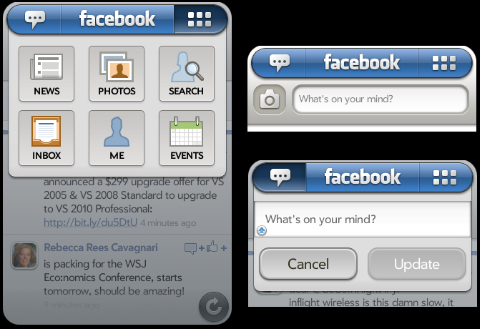
One feature that we spent time on was the base navigation. We wanted to make it incredibly easy to get to features you use often, and also quick to get to all features.

We ended up with a solution that made the following decisions:

News as Root

The root of the application is the news feed. Some Facebook apps have an icon window as the root, but we decided to behave more like the Facebook website itself. The news stream is the blood line, so start there. No matter where you go in the app, if you back gesture away…. you will always end up at the news stream.

Also, just like the iPhone app, we share the shake gesture as a way to refresh the data here. Shake away.

Status Matters

webOS devices have hardware keyboards and are great for creating content. In the Facebook context this means updating your status and uploading photos are prime ways to get your content into the system.

For this reason the top left area is your way to always get to your current status and update on it. In fact, if you are on the new stream, just start typing and the update area will pop down and capture your new status (while showing your last one below).

Also, if you click on the camera icon, you are sent into the core photo experience on the device which natively supports uploading to Facebook.

The Navigation Grid

For all other features, we wanted to give you a quick way to access them. Click on the top right grid and a pop down will immediately appear, giving you one tap access to any feature. No need to switch to a navigation screen first.

We are also playing with the ability to use that hardware keyboard by giving you quick key access to any feature (e.g. SYM + E == sends you to events). Is that a good idea?

Facebook Logo Power

The Facebook logo itself has some hidden love. In an homage to to websites, a tap on the logo takes you home…. which means back to the news stream. If you are on the news stream already, and have flicked down…. that same logo will bring you to the top.

Where to go next?

We are excited to offer access to data that Facebook users haven’t been able to get in an app before, but where do we go from here?

We definitely want to do a lot of polish on various sections that we have out there. One idea that I have been playing with from the get go is doing something immersive when you rotate the screen when in a news feed. Instead of just having the news feed work in that format, what if the content took over. I mentioned this in my last post about touch UI. I flick through the stream and if on photos, the album takes on the entire screen for example.

There are some other really fun features that revolve around webOS notifications and giving you a great way to “never miss a thing” (life moves fast you know ;) and choosing what content matters to you.

And, finally, we have to work out what makes sense in an app, and what could be baked into the platform. Giving access to birthdays is great, but would you like to have them as a calendar on the device? Maybe, but you would definitely want to be able to turn that view off…. and in fact you may already have birthday info in your profiles, so we should have one unified birthday view. Life gets more complicated when you go to the generic doesn’t it.

Again, we have just started here, but would love to hear from you on our feedback area in the app page.

Thanks to the team that played a part in this release! We haven’t reached Joe Hewitt foo yet, but we are having fun!