Feb 13

Launching Bespin; Feeling light as a cloud

Bespin, Mozila, Open Source, Tech with tags: , 5 Comments »

Talk is cheap. Shipping code is important. I have always felt that to be the case, so I always look forward to the first time that I ship something. At my latest adventure I got to do that yesterday.

It was a fun ride to go from the technical challenge of “can this be done” to having the experiment out of Mozilla Labs and into the hands of the wider community. One of the reasons I am so excited to be at Mozilla is that I get to develop in the open. You can watch our source code repository and see a community on irc and join us in our news group. Running an open project well is part art, and is incredible hard to do well. I have deep respect for those in the open source community that have succeeded. I am really looking forward to that challenge with Bespin and beyond. I want to make sure that we are truly transparent (no hidden agendas and back channels). I want to raise the profile of anyone who contributes to the project so people really know who the people behind Bespin are. I want to try hard to get designs out there early in the process so decisions can be shared, but I want to make sure that a vision drives the project forward.

Foolish chaps and companies have come to me in the past thinking that open source will be a silver bullet for “getting other people to do our work.” Those that have been involved in open source know that it isn’t the case. It is often more work. But, it is worth it. I have no doubt that the community that we hope to grow will come up with amazing ideas and contributions. I am humbled by the contributions even a DAY after launch. I am stunned that people think our experiment is worthy of their time and thought.

The wind is at my back, but I know that announcing Bespin is the beginning and not the end. The birth of the project. Now we get to see if we can have the kid grow up.

Not sure what Bespin is? Here is some info from the announcement and more. Thanks again to all of the kind words from people across the Web. It means a lot:

Bespin proposes an open extensible web-based framework for code editing that aims to increase developer productivity, enable compelling user experiences, and promote the use of open standards.

Based upon discussions with hundreds of developers, and our own experience developing for the Open Web, we’ve come up with a proposed set of features along with some high-level goals:

  • Ease of Use — the editor experience should not be intimidating and should facilitate quickly getting straight into the code
  • Real-time Collaboration — sharing live coding sessions with colleagues should be easy and collaboratively coding with one or more partners should Just Work
  • Integrated Command-Line — tools like vi and Emacs have demonstrated the power of integrating command-lines into editors; Bespin needs one, too
  • Extensible and Self-Hosted — the interface and capabilities of Bespin should be highly extensible and easily accessible to users through Ubiquity-like commands or via the plug-in API
  • Wicked Fast — the editor is just a toy unless it stays smooth and responsive editing files of very large sizes
  • Accessible from Anywhere — the code editor should work from anywhere, and from any device, using any modern standards-compliant browser


View Introduction to Bespin

Credits

There have been a lot of people that we can thank for getting us out there today. Firstly, our new team of Kevin Dangoor and Joe Walker. Secondly, the great new colleagues that we have at Mozilla. Our Labs team members have been inspiring. We are building on the shoulders of great work. We are not only working closely with the Ubiquity team (Atul Varma, Aza Raskin, Jono, and others) to make sure the command line and Ubiquity are integrated, but we use Atul’s code illuminated to house the documentation for Bespin code. The Weave team has provided guidance for a future where Bespin data can be housed in their scalable infrastructure, which excites us. Whenever we chat with a Labs team we see places for integration, and we can’t wait to get there.

We care about design, and have been fortunate enough to have input from two great designers: Sean Martell and Chris Jochitz.

Other Mozilla folk have helped a lot too. You will notice that Bespin makes heavy, heavy use of canvas. Vladimir Vukićević has given far too much of his time to let us run through ideas and profile the canvas performance. We have also already seen contributions from outside of Mozilla. A few issues have been put into Bugzilla by beta testers, and even code patches (for example, thanks to Ernest Delgado for his canvas skills).

We have only just begun. We really wanted to get this tech preview out as soon as we could to embrace the community and experiment heavily. We hope to have your name in the credits soon!

Get Involved

There are many ways to get involved with the Bespin project and the Developer Tools lab. You could start by giving us feedback on the product (via comments, in our group, on irc in channel #bespin, or in Bugzilla).

Have a feature you would love as a developer? Fancy sharing a design concept? (We like those). We would love to hear from you on all fronts, from ideas to design to code. One of the reasons that we are excited about Bespin is that it is written for the Web platform, on the Web platform. This means that your Web skills can be applied to your tool. Want a nicer syntax highlighter? With that we had support for a version control system that we don’t support? Wish that there was interesting Python support? Help us build it!

Bespin has been built with extensibility in mind. We want you to be able to tweak your tool. Bespin Commands are just one example. Would you like to embed the Bespin editor into your own project? We want to enable these kinds of use cases.

Feb 09

Will the real WebKit please standup

Comic, Tech, Web Browsing 6 Comments »

webkits

I recently heard a conversation in Palo Alto which had the following in part of it:

  • Chap A: Are you testing in WebKit?
  • Chap B: Which WebKit?

I have heard this before. I am running into this issue myself right now. Something that our team is playing with uses some bleeding edge standards, and some recently were added to WebKit nightly. Unfortunately, that doesn’t mean that they are in Chrome, AIR, Mobile Safari (in this case it is), or the other people who use and fork WebKit (from Nokia to Titanium).

On the one hand companies are highly leveraging each others work when they choose WebKit. Forking isn’t necessarily an evil thing anymore, especially if everyone is giving back to the cause as much as possible. The WebKit team implements CSS Animations, and you hope that it will be placed in browsers that use WebKit in the future. Watching the WebKit community deal with the many large companies will be interesting indeed in the coming couple of years. Luckily, the core team is top notch, and continue to push forward.

Feb 06

Internet Explorer: Microsoft and the EC

Microsoft, Mozila, Tech 2 Comments »

NOTE: It goes without saying, but to be clear, none of my thoughts here are related to Mozilla itself

Mitchell Baker has a post on the EC prelim conclusion on Microsoft and IE:

From EC: “Microsoft’s tying of Internet Explorer to the Windows operating system harms competition between web browsers, undermines product innovation and ultimately reduces consumer choice.”

Mitchell has some very interesting points, and the two high level ones that stick out at me are:

They did a bad bad thing

In my mind, there is absolutely no doubt that the statement above is correct. Not the single smallest iota of doubt. I’ve been involved in building and shipping web browsers continuously since before Microsoft started developing IE, and the damage Microsoft has done to competition, innovation, and the pace of the web development itself is both glaring and ongoing.

Bloody hell, coming up with a remedy that is fair and good for the Web is tough!

There are separate questions of whether there is a good remedy, and what that remedy might be.

The extent of the damage is so great that it makes it difficult to figure out an effective and timely remedy. I believe it’s worth some effort to try.

Thinking about the users, you end up at PPK’s point: 0 or 5. Hard indeed.

Also, take a good look at the entire Mitchell post as it is really interesting to see how Firefox has grown despite of the barriers, and that Microsoft shouldn’t be able to use it as a “see, look what can be done.”

Bizarre times indeed.

Feb 05

Gmail Multi Pane changes workflow

Google, Tech with tags: 14 Comments »

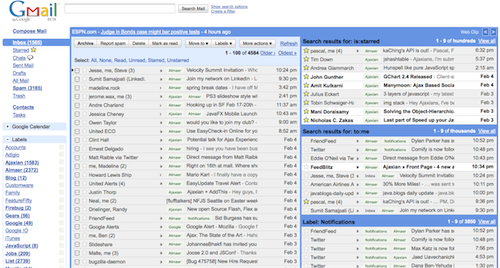
gmailmultipane

The new multipane view for Gmail by Vivi will change my workflow for the better. I have placed views to the right of my inbox that show me:

  • My starred items (is:starred)
  • Emails sent to me (to:me)
  • Notifications. This is a big one. These items are things that I kinda want to see fly by but don’t care too much about. In the past they would clutter my inbox as I didn’t want to “skip inbox” and not see them (I never pro actively check out labels). Now that I can have the list scanning by, I CAN change my filter to skip the Inbox which will keep it cleaner!
  • Skipped content. I have a bunch of mailing lists that I tell to skip the Inbox. The end result is that I rarely see it, so it is really quite silly. Now though, I can have a small window into that world.

Very cool indeed. There are pain points though. If you are not plugged into a nice 30″ monitor, your real estate gets cramped fast. You can choose to put items on top, bottom, or right, but right is the only option that makes sense to me.

I want to be able to have fine grained control here. Gimme a splitter so I can choose how much space to give. Let me put some on the right, some on top, some on the bottom. Let me show and hide items so I can shoot open my inbox to be full screen when I need too.

Selecting items on the other panes is strained. You don’t have checkboxes and the arrow keys to help you over there. I wish that I could click on a space on the very left and have the “>” item show up there so I can move around and select things. I hate the mouse.

I am curious to see how I like this, and how it changes me Gmail usage. Do you like it?

Feb 04

Google Latitude; Get your explaining ready

Comic, Google, Tech 3 Comments »

googlestripclubs

Google Latitude is cool indeed, and will have folks from Loopt and beyond watching (see Dodgeball didn’t die, it’s just slowly becoming a feature of Maps!).

Even with all of the privacy controls, you KNOW that there are going to be fun cock ups in the future, just like we see on Google Maps Street View. It just has to happen. But, it’s worth it :)

Shame the iPhone version didn’t come out on day one, and the Palm Pre version will be cool :)

Jan 22

The genius behind the Google 20% time; It isn’t the time

Google, Tech 5 Comments »

googledrex

Paul Buchheit has a really nice post on the power of code over talk and has one item that resonated with me:

This is where Google’s “20% time” comes in — if you want innovation, it’s critical that people are able to work on ideas that are unapproved and generally thought to be stupid. The real value of “20%” is not the time, but rather the “license” it gives to work on things that “aren’t important”. (perhaps I should do a post on “20% time” at some point…)

That is exactly how I felt about 20% time. It wasn’t about the time. In fact, I didn’t actually know that many people who took the time! The key was the following effect:

  • In order for 20% time to work, anyone must be able to see what is out there
  • In fact, if you want to get some people working “for free” you need to both advertise your project, and write it in such a way that it is easy to get ramped up and productive (end result: better code)

The end result is the culture HAS to be kept very open. The ability to see the projects that are worked on, check out the code, see presentations and design docs, is a key reason why Google does so well at engineering in my opinion.

Compare this to companies such as Apple where you don’t know what the chap sitting on the other side of the cube is doing. Therefore, even if you have some amazing wisdom that could be game changing for his project, it will never happen.

20% time means that sparks of genius can happen. If you copy anything about it, ignore the “time” part, and go with the open culture part.

Whenever I saw projects that were secret within Google it irked me. It stopped this from happening. It was as though that project was going walkabout instead of joining the party.

Jan 20

Why I often prefer Prototype too

Ajax, Tech, Web Frameworks with tags: 9 Comments »

protofun

Picture via Dunechaser

I still get asked “what Ajax framework should I use?” frequently indeed. I think that people feel that with my Ajaxian postings I have seen every framework in the world and will have a magic feel for things.

I dread these questions, as context is king for making the decision, and “feel” is a major part of it too. The various frameworks have in many ways come closer together over the years, so making the choice is harder, but also maybe not as big a deal as it once was.

That being said, I really enjoyed Glenn Vanderburg talk about why he prefers Prototype to jQuery. This is the kind of subject that is asking for trouble and foaming at the mouth from people on various camps. Glenn has the kind of nature, wisdom, and touch that makes it hard to think that way. He gives thoughtful points and isn’t trying to cause a stir.

These days, without any real context (e.g. skills on the team, what the project does) I kinda think:

  • jQuery is fantastic for taking a website and making it dynamic. Easy. elegant. Beautiful. If I was a designer doing a rich site I would stop here.
  • Dojo is fantastic for building a large scale application that will do a lot, and end up with a ton of JavaScript. Everything you need will be found there. This isn’t to say that Dojo can’t be used on the small anymore. The new core is small and fast and good.

Prototype, for me, fits in between these worlds. It is small enough to feel small (not a huge library to learn) yet large enough that I don’t jump out into creating a lot of my own code.

On a recent jQuery project that grew fairly big and I found myself surprised that the core didn’t have certain methods and features. Much of it was small things (one example I remember is array utilities). I would find myself looking around for plugins, wondering which ones are good, and generally having a little bit of a tough time. Then there is a the type system. For something that isn’t strapping on a bit of code to the web site, I actually like Class.extend and the like. With jQuery I would use Traits or Base or something which is fine…. but not just there in the same way.

I get used to myArray.last() and having the convenience methods available to me directly on the objects, even if the puritan in me feels a little strange. Just as Ruby “felt right” to me. Prototype does too (duh, since its heritage). A blend of purity and pragmatism. More often than not Prototype surprises me “oh, wow, it has that function already!” On another recent project that got converted to Prototype, I was able to delete a LOT of code. Utility classes went away. Libraries went away. There is nothing better than the feeling of deleting code. Am I right? :)

So, I agree with Glenn. For me, Prototype is the right balance for many of my projects. I still enjoy playing and using others when the project calls for them, and I am ignoring the huge number of other great frameworks (YUI, GWT, MooTools, Ext, SproutCore, Cappucino, man I could go on forever here).

Jan 19

Frustrating User Experiences: Remember what I say Wordpress!

Tech, UI / UX with tags: 4 Comments »

Wordpress 2.7 is such a breath of fresh air. The admin interface feels great and they fixed so many small things that used to drive me nuts.

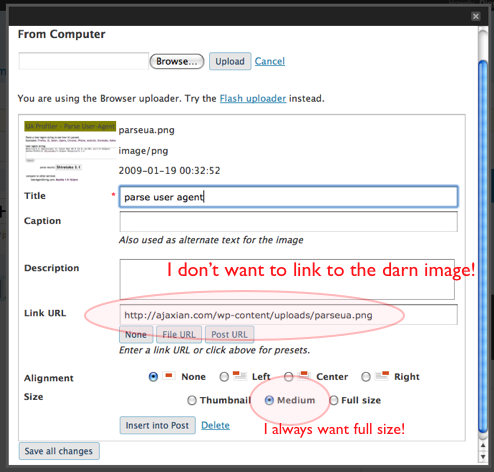
One of these items was the file uploader. Here is Wordpress 2.6:

wp26

My use case is that I use the full size image 99.99% of the time. I never want to link to the image itself in the hyperlink. However, the admin interface tries to force me down that path EVERY darn time. I would find myself hacking up the Wordpress code to give me what I want, and then when I upgrade I had to do it all over again. Grr.

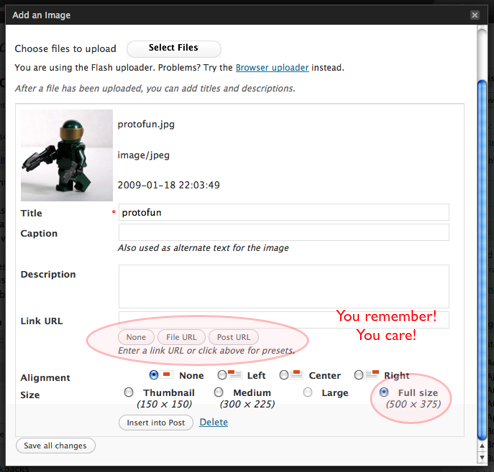
Then I upgraded to Wordpress 2.7 and got:

wp27

It remembers. Imagine that! Kudos to the Wordpress team.

Jan 07

TokenObject: A strange little piece of code that creates objects for me

JavaScript 2 Comments »

Do you ever write random bits of code and wonder why you are doing it? Something that seems worth it at the time and then you really wonder?

I just did this with a class that I call TokenObject. The goal of this trivial class is to take a string, and give me a nice way to get pieces out of it. Normally I would use split and grab the right piece, but I was doing so much conversion from “command line string” to an object, that I ended up with something that lets me do this:

var userpass = "dion password";
var up = new TokenObject(userpass, {params: "user pass"});
// up.user;
// up.pass;
// Can also get via: up.param('user'); up.param(0);

Funny huh? :)

/*
 * TokenObject: Given a string, make a token object that holds positions and has name access
 */
 
var TokenObject = function(input, options) {
	this._input = input;
	this._options = options;
	this._splitterRegex = new RegExp(this._options.splitBy || '\\s+');
	this._pieces = input.split(this._splitterRegex);
 
	if (this._options.params) { // -- create a hash for name based access
		this._nametoindex = {};
		var namedparams = this._options.params.split(' ');
		for (var x = 0; x < namedparams.length; x++) {
			this._nametoindex[namedparams[x]] = x;
 
			if (!this._options['noshortcutvalues']) { // side step if you really don't want this
				this[namedparams[x]] = this._pieces[x];
			}
		}
 
	}
}
 
TokenObject.prototype.param = function(index) {
	return (typeof index == "number") ? this._pieces[index] : this._pieces[this._nametoindex[index]];
}
 
TokenObject.prototype.length = function() {
	return this._pieces.length;
}
Jan 02

Loving Ubiquity; Extending the Web in 2009

Ajax, Tech, Web Browsing 4 Comments »

I have a project that deals with JavaScript commands that anyone can author, so I decided it would be smart to take more time looking and integrating with Ubiquity which recently got another beautiful upgrade.

Ubiquity really is the “other” command line of the Web (the URL bar being the first one). It gives me Quicksilver like access, but also has huge improvements: Writing plugins is simple JavaScript, and you can subscribe to commands from other people. This is huge. A social command-line!

There is a built in tinyurl command, but I use tr.im one these days, so I quickly wrote one:

CmdUtils.CreateCommand({
  name: "trimurl",
  homepage: "http://almaer.com/firefox/commands/",
  author: { name: "Dion Almaer", email: "[email protected]"},
  license: "ASL",
  description: "Sends your URL to tr.im instead of tiny url",
  help: "Just type in the URL!",
  takes: {"url to shorten": noun_arb_text},
  modifiers: {"as": noun_arb_text},
 
  preview: "Replaces the inputted URL with a Tr.im URL.",
  execute: function(urlToShorten, mods) {
    var baseUrl = "http://tr.im/api/trim_url.json";
    var params = "?url=" + urlToShorten.text;
 
    var custom  = mods["as"].text;
    if (custom) {
      params += "&custom=" + custom;
    }
    jQuery.getJSON(baseUrl + params, function(data) {
      CmdUtils.copyToClipboard(data.url);
    })
  }
});

This chap uses modifiers to allow me to pass in a custom url.

The following said that there will be a url following, and you can optionally say “as customname”:

  takes: {"url to shorten": noun_arb_text},
  modifiers: {"as": noun_arb_text},

I couldn’t find a way to just add to the takes hash, as it would be nice to say:

  takes: {"url to shorten": noun_arb_text, custom: noun_optional_text },

After using Ubiquity for some time now, I am really impressed with how the team is accelerating, and I see this as a great way to extend the Web, and Firefox in 2009.

I find myself in a funny place with the key combos for bringing up Ubiquity and Quicksilver in my mind. I am using Quicksilver less and less (e.g. won’t use it to search the Web or do anything with email) and Ubiquity more and more. As the Open Web takes over the desktop (another prediction;) then Ubiquity will gain usage for me.

Atul has released a preview of Ubiquity 0.2 which has a new architecture and a new Locked-Down Feed Plugin (LDFP).