Mar 23

Debug the memory usage of your Ajax application

Ajax, Mozila, Tech with tags: 5 Comments »

cgi

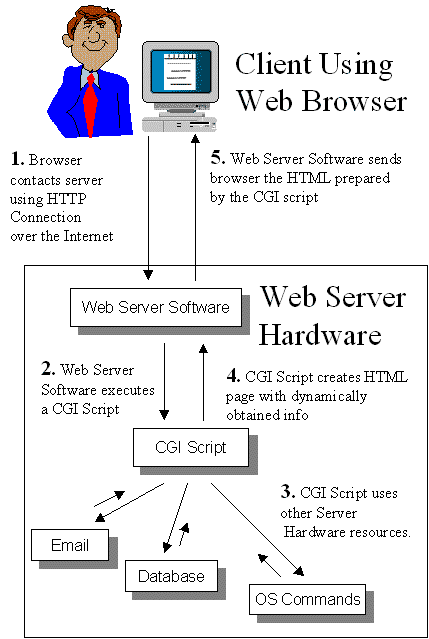
Do you remember when Web applications were CGI scripts? You had that cheeky bit of Perl that would be exec’d away. It was a haven for the lazy among us. What if you didn’t close the DB connection down perfectly? Didn’t matter. Use too much memory? Who cares. The process would die in seconds!

I then remember the real Web 2.0, when mod_perl and the like came about (yah yah there was NSAPI/ISAPI which I had to deal with too) and you realized that all of that bad programming now came at a price. The applications would be sitting on the server for a long time, so you could share a lot, but if you were sloppy you could cause bad things. Now you have to audit the code and gets thing right (as well as working around mod_perl bugs, but that is another story!)

The same has happened with the world of Ajax. Applications that used to be pages that would be refreshed are now replaced by sites like Gmail that sit in a browser tab all day long. If your application does something a little bad now, it can be noticed.

This is where the post that Ben just made on a new
memory tool for the Web comes in. As we write Bespin and other Web applications we feel the pain where we wish certain items weren’t as much of a black box as they are now in the browser. A first bite is memory, and being able to get some visibility into the heap, or see when the garbage collector is kicking in and how long it is taking.

What other tools like this would you like to see as you write long living Ajax applications in the browser? We are all ears!

Mar 18

Why Open Source is amazing; The story of the Quick Open Bespin feature

Ajax, Bespin, Open Source, Tech No Comments »

Going from hacking away on Bespin before our launch, and now watching it 100% out in the open thanks to open source has been a fascinating transformation. Building a community is so much harder than hacking on code, and very different constraints appear. The past of “get a feature done” is changed to be “make it easy to get features done”. We still have a lot of work to do on extensibility, but it has been fun to see what people have already been able to do.

We have had experienced and junior folks pick up Bespin and help out, and I am trying very hard to strengthen a tough skill… delegation. Instead of picking off some bugs, I try to document them better and explain them so anyone in the community can pick them off. Sometimes it would be easier to hack up a quick fix compared to walking someone through a set of patches. However, that doesn’t meet the goal of getting people fishing away on our code and scratching their itches. Ben, myself, and our team doesn’t scale out to the size of developer tools groups at other huge companies, so we need to do what Mozilla does best….. build honest community. I am having a great time doing just that! The early contributors have been amazing already.

There is one recent experiment that I wanted to share. I was thinking about hacking on a key feature…. the ability to quickly search for and open files. This is the Apple-T feature in Textmate. I use it in the same way that I use Alt/Apple-Tab, or Apple-~ to move around. It is a core way in which I move around my projects. Instead of going right into code, we put together a mockup of how the feature could look:

Then, I spent a bit of time on the general design document itself to explain the feature, both from a use case / design angle, and on the “high level” coding side. I tried hard to give enough detail to explain the feature, while still allowing an implementor the ability to be creative and come up with their own ideas.

A few days later, Julian Viereck (a contributor who has already been incredibly helpful and generous with code) stepped up to the plate to say he would implement this, and in short order with the help of Kevin Dangoor building the server side infrastructure (index to search to find out the file names in this case), they had built a solid first version of the functionality.

It’s phenomenal, and I am so grateful to Julian for putting in time to make it work so well. Not only did he write the feature, but he also create a new Thunderhead component head to allow for moveable windows. Very cool indeed. Here are his thoughts on the implementation:

As described in the DesignDoc Quickopen is a window popping up in the editor to let you choose a file you want to jump to and perform some work on with the editor. This allows you to open a other file without going to the dashboard and back again to the editor => you can stay longer in the editor and have not to reload the whole page just for changing the current file ;) This is a quite important feature when it comes up to work on a “real” project in Bespin as you really stay on the work itself :)

To open Quickopen press ALT + O in the editor.

Quickopen: How it works?

When the user fires up Quickopen the first time it shows a list of the current opened files in the project (quite the same as the Open Session thing in dashboard, but just for the current porject). When tipping a searchkey a request is send to the server and a result list back to the user and displayed.

Kevin did the backend stuff. He says “the server is using a *really* stupid file cache to make searches zippy”. Well, it’s really zippy ;) But here is a list of things I would think that could be improved:

a) the seachindex is not updated at the moment. So once deleted a file, it is still in the seachindex. Try to open this file with Quickopen will cause a strange behavoir. The best solution would be, to have the searchindex in sync with the filesystem, but well, thats maybe a bigger deal. For the moment it would be great to have a command for paver like “paver updateSearch -u <username>”.

b) the search results list also files that cannot be opened by Bespin (e.g. image files…). I would not like to see the backend making a choice which files the user should be able to seen in this result list and which not by certain rules. But I think let the user make that choice is a good point. I’m for example not interessted in the image files BUT also not interessted in all these .py files and these stuff. There should be a new user setting to make this adjustments. But at the moment I have no cloue how this setting has to look like? A regex, or something like “excludeFiles= *\.js|.html|.css” for excluding all files except js-, html- and css-files?

c) the search should remember how often the user picked a certain file from the list and put this file more above in the resultlist.

Other ideas? These is work to be done on the backend. I never wrote one line of python and have not looked really at the backend stuff, so maybe someone else should take over this part :)

But when making so often a switch between the files it also comes up to add other things: the editor should remember the mouse position on the files as the user jumps between them. This makes it easier to continue working on the files. For this I thought about adding a new kind of “settings” that stores such data like mouse positions, window positions and such stuff, but I cannot come up with a name for it.

What do you think?

BUT: There is even more new stuff: th.window!

When implementing the Quickopen window I was thinking: “why is there no such class in th”? Well, there it is: th.window!

th.window brings up a window in the browser, with the same border and window bar as the one used by Quickopen (well, Quickopen uses th.window already, so the Quickopen stuff in quickopen.js is a good starting point to see how to use th.window ;)). Having a th.window class was something Malte asked for and I hope other stuff will provide from this new class as well :)

When creating a new th.window object, a new <div> with a <canvas> is insert. The canvas is used for the th.window::scene, to which is the th.WindowBar added automaticaly as well as the user panel; the place to put in the things that should stand within the window. Some basic functions are added to the window: you can drag them around on the screne, there is a close button within the WindowBar, the window closes automatically the user clicks outside the window (is this prefered in all way, I’m not sure) or press the ESCAPE key, there is a toggle, move and center function. Just the basics, but a good point to build on!

Thanks so much to Julian and the other bright sparks that have made Bespin a fun project to work on. There is so much to be done, but hacking on a tool that you actually use is compelling, so I can’t wait to see more!

Mar 16

Embedding and reusing the Bespin Editor Component

Ajax, Bespin, Open Source, Tech 26 Comments »

From the get go, the Bespin project means a few different things. One of the components is the Bespin Editor component itself. We have already seen people taking that piece and plugging it into their system. For example, the XWiki integration.

The problem is that we (Bespin team) haven’t done a good job at making this reuse as easy as it should be. That has now changed with the edition of the bespin.editor.Component class that tries to wrap up the various parts and pieces that the editor can tie into (settings, toolbars, command lines, server and file access) so you don’t have to think about them.

A common use case will be embedding the editor itself, and having it load up some content, maybe from a container div itself.

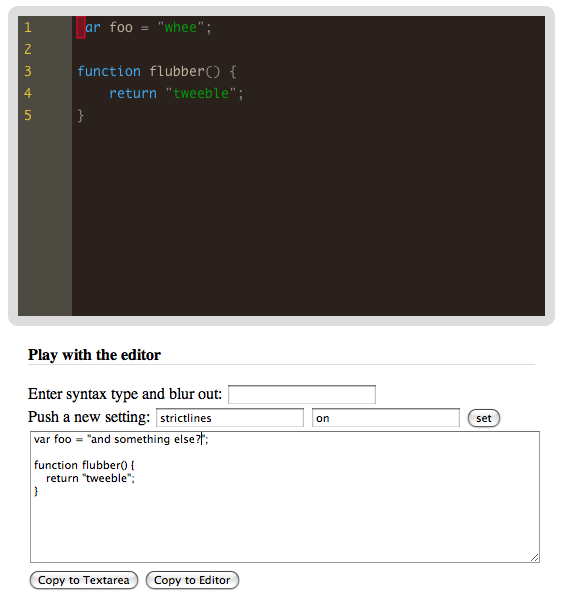
I created a sample editor to do just this:

editor component

There is a video of this in action, comically in 2x speed for some reason on Vimeo :)

Since this is a sample, there are things that you can do, that you probably wouldn’t in your case.

To embed the editor component you will be able to simply do this (NOTE: We haven’t deployed this version to production yet, so for now you need to load up Bespin on your own server, sorry!):

<script src="https://bespin.mozilla.com/embed.js"></script>
 
<script>
    var _editorComponent;
 
    // Loads and configures the objects that the editor needs
    dojo.addOnLoad(function() {
        _editorComponent = new bespin.editor.Component('editor', {
            syntax: "js",
            loadfromdiv: true
        });
    });
</script>
 
<div id="editor" style="height: 300px; border: 10px solid #ddd; -moz-border-radius: 10px; -webkit-border-radius: 10px;">var foo = "whee";
 
    function flubber() {
        return "tweeble";
    }
</div>

First we read in the embed wrapper code, which relies on Dojo (so Dojo has to be loaded first).

Then we create a component passing in the HTML tag to inject into, and options which in this case tell it to use JavaScript syntax highlighting, and then load up the editor using the value in the div that we are injecting into.

At this point the editor is ready to go. You can focus on the puppy and start typing, but chances are you want to access the editor text at some point (for example, read from it and post it up to a form).

To mimic this, we have a textarea that we can copy contents into (editor.getContent()), and then send it back to the editor (editor.setContent(contents)):

function copyToTextarea() {
    dojo.byId('inandout').value = _editorComponent.getContent();
}
 
function copyToEditor() {
    _editorComponent.setContent(dojo.byId('inandout').value);
}

The example also shows how you can change settings for the editor via editor.set(key, value).

There are more features we should probably put into the editor, such as automatically syncing to a hidden textarea with an id that you specify (so then a form can just be submitted and the backend gets the right stuf).

What else do we need?

Mar 12

Integrating info from Google Doctype into Bespin

Ajax, Bespin, Tech No Comments »

We have plans for integrating rich documentation and resources with Bespin. One quick hack that I have been meaning to do for awhile just got done finally today.

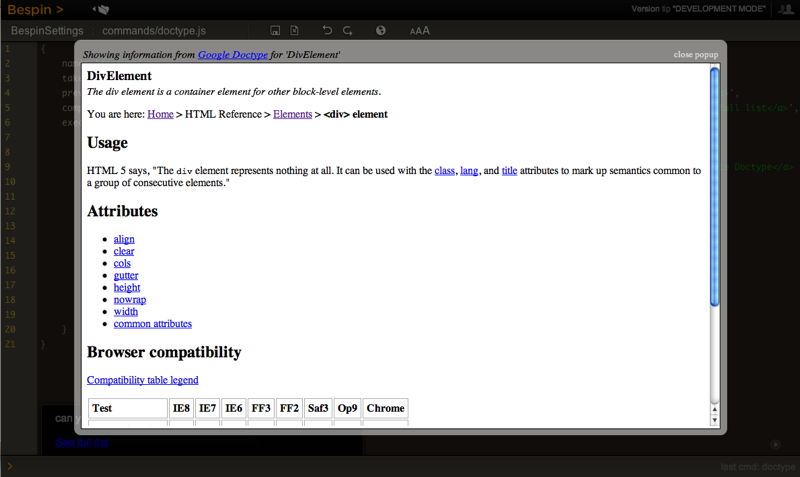
I created a simple command that lets me type doctype DivElement to get an inline popup with details on a <div>. It looks like this:

Bespin Doctype

Right now you have to know what sections are available, which is laid out for you. There are common patterns in there too, such as: NameOfTag + “Element” (e.g. the DivElement) and the same for *Entity and *Attribute.

In the future I would love to be able to tie search into the system so it is more forgiving, and also other features such as getting this data from a context menu, and more. What would you like to see?

The command is documented here, and to use it in your Bespin, you will need the latest version (as of March 12th) and then you can cmdedit doctype and paste it in:

/*
 * The doctype command takes a section, which is the WikiWordSection 
 * that must be one of the items on this list:
 * http://code.google.com/p/doctype/w/list
 *
 * It grabs the data and puts it up in an inline popup
 *
 * E.g. doctype DivElement
 */
{
  name: 'doctype',
  takes: ['section'], // part on the Wiki
  preview: 'grab the doctype info for a section<br><br><em><a href="http://code.google.com/p/doctype/w/list" target="_blank">See full list</a>',
  completeText: 'can you give me the Doctype wiki section?<br><br><em><a href="http://code.google.com/p/doctype/w/list" target="_blank">See full list</a>',
  execute: function(self, section) {
      if (!section) section = "Welcome";
      var el = dojo.byId('centerpopup');
      el.innerHTML = "<table width='100%'><tr><td><em>Showing information from <a href='http://code.coogle.com/doctype'>Google Doctype</a> for '" + section + "'</em></td><td align='right' style='font-size: smaller; color: #ddd; cursor: pointer'>close popup</a></td></tr></table><div style='background-color: #fff; border: 1px solid #000;'><iframe src='http://code.google.com/p/doctype/wiki/" + section + "?show=content' height='95%' width='100%' border='none' frameborder='0'></iframe></div>";
      el.style.width = "80%";
      el.style.height = "80%";
      dojo.require("dijit._base.place");
      dojo.require("bespin.util.webpieces");
 
      bespin.util.webpieces.showCenterPopup(el);
 
      dojo.byId("overlay").onclick = el.onclick = function() {
          bespin.util.webpieces.hideCenterPopup(el);
      };        
  }
}

Tabs or Spaces

twaddle

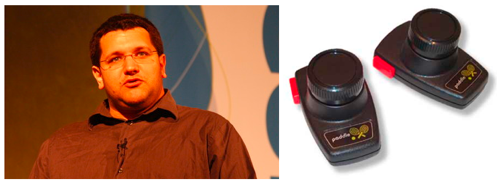
I am so happy that Ben got to save away my sinister “paddle twaddling” past in his post on tab support in Bespin and how one mistake took down the performance of the editor.

Mar 04

Supporting the system clipboard in your Web Applications: Part Two

Bespin, JavaScript, Tech with tags: 17 Comments »

paste
Courtesy SierraBlair

I had a rather long post on the pain of dealing with the system clipboard in Web applications now that Flash went and fixed some security hole :/

The solution in place at that time worked well in Safari, with the on[cut|copy|paste] and unfortunately not great with Firefox due to one crucial big of data being omitted.

Then Tom Robinson and a couple of others made the great point that I could get ALMOST everything I wanted with just the hidden textaraea trick. Instead of tying the trick to the on[cut|copy|paste] events, I can just manually grab the Cmd/Ctrl-C X V commands. The only downside to this is that if the user goes to the Edit menu and chooses something, it won’t work. Annoying, but that’s the world of the hacky Web sometimes.

I added in this new tactic, and copy and paste works OK for Firefox in the latest version of Bespin in code (not deployed to bespin.mozilla.com at the time of this writing):

dojo.declare("bespin.util.clipboard.HiddenWorld", null, {
    install: function() {
        // * Configure the hidden copynpaster element
        var copynpaster = dojo.create("textarea", {
            tabIndex: '-1',
            autocomplete: 'off',
            id: 'copynpaster',
            style: "position: absolute; z-index: -400; top: -100px; left: -100px; width: 0; height: 0; border: none;"
        }, dojo.body());
 
        var grabAndGo = function(text) {
            copynpaster.value = text;
            focusSelectAndGo();
        };
 
        var focusSelectAndGo = function() {
            copynpaster.focus();
            copynpaster.select();
            setTimeout(function() {
                dojo.byId('canvas').focus();
            }, 0);
        };
 
        this.keyDown = dojo.connect(document, "keydown", function(e) {
            if ((bespin.util.isMac() && e.metaKey) || e.ctrlKey) {
                // Copy
                if (e.keyCode == 67 /*c*/) {
                    // place the selection into the textarea
                    var selectionText = _editor.getSelectionAsText();
 
                    if (selectionText && selectionText != '') {
                        grabAndGo(selectionText);
                    }
 
                // Cut
                } else if (e.keyCode == 88 /*x*/) {
                    // place the selection into the textarea
                    var selectionObject = _editor.getSelection();
 
                    if (selectionObject) {
                        var selectionText = _editor.model.getChunk(selectionObject);
 
                        if (selectionText && selectionText != '') {
                            grabAndGo(selectionText);
                            _editor.ui.actions.deleteSelection(selectionObject);
                        }
                    }
 
                // Paste
                } else if (e.keyCode == 86 /*v*/) {
                    focusSelectAndGo();
 
                    setTimeout(function() { // wait just a TOUCH to make sure that it is selected
                        var args = bespin.editor.utils.buildArgs();    
                        args.chunk = copynpaster.value;
                        if (args.chunk) _editor.ui.actions.insertChunk(args);
                    }, 1);
                }
            }
        });
    },
 
    uninstall: function() {
        dojo.disconnect(this.keyDown);
    }
});

Because of the issues, I took out the UI buttons for cut/copy/paste, and am in fact wondering if the editor needs that row at all. I wonder if we can consolidate the header to one line, giving us more vertical space. A code editor for developers is not like Google Docs for average Joe users, so having the visual cues probably doesn’t matter in the same way for items like copy.

There are a few subtle annoyances such as running an action like killLine (Ctrl-K) which cuts the selection but has to do so in a non-work with the clipboard way.

End result: getting there, but still need to work on making this generally viable for any application on the Open Web Platform. What do you think?

UPDATE: Used the copynpaster variable throughout, and added a setTimeout around the paste operation as I found some people needed to hit the paste key twice as the focus()/select() was taking a little too long.

Mar 02

Bespin now learning some art in the Dojo

Ajax, Bespin, Tech with tags: , , 5 Comments »

two

Roberto Saccon has given the Bespin project a nice gift, by porting the Bespin codebase to Dojo. This was a lot of work and is very much appreciated. The obvious question is going to be “Why did you decide to change from Prototype to Dojo?”

Firstly, Ben and I really like Prototype. I am a Ruby guy, so it feels good to me. I talked about it a bit here, and I will use Prototype in many projects in the future.

The state of Ajax frameworks is quite interesting. On the one hand, many of the top dogs have actively learned from each other which has lead to many of them offering similar functionality. For example, Dojo and Prototype can do a good job with DOM selectors, which jQuery is known for.

Although you can do a good job in any of the top libraries, they still differ in scope, and are optimized for certain use cases, project sizes, and functionality wants.

jQuery offers a phenomenal API for doing stuff with the DOM. It feels right. It is also trivial to extend this world, which has lead to the huge number of plugins to do just that. Because of the clean, simple API, we have seen a huge surge in jQuery usage and interest. I would say that it is optimal for designers and beginner JavaScript folk. This is not to say that it isn’t also great for experts. There is large support from folks like Simon Willison. John Resig did something amazing. If you think functional, this will be your cup of tea even above and beyond.

Prototype goes a little further in that it offers more sugar on top of the language itself. Some find the strapping on of methods on core Objects as obscene. Personally, I love it. It just feels so much nicer for me to say array.last() or array.include(thing), compared to dojo.indexOf(array, item) > -1 for example. In fact, looking at a bunch of code has me feeling a touch nuts with all of the “dojo.” items in it. My brain is starting to ignore them.

That being said, Dojo’s purity gives you a lot. It may be more verbose to dojo.byId than $, but we have no namespace pollution.

The community quickly wanted us to package up Bespin in a way that we could share things. We wanted the same, and have natural components (e.g. the Editor, Thunderhead itself), and some didn’t like the leakage of the Editor component requiring Prototype which in turn meant pollution into the global namespaces. With Dojo we can hide away nicely, and can even run a build to become foo instead of dojo if we wanted.

Since the community really wanted it, and someone stepped up and actually did it, we accepted the change. On our codebase it had some interesting side effects. For example, before hand we had Prototype, Script.aculo.us, and a slew of third party libraries to give us a bit of this, that, and the other. With Dojo, they had everything we were needing and more, so we could hg rm external/ and be done. We are also doing Comet work and the like, and it fits in nicely.

The first change here was to get Bespin working in Dojo, but now we have more work to make sure that:

  • The codebase feels Dojo-y
  • Use more of the Dojo features (e.g. dojo.keys for key handling, CSS store, Comet, …)
  • Clean up and package our stuff nicely (e.g. bespin vs. editor vs. th)

If you are a Dojo fan, or fancy getting into it anyway, please join in! There are a few Prototype things left around, so some of the spirit is there.

A bit of an aside…

A big pain with Ajax and components, is the whole “I really like that jQuery UI component, but I am using Prototype already…. grrr”. Simon Kaegi of IBM has been putting together some thoughts and code around a JavaScript module system that would enable you to say “I want service X which happens to depend on jQuery, and service Y which depends on Prototype.” I am very interested to see where this goes. We sorely need it! The annoying problem on the client is that having multiple libraries is not cheap. On the server though? Not as big a deal potentially.

Feb 26

Supporting the system clipboard in your Web applications; What a pain!

Bespin, Tech with tags: 26 Comments »

copypaste

When we launched Bespin people noticed that our copy and paste experience wasn’t the best. It wasn’t integrating with the system clipboard in most cases. An editor needs clipboard support. Needs it. Essential. 101.

It turns out that this can be a royal pain to work across various browsers and platforms. I thought it may be good to share our story, where we were, where we are, and where we want to be. I also am looking forward to hearing your ideas, as we may have missed something.

First, what are we talking about here?

With our canvas based editor we needed access to the system clipboard to be able to copy data into, cut, and paste from the outside clipboard.

The first version that we had, used Clipboard Copy which accesses the clipboard APIs available in Flash. Unfortunately, our parade was rained on. With Flash 10 Adobe changed the access model to these APIs (due to security issues). Now a user has to explicitly click on a SWF control to get the access. To help, zeroclipboard tricks Flash, allowing you to at least fake out the user and have them click on any element. zeroclipboard hides a translucent SWF control on top of the element so the user thinks they are clicking on the “copy” icon, or something like it. This is all well and good, but we obviously need to tie into the key combinations that we habitually know (Cmd/Ctrl C, X, and V).

With Flash not able to do what we need (as Flash 10 will be well supported soon, and it broke it) we needed to take a fresh look at the problem.

What APIs do we have available in the browsers? In typical fashion, each browser does things differently.

IE had an early API to give you access. I won’t go into detail on this puppy because we aren’t interested in supporting IE yes, until we can get Canvas/fillText running in a performant manner. Then we will care.

What about Firefox?

Firefox has a rich clipboard API in the XUL platform itself via the nsIClipboard interface. It has everything we could possibly need, and we can implement copy and paste easily:

copy: function(copytext) {
    try {
        if (netscape.security.PrivilegeManager.enablePrivilege) {
            netscape.security.PrivilegeManager.enablePrivilege("UniversalXPConnect");
        } else {
            clipdata = copytext;
            return;
        }
    } catch (ex) {
        clipdata = copytext;
        return;
    }
 
    var str = Components.classes["@mozilla.org/supports-string;1"].
                              createInstance(Components.interfaces.nsISupportsString);
    str.data = copytext;
 
    var trans = Components.classes["@mozilla.org/widget/transferable;1"].
                           createInstance(Components.interfaces.nsITransferable);
    if (!trans) return false;
 
    trans.addDataFlavor("text/unicode");
    trans.setTransferData("text/unicode", str, copytext.length * 2);
 
    var clipid = Components.interfaces.nsIClipboard;
    var clip   = Components.classes["@mozilla.org/widget/clipboard;1"].getService(clipid);
    if (!clip) return false;
 
    clip.setData(trans, null, clipid.kGlobalClipboard);
},
 
data: function() {
    try {
        if (netscape.security.PrivilegeManager.enablePrivilege) {
            netscape.security.PrivilegeManager.enablePrivilege("UniversalXPConnect");
        } else {
            return clipdata;
        }
    } catch (ex) {
        return clipdata;
    }
 
    var clip = Components.classes["@mozilla.org/widget/clipboard;1"].getService(Components.interfaces.nsIClipboard);
    if (!clip) return false;
 
    var trans = Components.classes["@mozilla.org/widget/transferable;1"].createInstance(Components.interfaces.nsITransferable);
    if (!trans) return false;
    trans.addDataFlavor("text/unicode");
 
    clip.getData(trans, clip.kGlobalClipboard);
 
    var str       = new Object();
    var strLength = new Object();
    var pastetext = "";
 
    trans.getTransferData("text/unicode", str, strLength);
    if (str) str = str.value.QueryInterface(Components.interfaces.nsISupportsString);
    if (str) pastetext = str.data.substring(0, strLength.value / 2);
    return pastetext;
}

Verbose isn’t it? Hardly the most succinct API ever for the common case, but it does the trick. Or does it.

You can see the real problem here:

try {
    if (netscape.security.PrivilegeManager.enablePrivilege) {
        netscape.security.PrivilegeManager.enablePrivilege("UniversalXPConnect");
    } else {
        clipdata = copytext;
        return;
    }
} catch (ex) {
    clipdata = copytext;
    return;
}

For security, we have to ask the user to give us permission to use copy and paste. You get one of those ugly dialogues, and the user will be asked repeatedly for each session.

Not only is this a pretty poor user experience, but we can’t even get this far. When we ask for the priviledge, depending on the users settings, changes are that you will never actually get asked to grant them. You have to sign JavaScript and the like to even get close. This is pretty crazy. I don’t even get a CHANCE to ask the user for extended privileges (unless you get users to do magic like: user_pref("signed.applets.codebase_principal_support", true);). Here is where the cliff of the Web platform raises its ugly head. We need to fix this!

Time to get subtle here. Our use case isn’t about being able to sneakily get access to the clipboard without the user knowing. All we want it to actually get access based on the user doing something. When they Cmd/Ctrl C, X, or V. When they click on a copy button, then do the action. This is very different than getting access to the clipboard at any time.

In the code above, notice what the exception cause is doing: clipdata = copytext; This is our worst case scenario. If we can’t get access to the clipboard then we keep an internal clipboard that only allows you to cut/copy/paste within the editor itself. As soon as you want to copy something from a web page and paste it into the editor? Outta luck. This isn’t good enough.

Now, let’s take a look at WebKit. WebKit does a decent job and implementing the initial Microsoft work in a nicer DOM way.

There are a set of DOM events that have pairings that tell you before* “getting ready to do the action so set things up if you need” and then the action itself.

  • beforecopy
  • copy
  • beforecut
  • cut
  • beforepaste
  • paste

In our world with the editor, we use the before events to set things up, and we have to do something pretty hacky to make it happen. The copy event itself only actually goes through if you are on an element that supports it. There are hacks around this too. For example, if you want to be able to get a copy event on a div, you need to turn on contentEdible and set the tab index to -1. Strange huh?

To get around all of this, we use a hidden text input, which can of course accept these events. Then, in the before event we focus over to that hidden element. Here is an example for beforecopy:

Event.observe(document, "beforecopy", function(e) {
    e.preventDefault();
    $('copynpaster').focus();
});

You will notice that we make a call to preventDefault. This tells the system that we are in control and are handling the copy ourselves. This turns out to be important is some subtle ways too. For example, The OS will often grey out a menu choice for “Copy” if it doesn’t see anything selected. Since we are in control of the selection, we need to override that behavior and continue to pass through the event. In fact, I noticed a few weird things happening if you don’t get this all just right. For example, in WebKit, if you select the “Edit” main menu, it would fire a beforecopy right away, and then once again when you selected copy. Strange.

But, now we have gotten beforecopy to focus us in the text input, we are ready to implement the copy event which will not get passed through. Here we need to do OUR magic to get the selection that we want to put into the clipboard, and for that we use e.clipboardData.setData(type, data). In our case the type used is just plain text (test/plain) but you could use other rich data formats if you need.

You will also notice at the bottom of the code, we focus back on the canvas to shoot us back to where we were. This completes the cycle:

Event.observe(document, "copy", function(e) {
    var selectionText = _editor.getSelectionAsText();
 
    if (selectionText && selectionText != '') {
        e.preventDefault();
        e.clipboardData.setData('text/plain', selectionText);
    }
 
    $('canvas').focus();
});

The cut action is identical bar the step that gets the data into the clipboard. In the case of cut we also add a step to delete the current selection:

_editor.ui.actions.deleteSelection(selectionObject);

Paste is also quite similar, but instead of adding to the clipboard we are getting the data out, and for that we use:

e.clipboardData.getData('text/plain');

Now we are good to go. You can see the code in its entirety here.

You may notice some of the wiring up of the two styles (Firefox/WebKit).

We cheat and do a simple test:

setup: function() {
    if (Prototype.Browser.WebKit) {
        this.install(new Bespin.Clipboard.DOMEvents());
    } else {
        this.install(new Bespin.Clipboard.Default());
    }
}

We favour feature detection over browser detection of course, but here it is a little painful as the real test is to to see if the event in a copy/cut/paste/ has a clipboardData object associated with it. That’s a little too deep into the onion layers, so we punt.

We would love to use this standards approach with Firefox too, and we almost can. MDC has docs on support for this, such as paste but the rub is in this bug that states how onpaste doesn’t let you getData() back, which makes it useless for all bar signaling when the user wants o paste something. PPK does a good job talking abou the various quirks with these events in general.

We still have some problems though. We handle the copy/cut/paste menus and keyboard shortcuts perfectly, but our UI has our own icons that try to kick off these actions. This is where we need to get zeroclipboard going, and then we are done (in WebKit).

Phew. That turned out to be a long explanation. Fun times on the Open Web! What am I missing? What tricks have you run into? Inquiring minds want to know!

More articles from Bespin

We are learning a lot from Bespin and beyond. Here are posts from the team and community that you may find interesting:
Feb 24

Browsers are finally catching up; It isn’t the Future of Web Pages is it

Tech 7 Comments »

Ben and I are speaking at the Future of Web Apps in lovely Miami. Having just been in the midwest, heading to some nice weather is welcome. I spoke at the event in London and thoroughly enjoyed it. At the time I was speaking on Gears. This time, Ben and I are talking about the state of the Web, and it obviously excites us. The timing is perfect as we give the talk on the back of the recent release of Bespin, the project that let us play with the bleeding edge. We were unencumbered by the chains of old browsers, and it shocked us a little. These chains keep us in the stone ages, and if we just suck it up and live with them the platform will pale in comparison to those that rev.

It is 2009 yet the majority of us still have to work in a world of browsers that were built for web pages. This show isn’t called the Future of Web Pages though, is it!

Through innovative and tiresome work the community evolved what we finally coined Ajax. It looked a little like this:

Ajax hackery

It was a series of hacks. A series of quirks. Painful. But, just like the early planes, who cares? The beast does fly! This cobbled together set of technologies gave us our flight in the form of giving us the ability to build applications. The small changes that we got in XHR and the like meant that we could create interactive experiences on the Open Web.

But, the browsers are finally changing. The new crop come with technologies that show that the browser vendors are thinking about building a platform for desktop quality applications. The Chrome comic book was full of this. We highlight some of these technologies:

  • Super fast JavaScript. Other platforms have smart JIT VMs and we should be no different. With the latest VMs that browsers are integrating we get orders of magnitude in performance gains. This doesn’t just make things a little faster, it means that the game has changed and you can do things that you previously couldn’t
  • Offloading the processing. Fast JavaScript is great, but you still have a bottleneck in the old single threaded architecture of the browser. Web Workers gives us a nice API (no threading APIs here!) to offload the work. As we think that we can do more (due to the faster JS) we find ourselves with more code, and we need to let the browser do its thing while this code runs.
  • Multiple processes. Even with fast JavaScript and Web Workers, we need to isolate our worlds. If you have Gmail, a calendar, Bespin, and three other real Web applications running, all polling for updates and the like, it is too easy to have them collide as they all ask the CPU to do work. With the new multiprocess architectures we side step this issue. When I am in Bespin I want it to have as much nice as possible.
  • Rich graphics. We are used to having text, boxes, images to work with. That’s kinda it! Isn’t it amazing to think about what we have done with those simple building blocks? With Canvas, SVG, and the great new CSS primitives (border radius, css animations, css transitions, css shadows, and more) we get to think outside of the box.
  • Desktop services. We need to reach out. Real applications need to talk to the clipboard, get geolocation, access your address book, etc. We need to solve this problem to get past the cliff that we currently experience where people say “but to do X, you need to use a native desktop framework”. We need a trust model that works, and to get the APIs into the browser.

What we end up with is this a metamorphosis from the first planes to the jet:

Web Apps Future

This is why I am excited to work on new developer tools for the Open Web. I am jazzed that the community is making this happen. Browser vendors, web developers, together we can make a big difference.

Of course, when the koolaid wears off I am always acutely aware of the problems that we have on the platform. There is a long way to go, and we can’t just ignore old browsers. Fun times ahead though!

Feb 21

Exactly what is wrong with education and government; Input vs. Output

Personal 5 Comments »

Taking sexual harassment training is good stuff. I get it. I support it. However, the implementation is so poor that I had to comment on it.

The law states that you need to take 2 hours of training. See anything wrong with that?

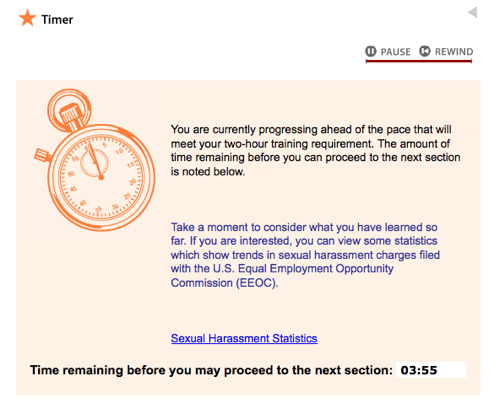
As I took the online class, after the first section (where I got every question right) I faced the following screen:

basedoninput

I was “ahead of schedule” so they made me sit and wait for minutes so I would “catch up.”

Doesn’t it make more sense to have the expectation that: “You will understand US sexual harassment law” with an exam that proves it, instead of just “you sat around for 2 hours…. and we all know that why you waited in between you could have just been playing Wii Mario Cart.”

Can we please start to measure on output and not input? If someone answers 100% of questions in 3 minutes, good on them. They know the law.

Feb 20

Headless Eclipse, and Smalltalk browsing with Bespin, thanks to Avi Bryant

Bespin, Tech with tags: , No Comments »

Nothing like seeing people doing things that make you saw “Wow.” and they are using your project!

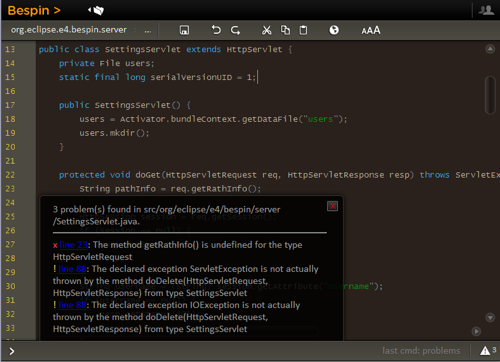
First, I posted on the Mozilla Labs blog about Boris Bokowski and Simon Kaegi and their work with Bespin fronting a headless Eclipse. Their demo is exciting to us as they were able to implement the Bespin Server API in short order, and use Eclipse to run Java compilation on the server, thus returning errors back to Bespin. This is exciting as this would enable a huge variety of languages and functionality.

I was fortunate enough to meet Boris, Simon, and an Eclipse crew today. It was a real pleasure to talk tech and share ideas. Amazing when you are surrounded by smart engineers who have been doing tools for a long time!

bespin-eclipse

Then, as I sit at the airport, I see a message from Avi Bryant of Seaside and DabbleDB fame (as well as many other things).

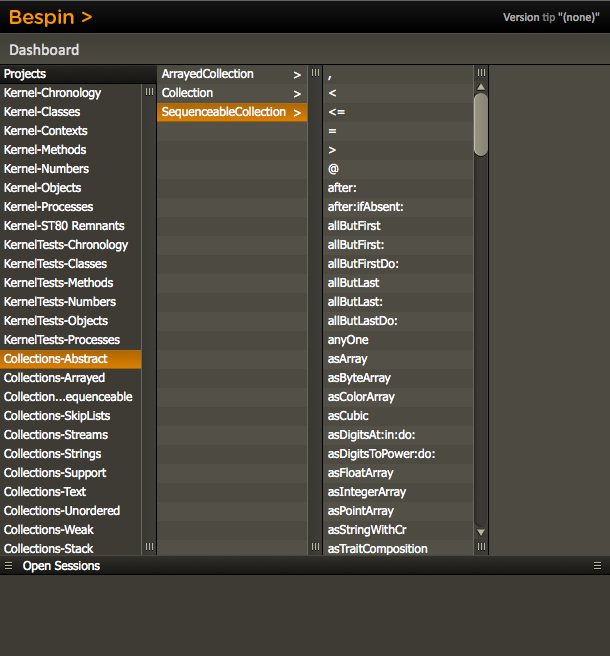
He did something very cool indeed. He backed Bespin with Squeak:

I work in Smalltalk, which deals with source code at method
granularity rather than file granularity. I spent a few minutes today
playing with a Bespin backend for Squeak that exposes the package/
class/method hierarchy as if each method were a separate file, which
works very nicely, and feels very familiar (since column browsers
were, AFAIK, invented for Smalltalk-80 in the first place :).

bespinsqueak

He points out the issues of the current Dashboard to Editor design, which we agree with. Our plan is actually to unify the two, and now we want to do it even faster to help his use case. What if you can be in the editor and quickly bring down the horizontal file pane (moving down the editor). Then you can select the methods and the code will change below. Excited to get that going. We also need small things like having the dashboard remember state.

Thanks to the people that have spent time playing with Bespin. Very much appreciated!