Apr 13

The wrong solutions to the frame busting war

Tech 4 Comments »

Marcus Westin wrote a little library called oFrameBust that goes beyond the if (top.location != window.location) frame buster to allow whitelists via:

<script type="text/javascript" src="http://oframebust.com/oframebust.js">
oFrameBust('digg.com', 'www.facebook.com', 'www.marcuswestin.com');
</script>

Unfortunately, for the entire system to work the whitelist party needs to grok oframebust, which is always a tough sell.

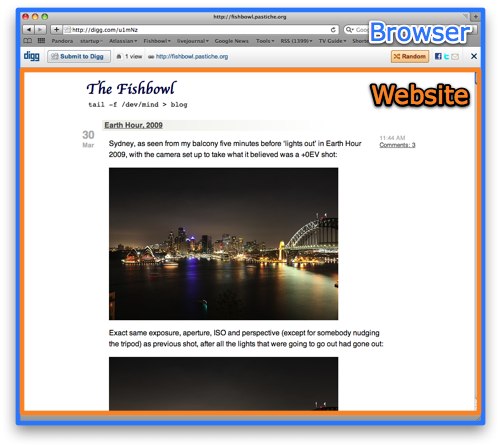
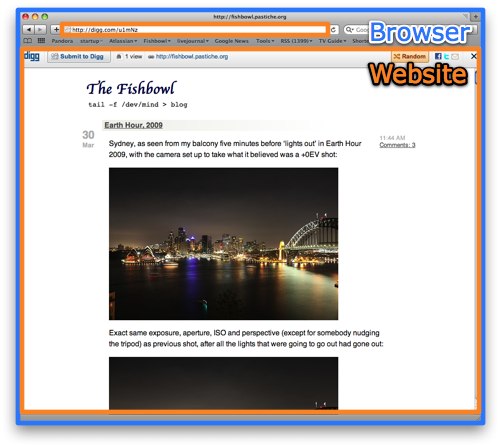
I think the best post I have seen on the entire topic is from Charles Miller as he gets to the root of the issue, which is point of view:

Digg’s point of view:

Website owners point of view:

Exactly. If someone installs a Digg toolbar add-on to the browser, no-one would say anything, as it is part of the browser and THE END USER REQUESTED IT. The DiggBar has people clicking around with no idea what has happened.

Watching people come up with rev=”canonical” and libraries to make url shorteners on their own domains makes me a little sad too. The world doesn’t need “ajaxian.com/Apasojd” Instead, we need SMS to be updated to grok the Web, and we need Twitter to take the link out of the message (as FriendFeed allows) so the characters don’t matter. The majority of my tweets follow the pattern of: “Blah blah blah di blah http://url” Make that a first class citizen. I even created Twitter Greasemonkey scripts to deal with the URL and UN-shorten them. In fact, don’t just do that, but make the entire message a link to that URL. There are better fixes out there.

Apr 10

Browser storage: Do we need SQL? Or would a JSON approach be better?

Ajax, JavaScript, Tech with tags: , 18 Comments »

jsondata

Ian Hickson: “I expect I’ll be reverse-engineering SQLite and speccing that, if nothing better is picked first. As it is, people are starting to use the database feature in actual Web apps (e.g. mobile GMail, iirc).”

When I read that comment to Vlad’s post on HTML 5 Web Storage I gulped. This would basically make SQLite the HTML 5 for storage in the browser. You would have to be a little crazy to re-write the exact semantics (including bugs) of SQLite and its dialect. What if you couldn’t use the public domain code?

Gears lead out strong with making a relational database part of the toolbox for developers. It embedded its own SQLite, in fact one that was customized to have the very cool full text search ability. However, this brings up the point of “which SQLite do you standardize on?”

The beauty of using SQL and SQLite is that many developers already know it. RDBMS has been mainstream for donkey’s years; we have tools to manage SQL, to view the model, and to tweak for performance. It has gone through the test of time.

However, SQL has always been at odds with many developers. Ted Neward brought up ORM as the vietnam of computer science (which is going a touch far ;). I was just lamenting with a friend at Microsoft on how developers spend 90% of their time munging data. Our life is one of transformations, and that is why I am interested in a world of JavaScript on client and server AND database. We aren’t there yet, but hopefully we can make progress.

One of Vlad’s main questions is “Is SQL the right API for Web developers?” and it is a valid one. I quickly found that for most of my tasks with the DB I just wanted to deal with JSON and hence created a wrapper GearsDB to let me insert/update/select/delete the database with a JSON view of the world. You probably wouldn’t want to do this on large production applications for performance reasons, but it works well for me.

Now a days, we have interesting APIs such as JSONQuery which Persevere (and other databases) use. I would love to see Firefox and other browsers support something like this and let us live in JSON throughout the stack. It feels so much more Webby, and also, some of the reasons that made us stay with SQL don’t matter as much in the client side world. For example, when OODBMS took off in some Enterprises, I remember having all of these Versant to Oracle exports just so people could report on the darn data. On the client the database is used for a very different reason (local storage) so lets use JSON!

That being said, at this point there are applications such as Gmail, MySpace search, Zoho, and many iPhone Web applications that use the SQL storage in browsers. In fact, if we had the API in Firefox I would have Bespin using it right now! We had a version of this that abstracted on top of stores, but it was a pain. I would love to just use HTML 5 storage and be done.

So, I think that Firefox should actually support this for practical reasons (and we have SQLite right there!) but should push JSON APIs and let developers decide. I hope that JSON wins, you? I also hope that Hixie doesn’t have to spec SQLite :/

Related
It was also interesting to just read this post Abusing Web Storage via Sam Ruby:

Alberto Trivero: The aim of this white paper is to analyze security implications of the new HTML 5 client-side storage technology, showing how different attacks can be conduct in order to steal storage data in the client’s machine.

Apr 09

What if you, and people like you, volunteered for the police?

British, Open Source with tags: , 1 Comment »

When thinking about Open Web evangelism my thoughts led me to some advertisements that I saw on the Tube when I was recently in London. They had content like this:

specialconstables

You can now potentially volunteer for the metropolitan police. At first this seemed a little strange, but it quickly made a ton of sense to me.

I remember how I felt about the police as a kid. The bobby-on-the-beat police. The cops were part of the community and were seen as truly helping out in many ways.

Now fast forward to moving to America. Here I fear the police. If I see a police car pull someone over I get goosebumps and raised hair on my arms.

London is a huge cosmopolitan city, and with that growth it has also seen an increase in crime. If you walk past New Scotland Yard you see a chap with a machine gun. Far from the local bobby. The problem is that you lose your grip on the community around you. If you don’t know what is going on and the vibe you have less information. You probably have less informants too.

So, how could the Met go about getting a closer connection to the people again? How about inviting them into the fold. Open the curtain so those people offer a valuable service and see how the force works. On the flip side, when you interact with a cop now, it could actually be your kids teacher! If the system works out you feel differently towards the copper crew again and the community gets more close knit.

I am obviously not close enough to the scene in London, and wonder how well this program will do / has done (anyone know more?), but in general, I love it. Putting people first.

Apr 08

Google App Engine and The Java Web; The Wrong Java?

Ajax, Google, HTML, JavaScript 6 Comments »

I had the pleasure of being at the Google Campfire event that launched the worst kept secret, App Engine supports Java and Google has a preview for you to check out if you signup in time.

Java is a huge ecosystem, which is a big win, but what interested me was the nuance. The Secure Data Connector feature that gives us a glimpse of “on premise” type functionality (that Microsoft is touting with Azure) is a big one, and something that enterprises need.

The GWT pitch and the Google plugin for Eclipse is another interesting one. I am always so incredibly torn here. GWT is fantastic technology. Because of the way it works, it gets to do things that pure JavaScript libraries would love to be able to do but can’t. The team is great, and the hard core tech is incredibly impressive. I understand why people use it.

My personal issue is that it feels so funny to see the two messages from Google.

Now, these aren’t mutually exclusive of course. GWT can wrap all of the HTML 5 stuff and both can be happy. But it just feels weird to me. The idea that JavaScript is the assembler of the Web, when it is such a high level language is hard to wrap my mind around. It can be moulded to do so much more than Java can with its static nature (which has downsides too of course!)

Another thing. Writing your applications using Java in this world is about the source code and the language but not about the VM. For me this is hard to wrap my head around too. I get to use a language I *personally* don’t like as much (Java the language) and have it run on a runtime that isn’t as good as the Java VM. Hmm. And, since there isn’t the VM there (on the client, there is with App Engine!), I don’t get the pleasure of writing in any of the very interesting languages available on the JVM (Scala, Clojure, JRuby, Groovy, etc). They have picked the wrong Java for my taste!

Now, Paul Hammant has a very detailed post about building a rich Ruby application on top of AppEngine4J. He flips from a jQuery view to a Ruby client using Swiby to a Ruby Shoes app and beyond. Then, at the end, he says something very interesting:

If Google made changes to GWT to make it a viable thick/desktop/offline technology then AppEngine might shift up a gear with online/offline apps.

Since you are writing Java code, why not ship down a jar file for browsers that support Java (still a fair few) and run the application natively within the browser? Kinda bizarre, but imagine if Gears had been done in Java, and people could add functionality easily that way (this is where Yahoo! BrowserPlus is interesting… how you can write services in Ruby and the like). And now you are sending down a jar, you could write the applications using any JVM language you want. Huh. That would be an interesting direction.

Who knows where this ends. When you get practical though, Google have delivered a nice experience for people that like Java, and that is a large group still.

I am still in the camp of DSLs and lightweight and all that jazz, and agree that one great thing about the Web is that some people can come in and make a change here and there at a very high level and make something their own.

Fun times!

Apr 06

Creating custom scrollbars with CSS; How CSS isn’t great for every task

Ajax, Bespin, JavaScript, Web Browsing with tags: , , 22 Comments »

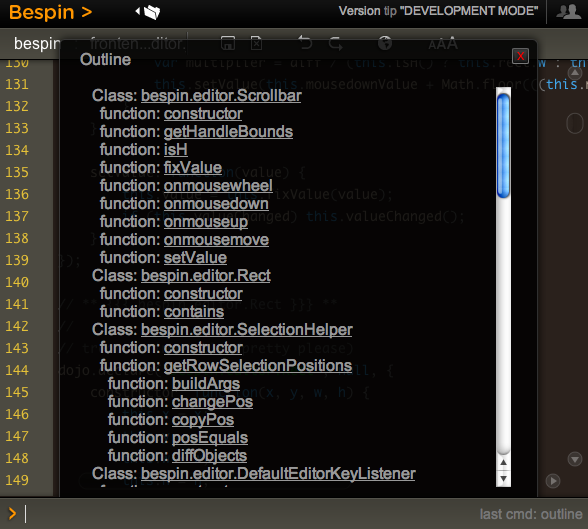
Have you tried to create a nice rich experience and then been fighting the “defaults” to go the extra mile? This reared its head with me recently with Bespin. There are certain commands that pull up divs of content and we need to scroll through it. The problem is that the native scroll bar looks so out of place:

uglyscrollbar

WebKit recently released the ability to style scrollbars in HTML elements (but not the main window, which you have been able to do in IE for donkeys years much to many peoples chagrin).

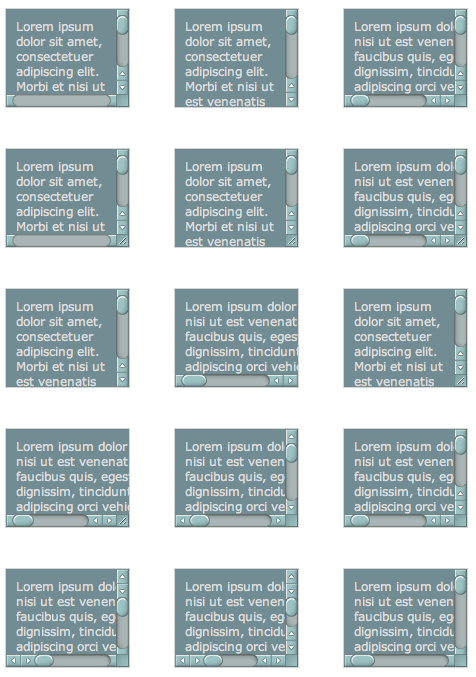
I decided to take it for a spin and loaded up the examples that show you being able to do every type of scrollbar that you can imagine:

manyscrollbars

So, it shouldn’t be so hard should it. From the blog post I see a few magically ::-webkit-scrollbar CSS properties that I can plugin and be on my way. But looking at the example view source you see many pieces like this:

:not(.none):not(.double-start)::-webkit-scrollbar-track-piece:vertical:end:single-button,
:not(.none):not(.double-start)::-webkit-scrollbar-track-piece:vertical:end:double-button,
.single::-webkit-scrollbar-track-piece:vertical:end,
.double-end::-webkit-scrollbar-track-piece:vertical:end,
.double-both::-webkit-scrollbar-track-piece:vertical:end {
    margin-bottom: -6px;
}

Holy pseudo classes batman! To be fair, this is partly due to the example page having many types of scrollbars in one (hence the not this and not that but the other) but there are still nested classes that you need to grok to get this going.

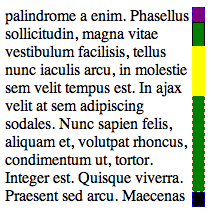
I quickly built a debug scrollbar where I styled the various pieces with simple colors and borders so I can see which was which. I also went about making the scrollbar have one up arrow on top, and one down arrow on the bottom.

debugscrollbar

The parts and pieces of a scrollbar are quite simple:

  • Thumb: This is the piece that shows you where you are in the scrollbar. This is the chap that you can move around
  • Track: This is the area of the scrollbar that you can move the thumb up and down, or along (depending on the orientation). There is both the area between the top and the thumb, and between the bottom of the thumb and the bottom of the scrollbar
  • Buttons: There may be buttons that you can click to increment or decrement the selection (which moves the thumb). There are various styles (single button, double button, etc)
  • Resizer: This can change the are of the element (e.g. enlarge of shrink)
  • Corner: This area may show up with both horizontal and vertical scrollbars open

The debug scrollbar kinda shows these areas off in a simple visual way. Note how using display: block|none enabled me to setup the single button on top and bottom functionality:

/* Turn on a 13x13 scrollbar */
::-webkit-scrollbar {
    width: 13px;
    height: 13px;
}
 
::-webkit-scrollbar-button:vertical {
    background-color: red;
    border: 1px dashed blue;
}
 
/* Turn on single button up on top, and down on bottom */
::-webkit-scrollbar-button:start:decrement,
::-webkit-scrollbar-button:end:increment {
    display: block;
}
 
/* Turn off the down area up on top, and up area on bottom */
::-webkit-scrollbar-button:vertical:start:increment,
::-webkit-scrollbar-button:vertical:end:decrement {
    display: none;
}
 
/* Place The scroll down button at the bottom */
::-webkit-scrollbar-button:vertical:increment {
    background-color: black;
    border: 1px dashed blue;
}
 
/* Place The scroll up button at the up */
::-webkit-scrollbar-button:vertical:decrement {
    background-color: purple;
    border: 1px dashed blue;
}
 
::-webkit-scrollbar-track:vertical {
    background-color: blue;
    border: 1px dashed pink;
}
 
/* Top area above thumb and below up button */
::-webkit-scrollbar-track-piece:vertical:start {
    border: 1px solid #000;
}
 
/* Bottom area below thumb and down button */
::-webkit-scrollbar-track-piece:vertical:end {
    border: 1px dashed pink;
}
 
/* Track below and above */
::-webkit-scrollbar-track-piece {
    background-color: green;
}
 
/* The thumb itself */
::-webkit-scrollbar-thumb:vertical {
    height: 50px;
    background-color: yellow;
}
 
/* Corner */
::-webkit-scrollbar-corner:vertical {
    background-color: black;
}
 
/* Resizer */
::-webkit-scrollbar-resizer:vertical {
    background-color: gray;
}

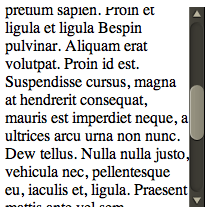
By moving the scrollbar around I could quickly see how this all worked, and it got me to this point which enabled me to plugin the images to make this puppy work for Bespin:

bespinscrollbar

There were a couple of key tweaks needed to make this work:

Getting the buttons working

I used the same trick used in the debug example to turn on the up area above, and the down area below, and then it was just a matter of targeting the correct area for the arrow images:

/* Turn on single button up on top, and down on bottom */
::-webkit-scrollbar-button:start:decrement,
::-webkit-scrollbar-button:end:increment {
    display: block;
}
 
/* Turn off the down area up on top, and up area on bottom */
::-webkit-scrollbar-button:start:increment,
::-webkit-scrollbar-button:end:decrement {
    display: none;
}
 
/* Place The scroll down button at the bottom */
::-webkit-scrollbar-button:end:increment {
    background-image: url(images/scroll_cntrl_dwn.png);
}
 
/* Place The scroll up button at the up */
::-webkit-scrollbar-button:start:decrement {
    background-image: url(images/scroll_cntrl_up.png);
}

Get the track pieces to show

Next up was getting the gutter to show up. As mentioned early on, there is one track, but two areas that can show…. before the thumb and after. You can target these areas via -webkit-scrollbar-track-piece:start || :end and then it is a matter of using the multiple background ability available in new browsers. First we have the top of the gutter, and then a recurring background (and the same for the bottom). This way it just grows with the area that it gets:

/* Top area above thumb and below up button */
::-webkit-scrollbar-track-piece:vertical:start {
    background-image: url(images/scroll_gutter_top.png), url(images/scroll_gutter_mid.png);
    background-repeat: no-repeat, repeat-y;
}
 
/* Bottom area below thumb and down button */
::-webkit-scrollbar-track-piece:vertical:end {
    background-image: url(images/scroll_gutter_btm.png), url(images/scroll_gutter_mid.png);
    background-repeat: no-repeat, repeat-y;
    background-position: bottom left, 0 0;
}

The Thumb

To get the thumb working, I thought I would do the same background image trick with three images (top of thumb, bottom of thumb, and background for the middle). Unfortunately this didn’t seem to work for me as I couldn’t get the middle to not go through the top and bottom. So, instead, I went with another new CSS trick: border-image. Here I splice the top and bottom of a thumb (the top and bottom 8 pixels) and stretch the rest:

/* The thumb itself */
::-webkit-scrollbar-thumb:vertical {
    height: 56px;
    -webkit-border-image: url(images/scroll_thumb.png) 8 0 8 0 stretch stretch;
    border-width: 8 0 8 0;
}

John Resig has a nice readable post on border-image.

And, there you have it. Now we can have nice Bespin-y scrollbars throughout Bespin. This may not be complete though, as we have the ability to also tie in :active and :hover work if we wish (change the color when selecting etc).

Of course, many people had “custom scrollbars”. There are plenty of comments on the original Surfin’ Safari post, and various rants about Flash versions. I agree that we have all seen bizarre Flash versions of scrollbars that don’t look like them at all, and where the designer didn’t bother to put in support for the mousescroll ability etc, but this is a bit different. It let’s you merge in your look and feel, yet with native scrollbar functionality.

And, with Google recreating the button maybe we can feel a little bit better about tweaking the look of common UI elements as long as they are familiar enough to users to still make natural sense.

Now, the CSS declarative way to do scrollbars seems to get pretty ugly to me with all of he pseudo classes and various magic to get the functionality that you would like. I have to admit to liking Kevin’s demo of Flash Catalyst at Web 2.0 Expo and how it lets designers build out a scrollbar. We should be inspired to do tools like this. What if we had an API that wasn’t CSS, but let us say: “I want a Mac style double on the bottom button scrollbar. And, here is a thumb, here is a track, go for it”.

That being said, at least we do have the ability to do this kind of thing now. I hope that other browsers follow WebKit in this instance.

Apr 02

Bespin Concept Defrag Command; Exploring some fun visualizations

Tech 4 Comments »

One of the fun side effects of working with the community on a code editor that is built on Open Web technology is that we get to experiment. The number one priority is to move fast to create a performant highly usable editor, but how can an editor innovate?

A lot of editor innovation has happened behind the scenes, with code completion and the like. What can be done visually?

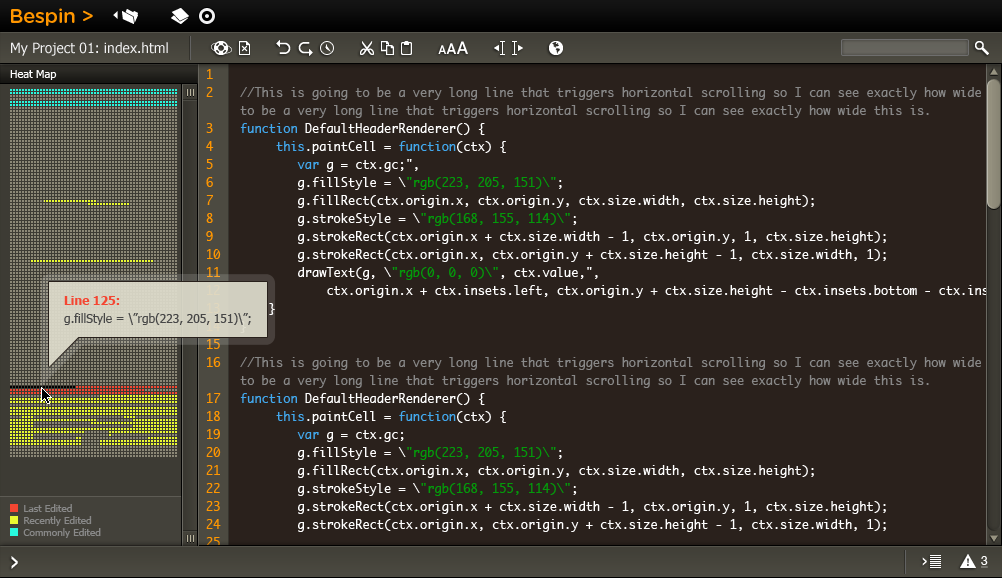
One idea is illustrated in the image below:

bespineditor_heatmap

As an individual developer, I often find myself working in the same few files while I complete a given task. Mylyn does an interesting job of keeping a notion of a context for tasks (such as fixing bug number 928394). As I jump between areas in a few files it could be nice to visualize that fact which is the item on the left of the editor. Areas can change colors based on usage and time spent, and I can click between them easily. When you mouse over an area it tells you what is there. (NOTE: Thanks to the work that Malte did, you can also use the command line and type goto MyFunctionName as a way to jump to a given function).

With this view in place, not only can we show your areas of jumpitude, but we can also show you what has changed in the file, say since your last commit so you can visualize your changes a little. Of course, this could be condensed down into the scrollbars themselves for simple cases, and only show a richer view when you ask for it.

Having this visualization in one file is nice, but what about watching the entire project? I don’t know about you, but I often find myself jumping between using another objects function, and seeing what it does (going to the declaration). This can show the cross linking. In fact, I also love the ability to jump through to a declaration from a method call. We have to get that into Bespin too, but have also looked at giving the option to call an action and popup the declaration inline so you don’t have to jump forward and back and can see the usage info while still seeing the code you are actually writing!

This also dove tails with the social collaborative aspects of Bespin. It is great to see where you have been editing, but what if we could also show where your team mates are editing. One key feature would be “tell me if someone stomped in an area that I am coding” … all so I can commit the code as fast as possible so the other poor bugger has to merge! ;) The data can be garnered via the obvious multiple people in collaboration mode, by cross checking edits coming in, and from commits themselves.

I am really jazzed to have a platform to play around with some experimental visualizations and I look forward to seeing your concepts. Worst case, we have the start of a Bespin defrag command!

Mar 30

Dealing with JavaScript scope issues; The tale of Alex kindly indulging me

Ajax, JavaScript, Tech with tags: 8 Comments »

Dealing with JavaScript scope issues; The tale of Alex kindly indulging me

JavaScript is about run-time. Run-time is great and all, but especially when dealing with the browser, and how your Web page has to bootstrap the entire world on every load, Ajax developers have to think about issues that other people don’t. Problems that others can compile away, or know that “that happens once when I start up the puppy on the server” are here for us to stay.

This often seems to mean that we have to deal with writing our applications in ways that aren’t as clean as we may like. We run across problems where for the Nth time someone was bitten as somewhere code did a “for in” that wasn’t guarded with hasOwnProperty and then someone throws up there arms. Never Again. Dojo does a lot of things out of this experience. It is out of real-world pain that choices were made in the toolkit. One of these is how they are very careful not to pollute the global namespace. This is great in that you don’t run into collisions, especially in a world where code is being sucked in from who knows where (e.g. some Ad code is sucking in things). As the author of some JavaScript code, you don’t actually know what else may get into your global area when running, so you need to guard against it.

The problem is that this means that you can lose out. Prototype feels so right to me in many ways as it is less of a “JavaScript library” than a “way in which JavaScript should have evolved”. We have seen some of its goodness get into ES 3.1 (e.g. bind()) but at that rate of progress we will get four more methods in 20 years ;)

"some content   ".trim(); // feels right
dojo.trim("some content   "); // doesn't feel right

I have to take a second to tease here. Did you notice that there are two trim methods in Dojo? dojo.trim and dojo.string.trim. This is a good example of the crazy things that we have to think about. It appears that dojo.trim is lean code, so it gets into base, but dojo.string.trim is more code, but it runs faster. Wow :)

Once you get a lot of code going, you suddenly realise that the word “dojo” appears 50 times per screen of code. It makes me want to create a Bespin plugin that change the shade of that one word. It feels like Java. Unlike Java, you can’t import away some of the pain. You can try to var foo = some.really.big.package; but that gets annoying quickly.

So, to the point of the blog post. When I saw Alex Russell at a nice wine bar in San Francisco last week, I told him how I would die for the ability to have the best of both worlds of Dojo and Prototype:

I want to be able to write code the way that feels right, without the verboseness, but ALSO not run into the scoping issues. I would even take a performance hit for this. What if I could have:

runSomeCodeWithMagic(function() {
    // in here I am in the lovely land where "some content   ".trim() works
    // and I can just forEach instead of dojo.forEach
    // but the outside world isn't affected
});

Well, Alex listened to me blather on, probably thinking I was a total idiot, and then went on to quickly indulge me by giving me a little of my wish by giving me dojo.runWith:

dojo._runWithObjs = [];
dojo.runWith = function(objs, func){
	if(!dojo.isFunction(func)){
		console.error("runWith must be passed a function to invoke!");
		return;
	}
	var rwo = dojo._runWithObjs;
	var iLength = rwo.length;
	// console.debug(func.toString());
	if(!dojo.isArray(objs)){
		objs = [ objs ];
	}
	var catchall = dojo.delegate(dojo.global);
	var fstr = [ "(", func.toString(), ")()" ];
	objs.unshift(catchall);
	var locals = {};
	objs.push(locals);
	objs = objs.reverse();
	dojo.forEach(objs, function(i){
		var idx = rwo.length;
		rwo.push(i);
		fstr.unshift("with(dojo._runWithObjs["+idx+"]){");
		fstr.push("}");
	});
	(new Function(fstr.join("")))();
	// allow us to GC objs passed as contexts, but don't rewind
	// further than we started (allowing nested calls)
	rwo.length = iLength;
	// TODO:
	//		iterate on locals and look for new properties that
	//		might have been assigned. Maybe give the with-caller a
	//		way to handle them or specify a policy like "make
	//		global"?
};

To use it I can do something like this:

<html>
    <head>
        <script src="http://o.aolcdn.com/dojo/1.3.0/dojo/dojo.xd.js"></script>
        <script src="runwith.js"></script>
        <script>
        dojo.addOnLoad(function() {
            dojo.runWith([ dojo ], function() {
                var sum = 0;
                forEach([1, 2, 3, 4], function(i) {
                    sum += i;
                });
                byId("result").value = "The sum is: " + sum;
            });
        });
        </script>
    </head>
    <body>
        <h1>Run with Wolves</h1>
 
        <input type="text" id="result">
    </body>
</html>

Very nice! Only a couple of dojo’s in sight!

Here are some of the thoughts from Alex himself:

Note/warning about the runtime cost: If your browser parses things fully in it’s JS engine up front, this function may hurt. A lot. It de-compiles a function using the toString() method, meaning that it does an uneval + eval + string concat + with() call. Each of these operations alone might be painful in a slow engine. Together they could be fatal. On the other hand, if you’re using these functions in, e.g., Chrome/V8, this could turn out to be relatively cheap, particularly as this is run-once kinda thing. The runtime cost involves namespace misses on locals, and that can be significant. I dunno. You’ll have to test to find out.

Note that you won’t easily be able to define globals from here by dropping a “var”. This might be a feature or a bug, depending on how you think about it.

Anyway, hope it’s useful. I’d imagine that you’d structure your files like this:

// something.js
dojo.provide("thinger.something");
dojo.require("thinger.blah");
 
dojo.runWith([ dojo, thinger ], function(){
       ...
});

What about getting the magic on the core objects? Again, only within the magically land of that scope do we want String to have the trim method…. and code outside of it shouldn’t see it. Can we swap onto the objects and their prototypes? Alex has some thoughts here too:

I think I can proxy intrinsics at some additional cost. I’d like to make it a protocol, though, so that you might be able to have a list or function that handles your extensions. E.g.:

var contextObj = {
    ":intrinsics": {
        "String": { ... },
        "Number": { ... },
            // ...
    }
};
 
dojo.runWith([ contextObj, ... ], ... );

This would give us a way to un-install them later, but I don’t have a solution for aync code as we do with with(){ … } which actually binds definitions at declaration time.

I might try to proxy intrinsic prototypes somehow, but I need to spend more time thinking about how to get that to work well. I’d like these things not to place big constraints on how you think about or use this system.

Wicked. This also ties into Pete Higgins and some of the very interesting work he is doing in similar but different veins with his dojotype and plugd which munge Dojo into interesting forms.

Since Dojo has pretty much everything that any other library has, you can start thinking about how you can bend it to look and feel like others, take on their APIs when it makes sense, and bend it to your whim.

With research like Alex’s we could see an interesting view when you can create worlds which don’t affect each other, let you have a view that makes sense for your code, but doesn’t affect others.

Even if you poo-poo some of it for the performance aspects, this is why it is incredibly exciting to see the latest JavaScript Vm work. With these guys running, they can optimize a lot of this a way, and things that used to be bottlenecks in the code will cease to be.

Thanks to Alex and Pete for indulging me, and taking the time to listen and produce really interesting solutions!

Updated: Using the Dojo Loader

James Burke has a very cool follow up on how to give a solution to this kind of problem using the Dojo Loader itself:

Setup your locals

dojo.provide("coolio.locals");
 
dojo.setLocalVars("coolio", {
 trim: "dojo.hitch(dojo, 'trim')",
 $: "dojo.hitch(dojo, 'query')",
 id: "dojo.hitch(dojo, 'byId')"
});

Now setup your actions that will use the locals:

dojo.provide("coolio.actions");
 
coolio.actions = {
 init: function(){
  $("#trimButton").onclick(coolio.actions, function(evt){
   id("trimOutput").value = trim(id("trimOutput").value);
  });
 }
}

Finally, use HTML to auto load:

<script type="text/javascript" src="dojo/dojo.js" djConfig="require: ['coolio.locals']"><script>
Mar 27

Vote for me! The case for: set strictlines on

Bespin, Tech 23 Comments »

When Ben and I first started to use Bespin, at the time that we developed Bespin we would argue, or “discuss” subtle nuance of the coding experience. This inspired us more in the creation of the project, as we want to create an editor that Web developers can tweak and change in the language, platform, and tools that they use in their own lives.

Making the time to trick out and customize your developer tool is crucial. We spend day after day in our tools, and if you don’t take the time to learn them and trick them out, you aren’t going to be as efficient and productive as you can be.

Developer tools are often expert systems, and so we want to make Bespin as extensible as possible. Common attributes are wrapped in settings, and one of them is called strictlines. It is one of the places that Ben and I differ on how we like our editors to work (and disagreeing is fine because we get to choose for ourselves!)

The default behavior of the Bespin editor right now is to have this setting turned off, and that means:

  • You can click the mouse on ANY area that you can see in the editor and the cursor will go there and allow you to start typing.
  • If you position yourself at the beginning of the line and hit the left arrow, you will not budge.
  • If you position yourself at the end of the line and hit the right arrow, you will keep moving right

This is how IntelliJ IDEA works by default.

Contrast this to strictlines mode (where you have to explicitly set strictlines on). Now:

  • If you click off to the right you will be placed at the last column of the row
  • If you position yourself at the beginning of the line and hit the left arrow, you will go up a row and placed at the last character (so backwards).
  • If you position yourself at the end of the line and hit the right arrow, you will move to the start of the next line (so forewards).

I prefer strictlines, and most editors seem to come with that mode on. I don’t like the feeling of being able to click anywhere and not knowing if there is space in the file over there or not. I like being able to hold down left and go through the lines backwards, and vice versa for heading right.

Below is a video showing the two modes so you can see them in action:

What do you think? What would you like to see as default? To vote, comment on the blog or get on Twitter and “@bespin set strictlines on|off”.

Vote on! :)

Mar 25

Canvas 3D, standards, and where

Mozila, Open Source, Tech, Web Browsing with tags: , 6 Comments »

I was excited to hear about the Canvas 3D effort that Mozilla, Google, and Khronos are engaged in (and others can too of course).

Khronos is the group being OpenGL, and thus a good set of folks to be involved in the Canvas 3D approach that is in the mould of “OpenGL ES like for the Web” in that it is a low level API that others can build on top of. Others have played with higher level “Games” APIs, or virtual worlds, and this is not the same. It is a primitive that will enable people to do interesting things that sit on top.

I noted Ryan Stewart (friend and great chap) weighing in:

So it’s unfortunate to see that even the browser vendors have given up on moving the open web forward through standards. Whether it’s the WHATWG versus the W3C or the trials and tribulations of actually implementing HTML5, things are very broken and everyone is moving on regardless. I don’t blame any of them, but it doesn’t seem like it’s good for web developers.

Then, I saw John Dowdell, also of Adobe, talking about standards.

I already talked about how many of the leaps on the Web haven’t started in the W3C (and rarely start inside standards orgs first) and rather come out in browser implementations that are then shared. Think XMLHttpRequest. Think Canvas itself from Apple! Do something well, see people use it and get excited about it, and then get multiple implementations and standards. Everyone wins.

John’s wording is interesting:

“But Mozilla’s proposal relies upon further proprietary extensions to the experimental CANVAS tag”

“And you’d lose the moral fulsomeness of the ‘Web Standards for The Open Web!’ pitch when focusing on your own proprietary alternatives to existing standards.”

Look at how browsers have done some things recently. Take some of the new CSS work that Apple started out. When the Mozilla community liked what they saw, and had developers demanding, they went and implemented it too. When you see WebKit and Gecko doing this kind of work it is particularly Open because the projects are open source and you can check them out (well, if you are allowed ;) How great is that, to iterate nicely in the open…. and then when ready we can drive into the standards bodies.

Back to the Canvas 3D work. Having Mozilla, Google, and Khronos work on this in the open seems pretty darn good to me. This won’t be hidden behind a proprietary binary that no-one can see. There will be some work in marrying the world of OpenGL ES and JavaScript as nicely as possible, and there will be plenty of room for the jQuery/Dojo/Prototype/YUI/…. of the world to do nice abstractions on top, but this is good stuff. This is more than just throwing out an API on top of a proprietary system, and I can’t wait to see what comes of it all. Want to get involved? You can in this world.

Mar 24

Event Driven Architecture in JavaScript is fun; Bespin Extensibility

Ajax, Bespin, JavaScript, Tech No Comments »

In former times (I love how Germans say that) I spent time working on event driven systems and busses. Those unfortunate enough to work with Enterprise JavaBeans were happy when Message Driven beans were announced as they could tell the pointy hair chaps that they were indeed doing EJB, and would continue working in their MOM architecture.

Now I fast forward to my days with JavaScript, and I remember getting excited to see the common JavaScript libraries support custom events. I now had a very nice way to work with my library to use event driven architecture on the client side, which is actually quite natural to do too. We see this pattern in desktop APIs such as Cocoa, and it helps enforce the practice of responsive applications for end users.

I may have taken this notion to the extreme a little in Bespin.

We have a general event system to put general work and you will also find that most of the components of Bespin also have their own events.js. A component will often load up the events by doing something like this:

// from within the editor itself, pass into the event system so the events are in scope
new bespin.editor.Events(this);

The event class will take in that component, put it in scope, and then an event can just use it. Note the use of editor here:

dojo.declare("bespin.editor.Events", null, {
    constructor: function(editor) {
        bespin.subscribe("editor:openfile:opensuccess", function(event) {
            editor.model.insertDocument(event.file.content);
            editor.cursorManager.moveCursor({ row: 0, col: 0 });
        });
    }
 
    // ... all of the events
});

As new events come into play for the editor, this is where they will naturally be placed.

There have been some really nice fall outs of this approach. It has been really nice to have the notion of “this just happened, if anyone is interested, here is some info.” There is no need to find an object and call a method on it…. the event bus just takes care of it all for you.

There has been a nice side effect in the case of sharing commands across different parts of the application. Take the dashboard vs. the editor itself. Both have a command called newfile that looks a bit like this:

bespin.cmd.commands.add({
    name: 'newfile',
    takes: ['filename', 'project'],
    preview: 'create a new buffer for file',
    completeText: 'optionally, name the new filename first, and then the name of the project second',
    withKey: "CTRL SHIFT N",
    execute: function(self, args) {
        if (args.filename) {
            args.newfilename = args.filename;
            delete args.filename;
        }
        bespin.publish("editor:newfile", args || {});
    }
});

The core piece is that the command basically just sends an event of type editor:newfile. On the other side of the coin, who is listening to this event? Well, in the case of the dashboard, it changes the URL to the editor itself, but if you are already in the editor itself, you don’t need to do that, and can just clear the editor buffer and file state.

Having commands at this high level means that they are easy to share.

We do need to do some more thinking about when it makes sense to promote something to be a full fledged event. In general I like the idea that people can write plugins and extension code that only requires them to grok some events and they are in and out in a jiffy.

However, some team members have brought me down to Earth and I realize that if we go too far here we will be reinventing method dispatch itself, and in a way that is only asynchronous :)

We don’t want to go that far. The no-brainer use cases are for typical call backs such as “a file has opened, care?” Something that an event asking for something to be done (e.g. newfile above) is a more subtle item and shouldn’t be over used.

Another side effect from using this model is that I remember exactly how much I like named parameters, which is why you will see the pattern is publish(eventName, argumentsHash). Dojo allows you to pass in multiple arguments, and in fact makes it harder to only send in one object as you have to dojo.publish(eventName, [ one ]). The [ ... ] looked ugly, so we wrapped the mechanism as bespin.publish(...). We also did this because we wanted to be a layer above the implementation. The Prototype version used Element.observe() and Element.bind() and we had to change all of that work in the port. Hopefully we won’t have to do this if a major change happens in the future.

Fun times! I will also write-up the effects of this, and how extensibility kicks in with Bespin on commands, your configuration, and plugins.