Sep 02
Steve Jobs on Ping and Facebook:
Facebook wanted “onerous terms that we could not agree to.”
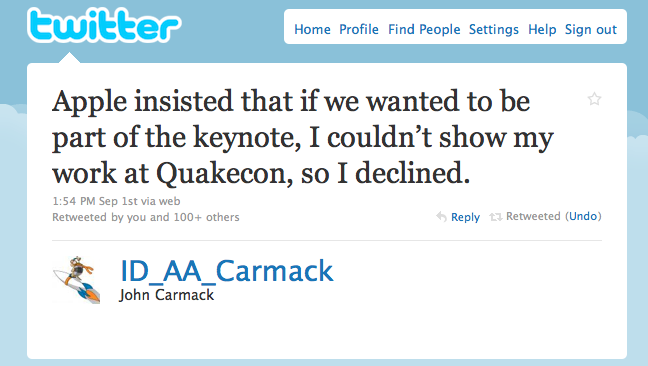
but when I read this, in another time I was reading about other Onerous silly terms:
Steve Jobs on Ping and Facebook:
Facebook wanted “onerous terms that we could not agree to.”
but when I read this, in another time I was reading about other Onerous silly terms:
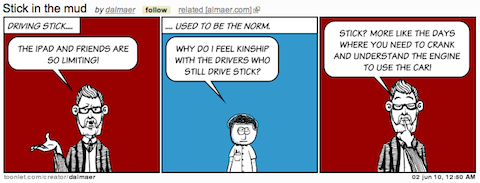
I have been talking in analogy for the last few days. The common meme is relating the computing usage trends to that of the car industry. As I watch continue to watch my family use their devices, it does feel like things are changing. My mum continues to thrive on her iPad / Palm Pixi combo. She feels empowered to try the different corners of the experience. To download new experiences. She is having fun.

One friend suggested that it is like the shift (pun intended) that we saw when automatic transmissions were introduced. At first they were expensive and had some issues, but being able to have simple controls changed the way that people drove. It became so simple. There were people who cried that it would never take off. “People want the control of a manual stick shift system!” However, although we continue to see some die-hards, the vaste majority of the US population drive automatics (this isn’t true everywhere in the world). That battle is over. We will never go back.
The iPad experience is like driving the computing experience without the manual hassle. You don’t have to know how to install the engine to start out (install an OS), nor deal with (and worry endlessly about) the workings. In general, you just don’t need to worry about all of the abstractions any more. The notion of files. And, don’t get me started on viruses.
As my mother thrives on her iPad, I use it sparingly, mainly as an entertainment consumption device. Wait a minute: Am I am the guy who loves the stick shift and never wants to jump to an automatic? I am a little different from the religious chaps who claimed they couldn’t understand why anyone would want an automatic. Or looked down on those people. I understand why my Mum prefers the iPad experience.
I do find the iPad experience often frustrating however. My “why did the car shift then? it wasn’t time!” moments occur mainly around the restricted access to customization, and the inherent and enforced immersion.
First a small thing, which will unfortunately show off an how anal I can be:

I want to rename this to “BBC News”. I am the guy who winces when someone bookmarks a page and doesn’t rename it, thus having “Foo.com – a barish company that deals in widgets, gadgets, monkeys, and flubbers”. I want to jump in and rename it to “Foo” on the bookmark bar. More space. More room. Petty for sure.
Where it gets more real for me is in the lack of integration between applications. Being immersed with one application at a time can be a fantastic thing, I will give you that… even if I often would love to give a bit of screen real estate to me Twitter stream while working on another app right next to it. However, if you live in an immersive environment, you need great integration between experiences. I should be able to Tweet/Share from any application, and not have to close down the app, go to a Twitter client, and get back to the app that had content I was tweeting. A lot of this comes down to multitasking, but more comes from integration….. and putting intents on a stack. On the iPad I feel like I am jumping through doors without an easy way to go back.
The browser has some of these notions baked in. States have URLs that I can bookmark. I can go forward and back. I can search. I can fork off (new tab). Turns out, I really like those abstractions, and miss them when they are not there, and every single app tries to reproduce some of them. They are often cross cutting concerns. I don’t want the app developer to have to write code and choose where to put a “Share” button. I want the system to know that I have an account on Twitter and let me share with a simple gesture.
Back to the Web. I was a little stunned when a friend showed me the Speed Test.net experience on an iPad:
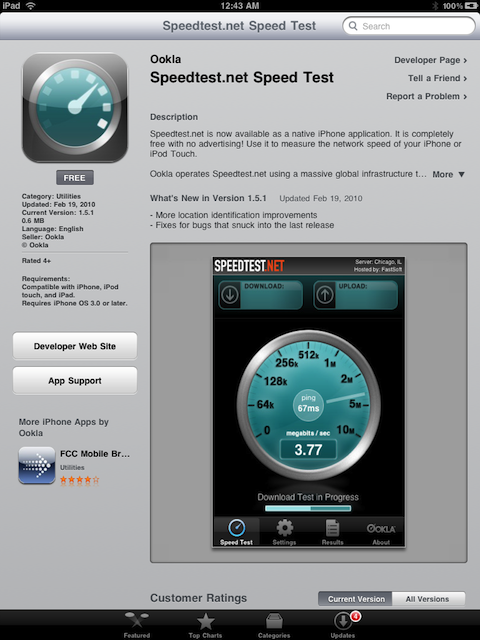
Yup, if you go to speedtest.net, you are automatically redirected to the App Store. There is no way to trick it (again: would be nice to have customizability and tweak user agents etc).
To the credit of the speed test developers, the website is driven by Flash, which won’t work…. so they are trying to do something good for a user. I get that.
However, I am scared to death to think of the Web going this way. You go to websites and get sent to apps directly. I *do* want user agents to tell me if apps are available (hence the App Discover experiment), but don’t force me into the world of apps. I also think that doing what YouTube does and take over a URL in a certain way can be a good thing. I would love to install handlers for mime types…. so a certain link always opens up my favourite Twitter client say.
I personally prefer many of the Web experiences to the “new” app experiences. (I talked earlier about the abstractions that I find useful). This could break the Web. Data that was shared at the ReadWriteWeb Mobile Summit showed that the same users often hit a site using: mobile website, full website, and application. We are context switching in real-time already. Different views are best for different use cases.
It definitely feels like there is a shift in the force. We need to get the balance spot on as we move to automatic transmissions. What should be customizable. What should be locked down. As developers as well as consumers, we need to make our voices heard. What do you think?
It has been a lot of fun to play with the iPad since it came out. I tried it out at work a bit, assumed the lean back position on the couch (its forte), and used it on the trip to JSConf. I think it is a fantastic device, and love the touch-y feel-y. I have gotten past the phase of “using it because I have it” and now actually make fun of myself when I use it in certain situations.
For example:
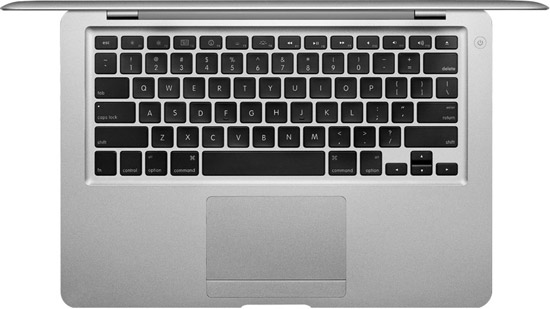
I think I have found the ideal iPad stand. A Macbook Pro keyboard. There isn’t anything new here. Other tablets have allowed you to do this, but I think for me the iPad will make sense when it is just part of my laptop. Let me boot to the open Mac OSX or the closed device OS. When I pull it off of the keyboard, it is an instant iPad.
This will come in due time, and that will be exciting. Right now, I have the feeling that I could easily go weeks without really using the iPad. We need a phone. We need a laptop. The iPad is a fun gadget toy, but will evolve to be part of our computing life.
That being said, I got one for my mother and it has been been perfect. She is mostly consuming media with the odd emails and the like, and now she has a device that she isn’t scared of. Fantastic. And, as Faruk Ateş points out… there are a lot of folks like my mum. Vast majority? And then there are the kids… on their iPod Touches… learning The Way.
As an experiment, I put the iPad on the couch and watched my son come in (had never told him about it, or that we had it). The newly four year walked up to it, unlocked it, found a game, and started to play. No manual required. The iPhone has trained him.

Steve Jobs didn’t hold back when talking about Google and Adobe. That is great. Life is so much more fun when people speak their mind. I remember hearing a story when Sir Steve was asked why mac keyboards where the way they were. He grabbed a PC keyboard and started to rip out “stupid keys” (print screen, F keys, and the like) and swore a lot.
We love to paint with broad black and white brushes these days don’t we? Whenever I hear people talking about Google being “evil” or not…. I sit back and think about how interesting it is that companies become “people”, especially in this country.
It makes sense when you look up Corporation:
Corporations are recognized by the law to have rights and responsibilities like actual people.
That may have been a convenient (and often almost genius) abstraction by lawyers, but it is screwed up. It feels like the times when you use inheritence in a way that isn’t a ISA relationship, but it does kinda make the code nice. We have all done that, until we learned to favor composition. Corporations ISA Person? No. They are composed of them though.
I have been thinking about this ever since the recently surprise court decision the other day that “allows corporations and unions to pour unprecedented amounts of money into elections.”
Lawrence Lessig had some interesting commentary:
The court decision does feel totally wonky to me. Right now, $ has a direct bearing on elections, and allowing multi-nationals (who have the money) to rain it down makes no sense.
Fun aside
My renaissance friend Graham Glass talks about how corporations can be considered a single conscious in his series on “the mind”.
The issue with the vast number of corporations is that they are profit driven entities whose charter is to bring financial reward to shareholders. While you could argue that we as a species are driven by the selfish gene, corporations are driven by profits. Duh. Capitalism.
Google is a company. It is driven by this same goal. Now, there are various paths to a particular goal to make profits. Some companies sell things that kill people (weapons, cigarettes, etc). Others offer medical devices. All companies are not equal. Having spent time at Google, I do feel like the place isn’t just an evil cult. The people that make up the consciousness were very driven strong willed people that cared about the company mission (universal access to information and all that) more than just the $. Sure some folks are focused on that. Also, although the wool could be placed over your eyes, the guys at the top of the chain have their hearts in the right place. While Larry and Sergey are there, decisions will be made that aren’t solely based on profit. They want to create a different kind of legacy and company.
That being said, I think it is quite easy to fall into a trap such as:
If we do something here to block competition, we can make more $ and since we are Good Guys we can do better things with that money!
Google will sometimes do things that could be considered “evil” by some. That is life.
The good news with Google is that their search and ads business deals in a trust economy. It doesn’t take much to switch from Google to Bing. Google knows that. Even though they have some HUGE advantages (technical [data centers, talent], brand, etc) the low barrier to change is huge.
Not all corporations are profit driven
I had the huge pleasure of working for Mozilla, which is a mission based corporation. Wow does that make life different. While you have to sustain yourself, it does mean that you think of the world very differently. You would rather go out in a blaze of glory doing something great for the mission, than just slowly die not doing much. Every choice you make …. you think of the mission.
It was interesting to work there knowing that I actually wouldn’t want Firefox to be a 90% browser. You can fall into the similar trap as above and think:
We are mission based! If we had that domination we would use it for good!
But, not having that power in one hand is even better. Imagine working somewhere thinking “in my wildest dreams, the market would be shared somewhat evenly with the competition.” The Open Web is amazing in that there is NO SINGLE VENDOR. If we are able to keep a decent balance between browsers (and thus the platform as we know it) then we have a balance of powers. Sure, in some ways you can’t move as fast as a dictatorship, but there is a reason we don’t want dictatorships in our government (even if the trains run on time!)
And, this brings me to the Adobe half of the Steve Jobs equation. Flash isn’t dead. HTML5 is slowly going to put a dent into it if we ever get some of the use cases just right (e.g. video), but Adobe has a good penetration and can move at the speed of a dictatorship. The iPhone/iPad combo not shipping Flash will have an interesting dynamic here too, hopefully helping the HTML5 video cause. There is still much more work to be done. Flash and browser plugins have had a long history at forging new paths, and the Web can come in behind them and standardize. May that continue.
I do watch for single-owned platforms such as Flash, Silverlight, or now the Apple platform (even though they do great work on the HTML5 side of the house). I don’t want any of those vendors to have too much power. The thought of a Web that required the use of their technology makes me shudder (we have a piece of that with Flash video). Right now I can turn off those plugins and life moves on. Sure I can’t Hulu or Netflix, but that will change. I would miss some of the Flash sites that my kids use, but they could even be partially ported over to HTML5 these days.
I don’t want to “kill” these other platforms as they offer competition and spur on the industry. I just don’t want any one of them to take over. It may seem like the world would be better if we all just used Macs and iPhones and iPads, but would it? Do you think Steve would be a benevolent dictator?
Erm, no.
And thus I find myself torn. I really want to go out and by that iPad……. but when is it “too late”. Surely I have a few years right? I can enjoy the shiny new toy? :)

I love your work and respect you, @ppk, but you just wrote a very naïve post. Guessing @dalmaer slipped you a mickey, so I’ll forgive you.
I did see PPK with a drink, but I didn’t drop anything in it, I promise! :)
What are we talking about here? PPK has written a post commenting on the interesting “Apple’s mistake” essay by Paul Graham.
I love PPK and he is doing great work, but I have to respectfully point out a few things here, especially as some folks thought I put him up to it. For those who are jumping on him in entirety, here does have some things right too! Don’t just get mad at the fact that he called developers arrogant and stupid ;)
There are fantastic web applications on the iPhone. I use Gmail and Google Reader as a Web app, for example. The browser is good, but I have written many times (before being a Palm employee! These are my thoughts… blah blah) about how I wished that Apple let me go the extra mile and access more from the Web side of things.
Although you can do great apps like Gmail, the user experience available to Web developers isn’t anywhere as close to that of the iPhone SDK.
So, the feeling of “come on iPhone devs, don’t be stupid and just develop a web app!” is going a tad too far. There are very valid reasons to use native. With PhoneGap et al, there are growing reasons to cover various bases.
At Palm I am excited to push the Web stack further by having it as the SDK, not as an option in the browser. I believe that the Web can be the unifying platform across the multitudes of devices that users will have in the future. This world is going to cause a large number of changes to how we develop experiences, and I am excited by the challenge and working with the Web community (companies and individuals) to meet the challenge.
There is so much to be done on both the technology side (html5 on devices, apis, services, gpu, etc) and on the delivery side (future of app stores, richer discoverability, etc). You can also create fantastic applications for many platforms using Web technology TODAY!
Update
Faruk Ateş has written a detailed post on this topic too that discusses similar issues to my post above, but also goes beyond with more details on $, and the SDK experience.

It has been a crazy few weeks. After writing about my changing thoughts on Apple I have come across a lot of Apple news that makes me really want to swallow the blue pill.
After the blitz of news on the craziness of the Apple review process (concluding with Google Voice) we had vocal figures such as Michael Arrington coming out against the policies.
Jason Calacanis laid out his case against Apple (in which he wants you to buy a ticket to his show even to read it… and I like the TechMeme “tip” ;)
It feels like we are at the start of a real sea change. A bunch of people reached out to say “I am kinda feeling that too.” Jason discusses:
We are being far too easy on Apple. Jason is right, we should be outraged!
I have been thinking it kinda fun and cute to watch Palm and Apple go at it on whether the Pre should be able to talk to iTunes. Instead, I should be friggin’ up in arms. If I was a Pre user, doubly so. Don’t lockup my darn data Apple. I have never given into the iTunes way, and keep my media DRM free and with my own formatting. Less convenient…. but I just had too. Now I am very glad. The next war will be around data and who owns it. Hopefully the winners in the cloud grok ownership, and we get the best of all worlds, being able to go between services and devices.
Apple is treating its users badly, and its developers even worse. Developers, like anyone really, don’t read what they sign… and we all need to be talking about that.
Hopefully the publicity keeps poring in on Apple and we get more than Phil Schiller saying a few words. It will be tough to keep it up, as Apple will continue to produce fantastic goods.
For example, I still read this about iTunes 9 and think “finally! I can deal with my applications through the desktop. Yay Apple!”
Related Posts

My family has Macbooks solely. iPhones abound. We are an Apple family. I look around at work, at conferences, at the coffee shop…. and I see the same. Macs may be a small % of computers purchased, but they are an important percentage.
I jumped from Windows with glee. Finally, I can be productive with my computer. Things just work. Unix is under the hood so I can tweak away. I enjoy my computer. All important stuff and well worth paying for the BMW of laptops.
My fanboyism is waning though. My feelings are becoming more complex. The white/black of Apple/Microsoft has finally gotten the nuance of grey/grey. Whatever you say about BillG/Microsoft can you truly say that Jobs/Apple would have done any better in the “monopolistic” stakes?
It seems that with Apple doing well quarter over quarter we may get to see… via the iPhone. I am incredibly torn here. I love the iPhone, and it has changed the world of mobile. It feels like every year at JavaOne, someone would shout “mobile is here!” yet J2ME never brought it. No one did to the same extent as the iPhone.
Corporations are not intrinsically evil. Their goal is to create share holder value. There are various paths to this goal, and that is where it gets delicate… but I don’t think of corporates as evil. Making money is a good thing. Watching the ebb and flow of the business models on the Web and in software itself…. I am always looking out for where the business models are. Many long for the “good old days” of software. The simple days where you create something of value, and people pay money for that value directly to you. We went through shareware and freemium and ads. Others shout from the side line claiming that people will still pay for value! So, although I think keeping the core infrastructure of the Web open is vital (hence working at Mozilla!) I don’t think that everything should be open source and free.
I am getting a little worried about the mobile Web and the future of services and platforms. I think that users should be free to run their applications where they wish, and should control their data.
With the iPhone the platform is incredibly locked down. You basically have to use their tools, and built applications using a Mac. Then you get to send your application up to the Apple gods (reviewers) and if you are lucky, an end user can run your code. Unfortunately this process is cryptic and poorly implemented right now.
Apple can make a case that this process helps “keep us safe” (make sure apps do no evil) and “makes sure the store isn’t swamped by crap” (however there are a ton of crap apps!). I think that we should trust users and they should be able to install whatever they bloody want too. Apple should have a system that propagates known malware. A way for users to crowd-source issues just like Semantec is working on. As a developer I really have to wonder when I know that I could spend a lot of time on an application that a random Apple chap could block and thus wouldn’t see the light of day. No thanks!
Time to take a pill?
I am starting to feel ready to take the blue pill. To take it perhaps a little far, Apple has enslaved me by giving me yummy food (great hardware and software). It tastes so good, that I eat it and say “thank you sir, can I have another!”
I am picking on Apple a little here because it relates most closely to me, and the iPhone is exploding. I see how they are tying the block anyone out from iTunes and lock me in to their world. The world that Steve wants for us. Sorry Steve, but I am getting close to jumping from your utopia to create a better one, even if it doesn’t smell so nice.
The future has other fish to fry. As we think forward to a world without single devices, but instead with everything being a connected embeddable systems… maybe right in your clothes. In this world the battle will be for data and services. Who owns your data. Are the business models transparent? I have a funny feeling that we will have to constantly fight for this. Corporations don’t care, but people should, and some do.
I have always had this in the back of my mind with Apple. I didn’t jump all the way in. I kept my music apart from iTunes AAC lock and structure even though it was against convenience.
One side of my brain wants to continue. Take the red pill and enjoy a productive happy life. The rest of my mind is contemplating taking the blue pill. Maybe it will be ready with an advanced open web platform on the phone, one on the desktop, and eventually….. everywhere.
Is anyone else having these thoughts?

Imagine this scenario. Say you worked for a company that had a top website and a new browser came out. There were some known bugs when said browser used your website, so you would obviously change the website ASAP. Chance are that you are ahead of the game and already had the fixes ready as you tested with release candidates. Your users grab the latest and greatest browser and use your website with glee.
Now imagine if the following happened: the browser vendor was in charge of your website and you had to ask nee plea with it to update your site. The vendor refuses at first and you have no control at all! All of the users that have upgraded their browser are now getting a sub-par experience. It’s your site, but you have no control. You curse as you know that the fix is RIGHT FRIGGIN THERE but hasn’t been applied.
This is crazy talk. You would never cede control like that. But wait, isn’t that what can happen with the iPhone and Apple? Facebook is one of the most popular applications on the iPhone, yet I read the following from poor Joe Hewitt, the guru that single-handedly created Facebook for iPhone, as well as the original Firebug, worked on Firefox, and much much more:
Submitted an update to the Facebook app a few weeks ago to fix OS 3.0 issues, still awaiting approval.
As of right now, if I am running Facebook on the iPhone 3Gs there are known bugs that Joe has fixed. I can’t run it. This is how they treat THEIR TOP APPLICATIONS which has a brand name company behind it? Imagine how they treat the poor lowly buggers on the totem pole.
Well, actually, we don’t really have to wonder too much. How gutted are you if you bet a year of your company on something with some amount of apparent blessing from Apple, and then see it thrown back in your face with some rule cited … when you know that the guy next door got his work in even though he is doing the same or worse!
Back to Joe. He got the latest 3Gs and talked about how smooth it is. This is great news. I feel like I often have a frozen UI on my 3G (typing, scrolling, any interaction) and it bugs me. If Apple has gotten their device “responsive enough” where the average user doesn’t notice these glitches, they have gone a long way, and as Joe mentions…. will give him time to work on features and not tweaking his code to try as hard as possible to keep his UI responsive (which in some circumstances was proving impossible). Ben has told me “It’s like the PowerBook G4 to MacBook Pro upgrade dude” which is great to hear since recently all upgrades have felt like a wash (e.g. recent Macbook Pro upgrades).
Also, I took another look at the applications that I have installed on my phone, and quickly realized that I use ~5% of them. I have a huge number that I have probably run once. When I look at the ones that I do use, I also quickly saw that the vast majority could easily be web applications, especially with the HTML5 features of Mobile Safari. If Apple continue to open up the API to the WebView (or PhoneGap / Titanium Mobile continue to thrive) then it will be so easy to create a large swarth of applications using simple Web tech. Sure there will be reasons to go closer to the metal, but for a lot…. you won’t have to. That is exciting stuff. I would also love to chat more with Joe about his experience using Cocoa vs. Web tech for layout etc. We have chatted a little, but I would love to talk more.
I went back and forth on getting an upgrade this time around. I was a definite “No” at first due to the pricing, and then AT&T came out saying that they would be helping out, so Ben and I went to check it out. Note: we both were in the same line for the 3G last time around, and at the store we found out that HE got to get the phone for $200 (as a “valued customer”) whereas I would have the pleasure of paying $300 more. I couldn’t whip out my credit card and walk out with the same hardware as him for a shed load more. So, now he will get the chance to lord over me until I do make the upgrade “wow this compass is amazing. wow the responsiveness is fantastic. How did I live without video right in my pocket.” Or, maybe I will jump to a Pre and start hacking on the native SDK that is just Web itself?
Ben and I both got new work 15″ Macbook Pro laptops, and Ben isn’t happy.
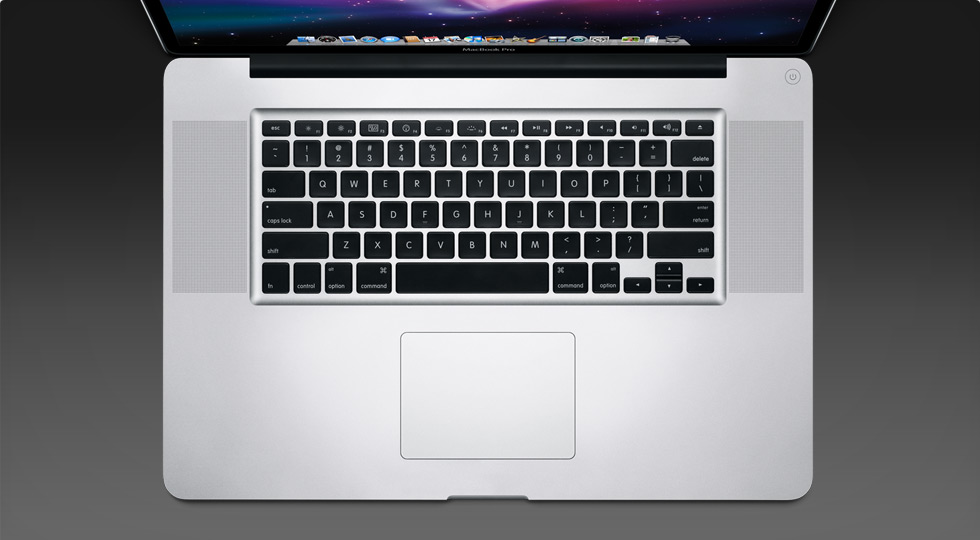
I have to admit that it doesn’t feel like the Apple designers may have gone one step too far with the trackpad. In one fell-swoop they took away the button and added new and exciting gestures.
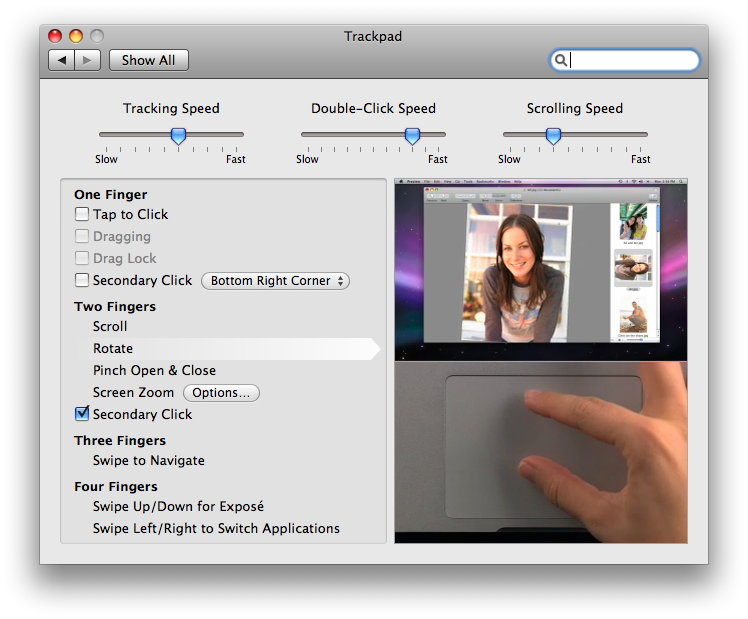
The big problem I have with this is that I have learned to use the trackpad with one thumb at the bottom (where the button was) and I use my index finger to move around. There is a lot of muscle memory there. What this means in practice is that I am in Gmail and the pinch gesture kicks in which results in my font changing size, or the rotate gesture causes an image to skew in Keynote.
In theory, it is beautiful to get rid of the button. In practice I miss the tactile feedback, and the separation of concerns.
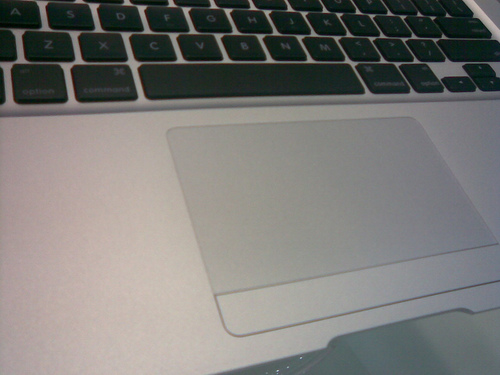
Maybe I should quickly grab a Macbook Air which still has the small little trim mouse button?
To those at you who have been using the latest generation of Macbooks, do you get over this? Will this be something that I forget in a month and life will actually be better?
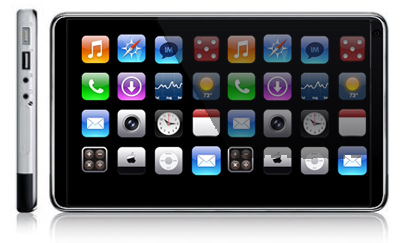
I am really excited to see what comes out of all of the iPhone Tablet rumors.
My son is three years old now, and knows how to use my iPhone. When using the computer, he instinctively started to think of it like the iPhone and would start to touch (and smudge!) the screen.
In the real world we touch things. We grab them. We manipulate them. We don’t often have an abstract notion of moving X to get Y.
Well, there is one that Sam knows well:

These machines are pure evil when you have a young’un as they say “Daddy! Daddy! I want the pink one there!” and you have no chance in hell of ever getting it :)
Anyway, so Sam knows how to use multitouch, and is at an age where we are thinking about setting him up with his own computer. I don’t want to go through the pain to teach him a mouse and keyboard quite yet though, so what if there was a computer he could hold and could use his normal skills to access? The iPhone tablet could be that device!
As a side effect, it would also be the PERFECT home automation device, as well as an eBook reader, and a casual browser, and email checker, and the list goes on and on and on. The computer is changing in front of our eyes isn’t it.


My posts, status updates, link blog, and anything else I do on the web is here:
I am honoured to be working with my long time friend and collaborator Ben Galbraith on helping to set the direction of the industry.