Apr 22

Mike Hanson, Douglas Crockford, and Facebook; A tale of security, privacy, and performance

Facebook, Tech with tags: 2 Comments »

sayinglike

Facebook announced a lot of bold moves at f8 yesterday. It was exciting to see Bret Taylor (who I had the pleasure to work with at Google) do such a great job on stage, and with the platform. There are many implications that will ripple out from this news, and here are some of my thoughts:

Act One: Security

At JSConf, Doug Crockford came out in his talk, asking to do an ECMAScript 4 to HTML5. Stop it. Block it. Go back to the table and fix the Web security model.

He must have had a giggle when he saw the new Facebook “Like” button. It allows anyone to throw a Facebook like on any page. I quickly put it up on Ajaxian:

<iframe src="http://www.facebook.com/plugins/like.php?href=<?php echo urlencode(get_permalink()); ?>&amp;layout=standard&amp;show-faces=true&amp;width=450&amp;action=like&amp;colorscheme=dark" scrolling="no" frameborder="0" allowTransparency="true" style="border:none; overflow:hidden; width:450px; height:30px; padding-top:8px"></iframe>

Note how you pass in the href of what you want to like. I am getting the URL for each post and plugging it in. However, you could put any URL in there, as folks quickly discovered. Isn’t it fun to have a like button on content that actually likes some XXX porn. You like innocuous content X, and your wife looks at your stream to see that you are into a dirty movie.

As soon as you iframe in the world of Facebook, the page in question gets the power to get content into your graph and stream. Ouch. Not good.

The UI should at the very least see if it is liking a URL that isn’t the same as the main window.location. If it is exactly the same page, when you hover on “Like” it could say “this exact page”. If it is on the same domain it could say “a page on this site”, and if it isn’t on the domain…. ALERT ALERT ALERT. Since Facebook knows who you are, why not even let me set what I want to do here?

It is also frustrating that I couldn’t easily change the look and feel. Neither “light” or “dark” themes work on Ajaxian for example. I hope that power user features are added, so you can set the colors for various elements without having to go low level and do everything from scratch.

Act Two: Owning My Data

When I look at how we add the “Like” in the browser, we see the code smell of an iframe to an external site. We see this in other forms too, such as script tags pointing to Google to get a Google Map. This feels utterly wrong to me. Instead of a code snippet that points to a particular service, I want to declare what I want to see.

In the case of “like”, let me just say something such as:

<div class="data-like"></div>

Then some JavaScript could come in and augment this to be the iframe, OR the right thing could happen. The browser itself could take over and understand the semantic meaning here.

Imagine if around the Web we had:

<div class="map loc:xxx,yyy"></div>

Rather than the Google Maps, Bing Maps, Yahoo! Maps snippets. If a cool new maps startup came along, I could change my maps provider in my browser, and ALL maps would be shown using the provider of my choice. Much better.

I want to see the same for “Like” and other social data. The browser could then know what services to ping with the like. For example, perform a “like” on Facebook, a retweet on Twitter, and a bookmark. That data could be stored locally, and I am assured that I can always have it.

This leads me to Michael Hanson, principal engineer at Mozilla Labs. Mike and I didn’t even get a chance to really overlap at Mozilla, but I met him before I left. He is a killer engineer, and someone who is going to have a profound effect on the state of identity for us all.

His early work, in alpha-ish stage, is around the notion of contacts in the browser. This add-on is fantastic. Contacts are consumed from Yahoo!, Facebook, Google, etc (a la Palm webOS Synergy) and people are first class citizens (e.g. person:[email protected], person:http://facebook.com/btaylor). With type=”email” you can auto complete of your friends. He already uses the new Facebook Graph API which is a dream to use compared to the old REST/FQL. I hope it is more solid too. Anyway, these are just a few of Mike’s features. Firefox is about to get very social.

So, the browser should be the universal like machine. Not Facebook. Not a service owned by a company. You. Your browser. You own your data.

Facebook continues to change your privacy policy, and the EFF just spoke out again: Facebook Further Reduces Your Control Over Personal Information. Some claim that ad companies do this and more already, tying it together sneakily on the backend…. but changing your privacy and making it OPT-OUT is terrible.

Act Three: Performance

Alex Sexton pointed out the performance side of a like button:

From what i can tell, a single facebook like button requires at least 12 unique requests and ~1 second of load time.

The button adds ~161 new http requests to this page on Levis which is ~4sec

Compare the difference in when onload kicks in via iframe compared to via JS.

Time for Steve Souders to do a P3P? :)

Again, if the browser handled the notion of like, we wouldn’t have this issue. Also, what if instead of a million iframes, we all loaded one set of JavaScript from Facebook, and there was a JavaScript function that would let us put the like content into a div. To optimize, we could pass in the set of URLs to ONE JavaScript function and get one set of metadata back. Then we have a function that adds the right HTML to a div. No matter how many like buttons you have. One request.

We could go the OpenLike route, but we don’t want a huge list of buttons and another resource to deal with. Let the browser do it. We don’t need to see a world of this. It is broken. Time to wake up:

whatahack

Chris Messina has some words on the subject too:

When all likes lead to Facebook, and liking requires a Facebook account, and Facebook gets to hoard all of the metadata and likes around the interactions between people and content, it depletes the ecosystem of potential and chaos — those attributes which make the technology industry so interesting and competitive. It’s one thing for semantic and identity layers to emerge on the web, but it’s something else entirely for the all of the interactions on those layers to be piped through a single provider (and not just because that provider becomes a single point of failure).

I give Facebook credit for launching a compelling product, but it’s dishonest to think that the Facebook Open Graph Protocol benefits anyone more than Facebook — as it exists in its current incarnation, with Facebook accounts as the only valid participants.

As I and others have said before, your identity is too important to be owned by any one company.

Apr 21

Finally. The perfect iPad stand.

Apple, Tech 3 Comments »

mbpkeyboard

It has been a lot of fun to play with the iPad since it came out. I tried it out at work a bit, assumed the lean back position on the couch (its forte), and used it on the trip to JSConf. I think it is a fantastic device, and love the touch-y feel-y. I have gotten past the phase of “using it because I have it” and now actually make fun of myself when I use it in certain situations.

For example:

  • Watching a movie in bed at the hotel room. Finding myself propping up pillows
  • Holding the iPad on the flight. For hours. Holding

I think I have found the ideal iPad stand. A Macbook Pro keyboard. There isn’t anything new here. Other tablets have allowed you to do this, but I think for me the iPad will make sense when it is just part of my laptop. Let me boot to the open Mac OSX or the closed device OS. When I pull it off of the keyboard, it is an instant iPad.

This will come in due time, and that will be exciting. Right now, I have the feeling that I could easily go weeks without really using the iPad. We need a phone. We need a laptop. The iPad is a fun gadget toy, but will evolve to be part of our computing life.

That being said, I got one for my mother and it has been been perfect. She is mostly consuming media with the odd emails and the like, and now she has a device that she isn’t scared of. Fantastic. And, as Faruk Ateş points out… there are a lot of folks like my mum. Vast majority? And then there are the kids… on their iPod Touches… learning The Way.

As an experiment, I put the iPad on the couch and watched my son come in (had never told him about it, or that we had it). The newly four year walked up to it, unlocked it, found a game, and started to play. No manual required. The iPhone has trained him.

Mar 09

palm-run: a walk through of building a new webOS application

Palm, Tech, webOS 2 Comments »

As developers, we often build scripts and tools to sharpen our workflow. One of the simple scripts that I am refining is palm-run, my swiss-army knive of a tool that deals with packaging, installing, launching, and tailing logs as I develop my application.

I put together a walk through of palm-run in the context of creating a new webOS application from scratch. In the screencast below I cover:

  • Generating your webOS application structure
  • Implementing a one-scene application
  • Packaging the application and running it in the emulator
  • Running an IPK directly, no packaging here mate-y
  • Setting up your application for development and production uses (more below)
  • Using the Palm Inspector to take a peak at the structure of your app as it runs

(I recommend going full screen on this bad boy to help read the deets.)

Development vs. Production

I wanted to go into a bit of detail on this one. When you build an app you want to have different builds for development and production. In development, you want debugging turned on with verbose output. In production, you want to exclude all but the necessary files.

The latest version of palm-run lets you tell it that you fancy production mode via -P.

You can enhance your webOS application to do more in this world by doing the following:

  • Create a config directory at the app root
  • Create framework config files for the two use cases. Here are two common versions:

    Development

    {
        "logLevel": 99,
        "debuggingEnabled": true,
        "timingEnabled": false,
        "logEvents": false
    }

    Production

    {
        "logLevel": 0,
        "debuggingEnabled": false,
        "timingEnabled": false,
        "logEvents": false
    }
  • Create exclude files for the two use cases (excludes_development.txt and excludes_production.txt)

Now you are set. To see a shell app that uses this, check out palmrun-configtest. If you build the app you will see that there isn’t console output if you palm-run with the -P option.

What else would you want a high level program like this to do for you?

Mar 03

Facebook in your Palm; Fun building the new Facebook app

Mobile, Tech, webOS with tags: 27 Comments »

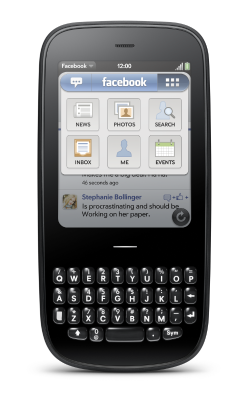
facepalm

When Ben and I joined Palm to run Developer Relations, we knew that we wanted to eat dogfood pretty quickly. We have had some mobile related projects in the past, but they were either mobile Web sites, or Java based. Being able to take our web skillz to rich mobile devices was much more new and exciting.

Building sample code and apps is useful for developers, and the team will be doing plenty of that (e.g. this is how you use the awesome List widget in every which way, and why you would do X, Y, or Z) but building a production app is a whole different level.

We wanted to learn what it is like for our developers to design, build, and distribute webOS applications. We could have started with a smallish app, but no :) Instead we took the great work of Justin Newitter (who built the original app) and went running with an updated Facebook app. Along with other great developers in the dev relations world, we have gotten our first early release out there today.

Here is a walk through of the app by PreCentral:

We have definitely learned a lot in our short time on the app, and this is the first release of many. I really want us to have a regular cadence to our releases. If there is a feature you are excited about let us know.

fbpixi

We added a broad feature set to the application. The first Facebook application was very much about synergy. Why put something in an application silo when you can bake it into the platform? I still contend that webOS is the best platform for Facebook users as it integrates throughout. Other mobile platforms do some of this, but I think we continue to do the best job here.

There are a bunch of Facebook features that our users still wanted though, so we worked with Facebook themselves to prioritize this list. The top features were access to Facebook Mail, full profile access (info, wall, and photos), people search, events and birthdays. We also wanted to do interesting things to the UI as we bring in these features. Oh, and a couple of mini-easter eggs.

Designing the application was challenging and a lot of fun. At a high level, working out a design that is true to webOS *and* a strong brand such as Facebook was a balancing act. You will run into this same issue even without a brand like FB. How does it have your DNA and still fit in with the core platform. This has been a design consideration since the dawn of time. Do you make a clean Mac app that looks like Mail.app? Do you do your own UI that looks like a funky Flash UI? Most of the time you are in the middle.

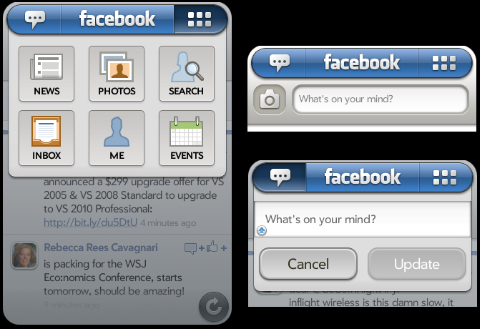
fbappnav

One feature that we spent time on was the base navigation. We wanted to make it incredibly easy to get to features you use often, and also quick to get to all features.

We ended up with a solution that made the following decisions:

News as Root

The root of the application is the news feed. Some Facebook apps have an icon window as the root, but we decided to behave more like the Facebook website itself. The news stream is the blood line, so start there. No matter where you go in the app, if you back gesture away…. you will always end up at the news stream.

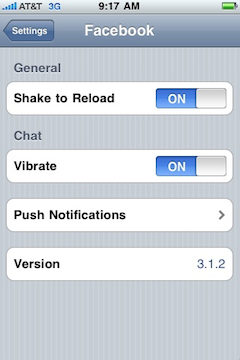
Also, just like the iPhone app, we share the shake gesture as a way to refresh the data here. Shake away.

Status Matters

webOS devices have hardware keyboards and are great for creating content. In the Facebook context this means updating your status and uploading photos are prime ways to get your content into the system.

For this reason the top left area is your way to always get to your current status and update on it. In fact, if you are on the new stream, just start typing and the update area will pop down and capture your new status (while showing your last one below).

Also, if you click on the camera icon, you are sent into the core photo experience on the device which natively supports uploading to Facebook.

The Navigation Grid

For all other features, we wanted to give you a quick way to access them. Click on the top right grid and a pop down will immediately appear, giving you one tap access to any feature. No need to switch to a navigation screen first.

We are also playing with the ability to use that hardware keyboard by giving you quick key access to any feature (e.g. SYM + E == sends you to events). Is that a good idea?

Facebook Logo Power

The Facebook logo itself has some hidden love. In an homage to to websites, a tap on the logo takes you home…. which means back to the news stream. If you are on the news stream already, and have flicked down…. that same logo will bring you to the top.

Where to go next?

We are excited to offer access to data that Facebook users haven’t been able to get in an app before, but where do we go from here?

We definitely want to do a lot of polish on various sections that we have out there. One idea that I have been playing with from the get go is doing something immersive when you rotate the screen when in a news feed. Instead of just having the news feed work in that format, what if the content took over. I mentioned this in my last post about touch UI. I flick through the stream and if on photos, the album takes on the entire screen for example.

There are some other really fun features that revolve around webOS notifications and giving you a great way to “never miss a thing” (life moves fast you know ;) and choosing what content matters to you.

And, finally, we have to work out what makes sense in an app, and what could be baked into the platform. Giving access to birthdays is great, but would you like to have them as a calendar on the device? Maybe, but you would definitely want to be able to turn that view off…. and in fact you may already have birthday info in your profiles, so we should have one unified birthday view. Life gets more complicated when you go to the generic doesn’t it.

Again, we have just started here, but would love to hear from you on our feedback area in the app page.

Thanks to the team that played a part in this release! We haven’t reached Joe Hewitt foo yet, but we are having fun!

Feb 24

Feeling Touchy; Learning how to build great touch UI

Mobile, Tech 7 Comments »

As you move to a new platform, it is interesting to watch your brain morph over time. I remember switching from Windows to Mac. At first the fonts looked blurry and weird. The mouse pointer didn’t weight right. The constant app menu was strange. There were things I liked about it right away, but they were mostly the fact that I had a command line, and the fact that apps were minimal, pretty, and useful.

Over time though, I grew to like the Mac more and more. A few months in and it was the Windows fonts that looked too sharp and weird.

I am going through the same experience with webOS and the iPhone. It took me awhile to get used to the back gesture on webOS and not look for a back button. Now I know how to organize my multiple windows, and use universal search as my quicksilver, and so much more. When I open up my iPhone now I am at the point where I try to do a back gesture by mistake. webOS is a touchier, needier device, and as I develop apps and play with the platform, I start to grok that more and more.

Embrace the touch

I discussed touching and horizontal scrolling awhile back, but the more I play with touch devices, the more I find myself wanting to build features for the touch. I have a ton of learning, but here are some of the lessons so far:

Native UI or Immersive UI

One decision that you have to make when you start building your application is the style of UI. Do you want a native looking UI for the given platform?

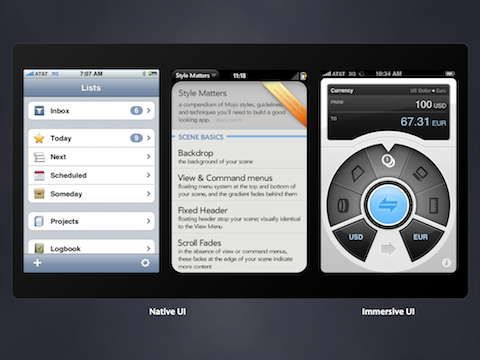
native-immersive-ui

Everyone jumped on native off the bat. We quickly saw libraries such as iUI come out that let you mimic the iPhone UI. Having a native UI can be important. You want to fit in. However, we have also seen the growth of immersive UIs. Convertbot is the example above on the right. It is task based and you feel like you are really interacting with the app. It is almost tactile.

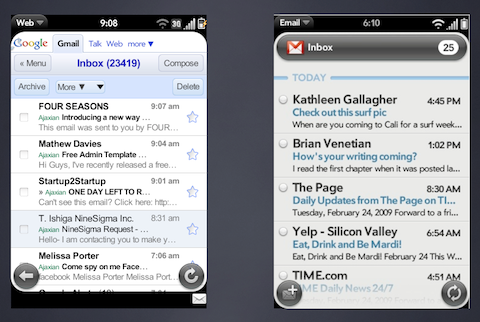
gmail-nativemail

It is interesting to compare the Gmail and native Mail client UI in webOS. The Gmail version is deployed via a website, whereas the native version is of course an application, but they are very similar. Both use HTML/JS/CSS. Both have their look and feels. Do you try to look like your website (e.g. Google look and feel), or do you try to go fully native. The blending of the two gets interesting. Your brand has to live in another native world.

Haptics and touch feedback

It is usability 101 to make sure that you are always giving users feedback on their actions.

First, how do we signal to users that there are particular touch areas? This one is a bit of an art. We don’t really have :hover and the like. I actually like the idea of having a long press show helpful information, but users aren’t used to using that ability yet (see: need more gestures!).

Where we do have touch areas, we need to make sure to have various depress states for the touch.

Users will touch all over the app, so think about what you can do where.

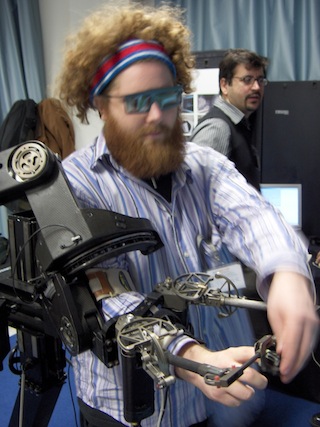
We are going to see haptics in the future. For now it feels like haptics are used like this:

james-haptics-robot

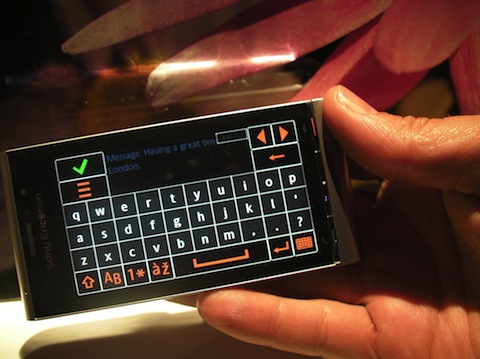
But the science is coming along. Sony Ericcson has a device (Satio) with haptic support for example:

sony-satio-haptickeyboard

Using the Keyboard: Software or hardware

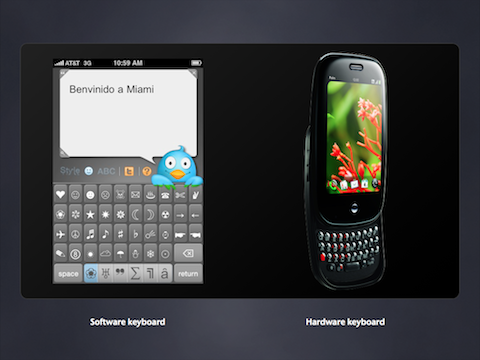
This brings us to keyboards. What is the optimal input for your application use cases.

keyboards

Feathers by Aral Balkan is a good example of both the task based nature of mobile apps, and custom software input. I like how Aral thought to create an app that solely creates Twitter messages. He didn’t create a full Twitter client that would do it all.

And if you have the pleasure of a hardware keyboard, how can you use that beyond the obvious inputting of text fields. The beauty of a keyboard that come out is that it doesn’t take away space from the screen. Could you offer short cut keys in the app? Different navigation? There is a lot more to explore here.

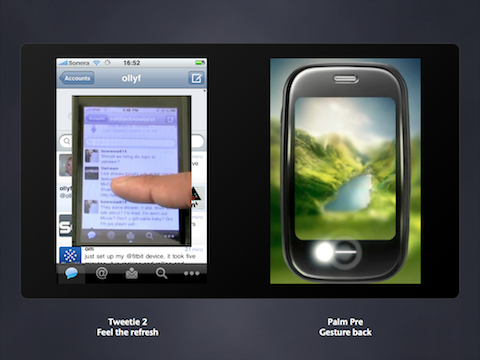
Gestures. Time to catalog and create new standards

gestures

We are seeing more and more gestures in applications. It feels like we are building out the standards right now. What will be the Ctrl-C’s of mobile? We get to build out invisible ways to navigate.

Tweetie 2 did something interesting when it threw away the refresh button and replaced it with the pull down. Isn’t it more work? Some people don’t like it (Jimmy Fallon for one!) but a lot of people find it more gratifying because it is more natural. We have buttons in the real world, but the apes in us are more used to touching the world around us in very different ways? This is one example of going back to our roots.

shake

Speaking of reload, we are seeing another common gesture here too. Using “shake” to reload, or relayout.

Orientation: Try to accept them, and be more creative

orientation

Have you ever turned your device on its side and not seen anything happen? That frustrates me. At the least, we need to rotate the UI and let it continue. But, can we go beyond that? I have been playing with this. What if landscape brings a more immersive experience?

Take an app that loads a stream (e.g. Facebook, FriendFeed, Twitter, whatever). In landscape, you can view one entry at a time. If the type of entry contains a photo album say, take over the full screen to show the photos and let you flick through.

It really is fun to play with touch apps these days, and I get the feeling that we are still in the dark ages wrt our interaction models.

What patterns have you enjoyed in using and building mobile apps?

Feb 15

Building an Web application from the inside out; Using node.js to bootstrap a server from client JS

JavaScript, Open Source, Tech, webOS No Comments »

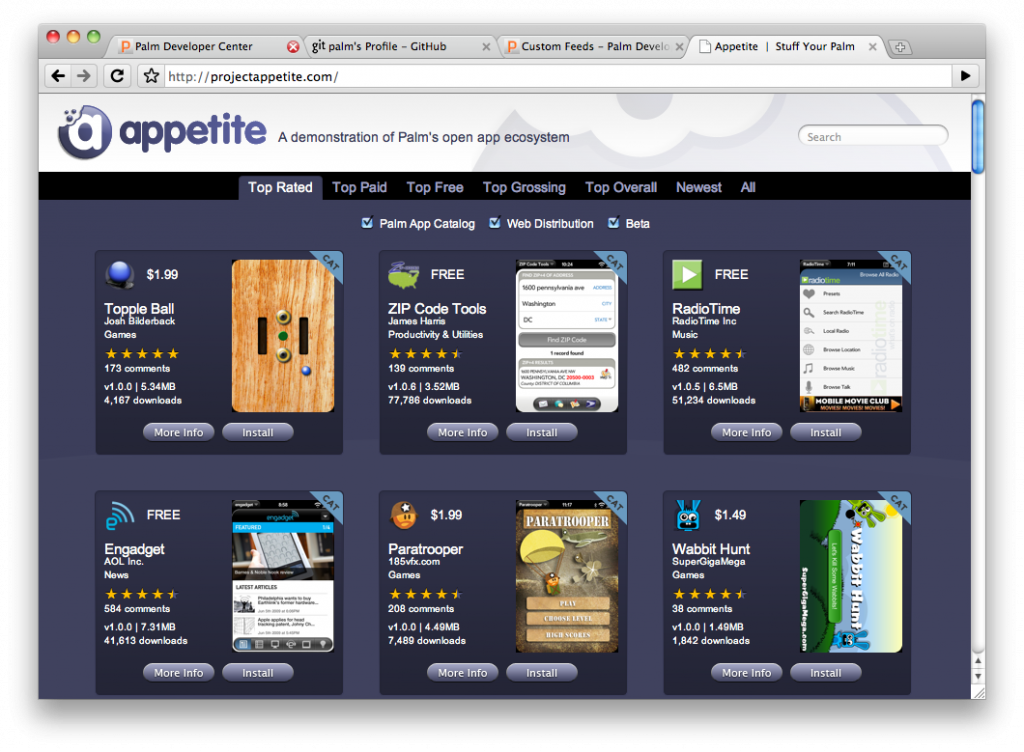
Over the winter holiday, Ben and I whipped together Project Appetite, an open source example that consumes the feeds from the Palm application ecosystem (both Palm Catalog and Web distribution). We didn’t have long to come up with something, and one of the interesting stories was how we took an API and mocked up the middle, allowing server and client to get going quickly.

The feeds that the Palm ecosystem puts out are RSS 2.0 XML feeds, with extra catalog-y info in an “ac” namespace. We converted the format to JSON to make life easier for the JavaScript client consumer. Although you can DOMParser() away (and use the Microsoft component) JSON is just so much easier. What lives at api.projectappetite.com is the result of the munging, so others could consume JSON directly if they so wish.

The Data

We quickly put together some dummy data, and for ease, put it in a file app.js that the client could consume. Once we iterated on the format, one of us could go off and write the XML to JSON code. We actually implemented this in a variety of ways as we experimented. Ben created a simple JDOM translation, and I fought with databinding, which still seems to be a royal pain with Java. The reason I checked that out was to create an open backend on app engine, and I wanted to go from XML to JSON to Java for persistence via JDO. From one set of Java objects I could @PersistenceCapable and @XStreamAlias("asset_url"). It wasn’t worth the effort.

The Client

We created an Appetite object that would be able to query the model and get the data that was needed. The constructor took the apps data, and then it did its magic. In this case is created some caches to make querying fast.

The public API contained:

  • app(id, locale): returns a single app based on id
  • find(opts): the core engine for querying the app data
  • types: contained the logic for filtering on top rated, top paid, newest, etc
  • sorts: contained the sorting functions to return the data in the right order (e.g. by download count versus date)

Very quickly the client was mocked up and the frontend was build out using this API. Again, at this point the entire front end could be built without waiting for server infrastructure.

The Server

Since the client API mocked out the functionality needed for the frontend, the server could actually reuse this logic. This is when the node.js server was born.

To play nice with node, we went back to the other files and added logic to export the data. E.g. in the client.js:

// check to see if you are running inside of node.js and export if you are
if (typeof GLOBAL == "object" && typeof GLOBAL['node'] == "object") {
    exports.Appetite = Appetite;
}

Once that was in place, we could load up all of the information that we need:

// -- Load up the libraries
var sys   = require("sys"),
   http   = require("http"),
   posix  = require("posix"),
   apps   = require("./apps").apps,
   client = require("./client");

And then we can get access to the client API via:

var a = new client.Appetite(apps);

We created a simple mapping that enabled a URL such as /app?id=[id]&locale=* to be converted to a method call of app({id:id, locale:locale}). We did this in a generic way that enabled us to add URL endpoints by simply added to the responder hash. The functions would return an object that could contain error codes and the like.

For example, the app end point:

// /app?id=[id]&locale=*
app: function(params) {
    if (!params.id) {
        return {
            error: 501,
            body: 'I need an id!' 
        };
    }
 
    return {
        body: a.app(params.id)
    }
},

We also added a magical DEFAULT handler to take care of bad URLs.

Finally, we would boot up the listening server and handle responses:

// -- Create the HTTP server binding
var host = process.ENV['APPETITE_HOST'] || 'localhost';
var port = process.ENV['APPETITE_PORT'] || 8000;
 
if (process.ARGV.length > 3) { // overwrite with command line args
    port = process.ARGV[3];
}
if (process.ARGV.length > 2) {
    host = process.ARGV[2];
}
 
http.createServer(function(request, response) {
    var path = request.uri.path.substring(1);
    var output;
 
    var responder = (typeof responders[path] == "function") ? responders[path] : responders['DEFAULT'];
    output = responder(request.uri.params);
 
    var contentType = output.contentType || "text/javascript";
 
    if (output.error) {
        response.sendHeader(output.error, { "Content-Type": contentType });
        response.sendBody(output.body);
    } else {
        var body = (contentType == "text/javascript") ? JSON.stringify(output.body) : output.body;
        response.sendHeader(200, { "Content-Type": contentType });
        response.sendBody(body);
    }
    response.finish();
}).listen(port, host);

After 86 verbose, commented code, we had a server that would respond to URLs and return data. And in this time the frontend continued to be built out.

Being able to reuse the client JS and wrap it to become a server was a lot of fun. I am definitely a big node.js fan! Now, I am looking forward to doing a lot more with Project Appetite…. but for now we are working on a pretty cool webOS application, and getting the developer platform better and better.

Some coffee in your Node

In an aside, the node hello world has been ported to CoffeeScript:

# To run, first install node and coffee-script
# Node: http://nodejs.org/#download
# CoffeeScript: http://github.com/jashkenas/coffee-script
#
# In a terminal window:
# $ cd coffee-script
# $ ./bin/node_coffee -r hello_web.coffee
# Tested with Mac OS X 10.5.8, Node 0.1.26, CoffeeScript 0.5.0
 
sys: require "sys"
http: require "http"
 
http.createServer( (req, res) ->
  res.sendHeader 200, {"Content-Type": "text/plain"}
  res.sendBody "Hello, World!"
  res.finish()
).listen 8000
 
sys.puts "Server running at http://127.0.0.1:8000/"
Feb 08

“How exactly do you make your paints?”; What if Google hired artists?

Tech with tags: 5 Comments »

idographics

Ben and I were chatting about interviews after hearing some horror stories from a friend. He made a jape about how bizarre technical interviews can be, and how we often ignore some really important factors… like a portfolio. A portfolio in this case answers the question of “what exactly have you created?”

I will pick on Google as it is the brunt of the “holy crazy interviews batman” trade, which is made more fun now that my sister-in-law is a recruiter there. I like to tease her. She knows that I am a fan of Google and think it is a fantastic place to work. I would be honored to work there again one day for example. Anyway, she doesn’t need my help in hiring… you have all heard about the food ;)

So, feel free to substitute Google for other high tech companies in any story below.

Imagine if Google interviews painters or artists in the same way that they hired engineers. Michaelangelo would show up, and would be hammered on questions about how he exactly makes and mixes his paints. Why does he use that particular kind? Why do those mixes chemically end up with the result that he desires. “If you were on a dessert island with 3 paints, what would they be and why?”, “Discuss the difference between RGB and CYMK”.

This may feel strange. A natural first step when you talk to an artist to see if they are any good is…. see what they have done! “Can I take a look at some of your pieces?” The artist will then probably show a variety that show a broad range of abilities. Some of you have probably had this experience hiring a wedding photographer.

Now, it isn’t that the process doesn’t matter. You want to chat about that side of things too. The right paint may result in a longer lasting piece. The right technique may result in you not getting annoyed by the photographer at your wedding. But, it is probably secondary to seeing what the person has actually done.

Google of course does a fair amount with art. The Doodles for example…. they have competitions for those, and the tools used may or may not play a factor.

Now, you may argue that the portfolio focus makes much more sense for art than other genres, including programming. You can tell a lot from seeing that art, and it is pretty static in time. Programming though, has to be maintained. It has to live. The “how” matters so much more. Maybe it is more like architecture than art. An architect can be known for his amazing looks, or building experiences, but the building better be structurally sound. You would still look at the portfolio of an architect first though, versus peppering them on structural engineering questions.

You do need to test the portfolio. It is one thing seeing that Bob Harris created an amazing website, a top 10 iPhone app, and contributed to a popular open source project…. but what exactly was the contribution. Projects have many folks involved. This is why you need to test the interviewee. Write some code with them. Talk through a real problem that they would actually have to solve on the job (shock horror). Do you *really* think that they will be implementing bubble sort on the job?

Interviewing itself is an art. It is hard to quickly make a decision on if someone will be a fit. Not only does there have to be a technical match in expectations, but there is the social match that is oh so important when a person joins a collective :) I have already talked about how the current process of hiring is like a shotgun marriage and broken but I definitely feel that in a constrained world there are three things that I favour when interviewing a candidate:

  • Understand their portfolio (ask the candidate to come ready)
  • Test the candidate to make sure they match with their portfolio (work with them on what they will be doing. E.g. pair on code)
  • Talk to key people who know the candidate and learn from them about the person
Feb 01

Google isn’t Evil. Flash isn’t Dead; Thank god the Open Web doesn’t have a single vendor

Adobe, Apple, Google, Tech 25 Comments »

openclosed

Steve Jobs didn’t hold back when talking about Google and Adobe. That is great. Life is so much more fun when people speak their mind. I remember hearing a story when Sir Steve was asked why mac keyboards where the way they were. He grabbed a PC keyboard and started to rip out “stupid keys” (print screen, F keys, and the like) and swore a lot.

We love to paint with broad black and white brushes these days don’t we? Whenever I hear people talking about Google being “evil” or not…. I sit back and think about how interesting it is that companies become “people”, especially in this country.

It makes sense when you look up Corporation:

Corporations are recognized by the law to have rights and responsibilities like actual people.

That may have been a convenient (and often almost genius) abstraction by lawyers, but it is screwed up. It feels like the times when you use inheritence in a way that isn’t a ISA relationship, but it does kinda make the code nice. We have all done that, until we learned to favor composition. Corporations ISA Person? No. They are composed of them though.

I have been thinking about this ever since the recently surprise court decision the other day that “allows corporations and unions to pour unprecedented amounts of money into elections.”

Lawrence Lessig had some interesting commentary:

The court decision does feel totally wonky to me. Right now, $ has a direct bearing on elections, and allowing multi-nationals (who have the money) to rain it down makes no sense.

Fun aside

My renaissance friend Graham Glass talks about how corporations can be considered a single conscious in his series on “the mind”.

The issue with the vast number of corporations is that they are profit driven entities whose charter is to bring financial reward to shareholders. While you could argue that we as a species are driven by the selfish gene, corporations are driven by profits. Duh. Capitalism.

Google is a company. It is driven by this same goal. Now, there are various paths to a particular goal to make profits. Some companies sell things that kill people (weapons, cigarettes, etc). Others offer medical devices. All companies are not equal. Having spent time at Google, I do feel like the place isn’t just an evil cult. The people that make up the consciousness were very driven strong willed people that cared about the company mission (universal access to information and all that) more than just the $. Sure some folks are focused on that. Also, although the wool could be placed over your eyes, the guys at the top of the chain have their hearts in the right place. While Larry and Sergey are there, decisions will be made that aren’t solely based on profit. They want to create a different kind of legacy and company.

That being said, I think it is quite easy to fall into a trap such as:

If we do something here to block competition, we can make more $ and since we are Good Guys we can do better things with that money!

Google will sometimes do things that could be considered “evil” by some. That is life.

The good news with Google is that their search and ads business deals in a trust economy. It doesn’t take much to switch from Google to Bing. Google knows that. Even though they have some HUGE advantages (technical [data centers, talent], brand, etc) the low barrier to change is huge.

Not all corporations are profit driven

I had the huge pleasure of working for Mozilla, which is a mission based corporation. Wow does that make life different. While you have to sustain yourself, it does mean that you think of the world very differently. You would rather go out in a blaze of glory doing something great for the mission, than just slowly die not doing much. Every choice you make …. you think of the mission.

It was interesting to work there knowing that I actually wouldn’t want Firefox to be a 90% browser. You can fall into the similar trap as above and think:

We are mission based! If we had that domination we would use it for good!

But, not having that power in one hand is even better. Imagine working somewhere thinking “in my wildest dreams, the market would be shared somewhat evenly with the competition.” The Open Web is amazing in that there is NO SINGLE VENDOR. If we are able to keep a decent balance between browsers (and thus the platform as we know it) then we have a balance of powers. Sure, in some ways you can’t move as fast as a dictatorship, but there is a reason we don’t want dictatorships in our government (even if the trains run on time!)

And, this brings me to the Adobe half of the Steve Jobs equation. Flash isn’t dead. HTML5 is slowly going to put a dent into it if we ever get some of the use cases just right (e.g. video), but Adobe has a good penetration and can move at the speed of a dictatorship. The iPhone/iPad combo not shipping Flash will have an interesting dynamic here too, hopefully helping the HTML5 video cause. There is still much more work to be done. Flash and browser plugins have had a long history at forging new paths, and the Web can come in behind them and standardize. May that continue.

I do watch for single-owned platforms such as Flash, Silverlight, or now the Apple platform (even though they do great work on the HTML5 side of the house). I don’t want any of those vendors to have too much power. The thought of a Web that required the use of their technology makes me shudder (we have a piece of that with Flash video). Right now I can turn off those plugins and life moves on. Sure I can’t Hulu or Netflix, but that will change. I would miss some of the Flash sites that my kids use, but they could even be partially ported over to HTML5 these days.

I don’t want to “kill” these other platforms as they offer competition and spur on the industry. I just don’t want any one of them to take over. It may seem like the world would be better if we all just used Macs and iPhones and iPads, but would it? Do you think Steve would be a benevolent dictator?

Erm, no.

And thus I find myself torn. I really want to go out and by that iPad……. but when is it “too late”. Surely I have a few years right? I can enjoy the shiny new toy? :)

Jan 11

The table stakes of 2010 and beyond

Comic, Mobile, Tech 1 Comment »

From websites to mobile apps

Remember the first dot-com boom when people started to think that creating a company was just about creating a website? They would register a domain before they had a business plan? Crazy days of sock puppets and and people renaming themselves as dot com versions. Behind the craziness was the reality that to a large extent you did have to have a website. A website was table stakes, and this continues to be the case.

With the iPhone another gold rush occurred. The initial rush is over and you can’t just throw an application into the appstore and hope to make a fortune. You actually have to create something compelling and differentiated to make hour mark. Imagine that!

The “quick buck” allure isn’t there and we are onto the next level of maturity. Having an experience for iPhone users has become table stakes for some too.

So, now you have created your website, and iPhone app, do you go to an Android app? Facebook? One for a new 3D TV? :) It is starting to get daunting.

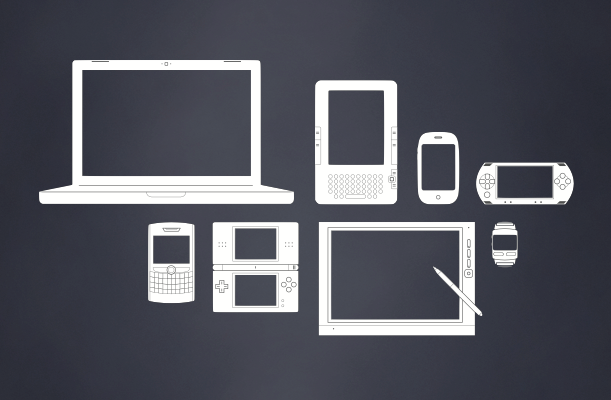
devices

Walking around at CES the consumer in me gets very excited to see the proliferation of devices. Everything is connected, everything has an API.

Then the developer in me wonders how this is going to scale and how we are going to deliver great experiences to all.

My hope is that the Web can become a great unifying platform. It isn’t easy to build Web apps that will just work anywhere. I just talked about the issues and fun of developing for devices and we are going to be getting a lot more form factors out there.

Jan 07

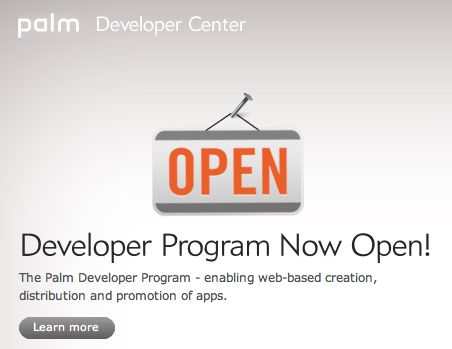
Palm Developer Program Opens at CES: A big appetite with a Plug-in Development Kit, $1M dollars of rewards, and more

Tech, webOS 6 Comments »

It has been a very different holiday season as everyone got ready for CES this year. This is my second time at the show (first time was having the honor to pick up an award for the Gears team) and was a very different experience.

It was great to come out with some good news today: from Verizon, to video recording, to Flash, to 3D games. From a consumer point of view the Palm Mobile Hotspot is pretty sexy. Tethering has been a pain, and I was eyeing up a MiFi when I got to learn that devices will be able to become MiFi hotspots. Awesome.

All good stuff, but I am obviously most excited about the developer side of things. This year it turned out that we got to turn on the full developer program today in conjunction with the other CES news. A ton of work went into this first launch of the full program and there is a lot packed in there:

palmdevprogramopen

New developer portal

When you work with Ben, you quickly learn that things should be as polished as possible. He really lead the charge on making a great new developer portal with a spruced up look and feel throughout, and some good new content. There is a lot more in the works and the community has been coming together nicely to provide some fantastic documentation too. We now have a good foundation to move quickly on, and to really help developers.

PDK: On-ramp for native code via Plug-in Development Kit

One of the things I love about the Web is its diversity. It isn’t just One Community. It has sub communities galore. On the server-side you have Java and PHP and Ruby and Python and [insert every other platform] camps all at home on the Web. Even on the client-side, despite the ubiquity of JavaScript, you see many different types of developers.

I am really happy that we are providing the Plug-in Development Kit (PDK) that will enable a path to native code on the platform enabling a role that we have seen on the Web via Flash, Gears, QuickTime, RealPlayer, and on and on.

The goals of the PDK are:

  • Easy porting of C/C++ applications to webOS, including those that use OpenGL ES 1.1 or 2.0
  • Easy integration of C/C++ components to enhance the capabilities of webOS applications

Read more about the PDK.

Flash 10.1

Flash 10.1 fits into this picture too. I am glad that we have a path for Flash developers to get their content to our users. Adobe has been working very hard to make their engine work on mobile. This has got to be a tough problem given the nature of it (event loop etc) and they are doing great. Can’t wait to see the finished product.

Hot Apps

We want to put our money where our mouth is, and want to reward developers in a fair way, so we decided to offer $1 million dollars in cash bonuses to webOS developers through our Hot Apps Program.

Contests are interesting, but having been involved in a few myself, they get very subjective and judging can be difficult. This is why this time around we wanted to try to let the market do its thing and reward developers based on downloads and how many devices have installed their application.

Some high level info:

The Palm Hot Apps Program will reward developers of the hottest webOS applications with a total of $1 million. The top rewards of $100,000 will go to developers as follows:

  • The developer of the free webOS application that’s downloaded the most between February 1, 2010, and May 31, 2010 will receive a $100,000.
  • The developer of the paid-for webOS app that generates the most revenue during the same period will also receive $100,000.

Developers of other top free and paid apps will also receive cash awards, as follows:

  • The next 20 apps in each category: $10,000 each
  • The next 200 apps in each category: $1,000 each

To qualify for an award, your app – either free or paid – must be available to webOS users via Palm distribution programs between February 1, 2010, and May 31, 2010. In addition, the following criteria apply:

  • The app must have been developed using the Palm webOS Software Development Kit or the Ares Integrated Development Environment. Since the Palm webOS Plug-in Development Kit is not widely available, applications utilizing this development kit or any APIs not in the Palm webOS SDK are ineligible.
  • Apps must be available for download through an official Palm webOS distribution program (App Catalog Distribution, Web Distribution, or Beta Distribution). Apps distributed through non-Palm methods do not qualify.
  • Apps developed by Palm employees or their direct relations are ineligible for awards.

What do you think of this approach?

GitHub Palm Repository

palmgithub

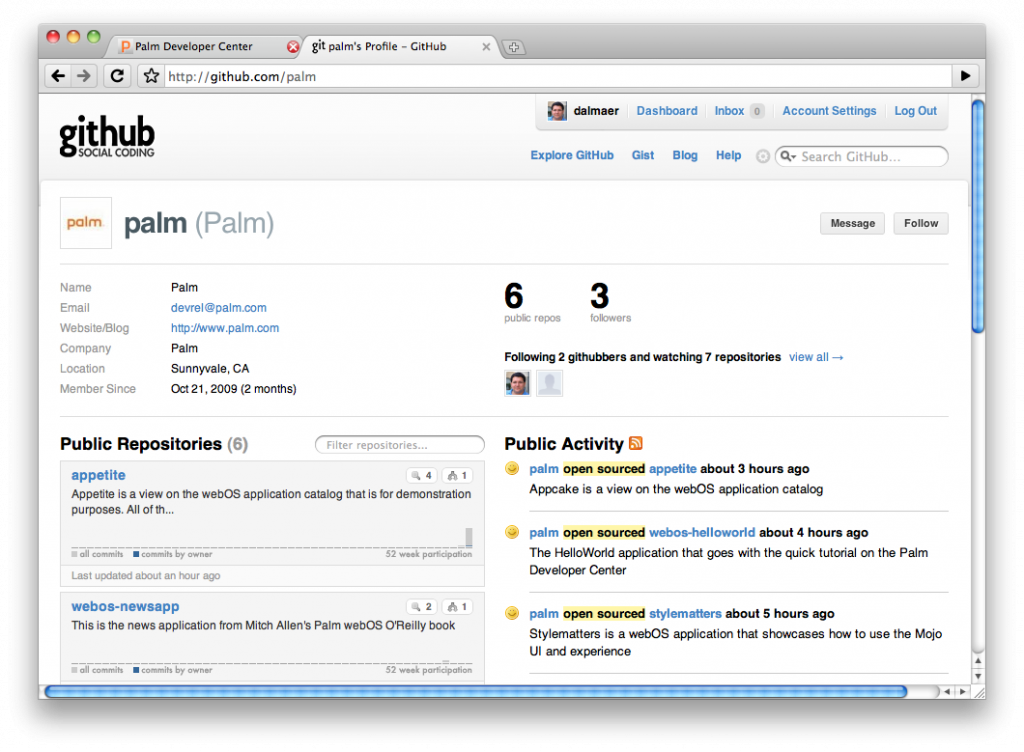
I am a huge GitHub fan and I am really glad that we have opened up our Palm GitHub account with some goodies. We have various projects that contain sample code that go from ye olde hello world app, to Mitch Allen’s great news app from his book to the indispensable stylematters app that our great HI put out to show you how to make beautiful, usable applications.

I hope that this is just the beginning and that you will see more and more projects on GitHub to fork! Speaking of projects to fork….

Project Appetite

palmappetite

One of the new projects is Project Appetite which is an open source project showing how you can interface with the Palm application feeds that come out of our full catalog.

Early partners have already built sites using the feeds: PreCentral App Gallery, webOS App Catalog Viewer, the House of Palm, and on FreshMeat.

Now you can integrate the feeds yourself. There are a lot of different pieces in that one project, and I need some other posts to go into details on the front end code (some fun CSS transforms if you are in Safari on Mac and hit Ctrl-F!) as well as the backend (using Java, node.js and lots of good stuff). There is still a lot that we want to do to help people and this is just the beginning of that project.

Phew. What a way to start the new year. Thanks for joining me on this journey and I can’t wait to see what folks come up with (including us!)