Jan 04

Gearing up your applications to be touched and the horizontal scroll

Mobile, Tech, webOS 2 Comments »

I have been having a great time hacking on code that let’s me do interesting things on my device. With webOS you get to use your old favorites (HTML/JS/CSS and Web APIs that you know) and now you are ready to take Web applications that you may have even already written, and make them work for the mobile form factor.

The two biggest challenges I have found so far on the design side have been dealing with the real estate available (screen size) and the touchy feely-ness of the device.

We have been trained on the desktop, thanks to the mouse as our pointer interface, to click lots of buttons. The tactile feedback that we get is the button looking depressed, but that is about it. The mouse has a lot going for it. The fact that I have a set of states due to the fact that there is a difference between having the cursor located somewhere, and having a click on that location is useful. It can be especially useful for discoverability. As a user mouses around you can unveil information “hey, if you click this button X will happen mate!” It also has the nice side effect that your hand can rest on it.

The infamous Minority Report interface looked great, and spawned many “look how we can do this now” prototypes, but try holding your hands in front of you for 10 minutes, let alone 8 hours :)

The mouse has a lot of drawbacks though. It is a level of abstraction. You aren’t touching the objects, you are touching a device that takes your input and does the real touching. This of course leads to touch screens and bypassing that abstraction. Watching my son tap and drag and manipulate a touch screen has been great to see. It matches the physical world a lot more. He tried to touch my laptop screen at first too.

Since you are mimicking the real world more though, you get into the uncanny valley problem. If you drag something…. it SHOULD drag! One of the interesting design choices that iPhone made was to allow you to drag things even though some folks would say “don’t let them do that, there is nothing back there”. You then saw studies where people were taking their browser screens and dragging them around just for fun. Crazy :)

Applications started to take advantage of this. iPhone started with many buttons. The back button is the classic one that is all over the shop. On webOS there is a gesture area that trains you quickly to swipe back whenever you want, like going back a page. It is fun to watch a webOS user try to swipe when using an iPhone. You get used to it, you like it, it feels more natural.
tweetie_refresh

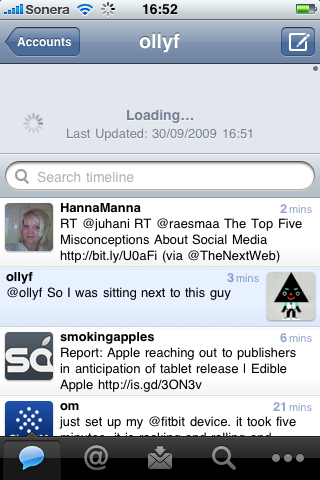
Applications like Tweetie 2 groked this too. They took away the refresh button and added a draggable notion. You drag the list down and let go to spin it into action. In many ways this is more work than a simple tap and is a touch less discoverable, but it has the benefit of “feeling nice” and once you know about it, there isn’t a darn button in front of you all the time. The UI can get out of the way.
newsroom-drag

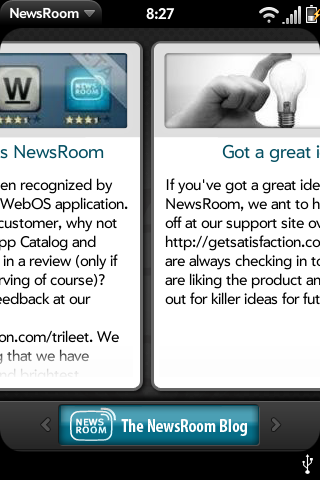
The Newsroom feedreader app on webOS does a really nice job here too. You flip and drag and move throughout most of the interface. After awhile it feels like you have a large virtual space and you are just moving the view port around to see what you want to see. It feels nice. I strangely find that it makes me want to use the application much more than an app with buttons and simple taps. Maybe I am just strange.

I find that I really enjoy the horizontal scroll. I wanted to build a simple HorizontalScroller component for webOS, but first I will detail the low level side of using a Scroller webOS component to get this effect.

The code for all of this is in my HorizontalScroller GitHub repo.

A simple way to build a horizontal scroller is to have a div that contains all of the pieces of content (pre-loaded, or you can lazily load by adding nodes to this div). It extends wider than the 320px viewport size of the Pre/Pixi and contains other elements that are each 320px. We have a view that contains this, and a controller that sets it all up:

The View

Here is how we setup the component with 3 items:

<div x-mojo-element="Scroller" id="scrollerId">
    <div class="scrollerContainer">
        <div class="scrollerItem" id="scrollerItem:1">first</div>
        <div class="scrollerItem" id="scrollerItem:2">second</div>
        <div class="scrollerItem" id="scrollerItem:3">third</div>
    </div>
</div>
</div>

and we style them:

/* A scroller needs a container element */
.scrollerContainer {
    width:  960px;
    height: 400px;
    border: yellow solid 1px;
}
 
/* An item that is viewable in the scroll pane window */
.scrollerItem {
    float:     left;
    width:     320px;
    min-width: 320px;
}

The Controller

The code that turns the divs into life lives in the controller.

this.controller.setupWidget("scrollerId", {
                   mode: 'horizontal-snap'
               }, this.model = {
                   snapElements: { x: $$('.scrollerItem') },
                   snapIndex: 0
               }
        );

The key is the “horizontal-snap” mode that make the drag physics feel right and ties to the snapElements which are the DOM elements for the inner divs. The widget takes care of snapping to those elements for you!

Of course, you can use this base to do a lot. The afore mentioned Newsroom styles the divs so it looks like switching cards.

Next up: I will get the HorizontalScroller component done and dusted to make life even easier.

Conclusion

It is enjoyable to use the constraints of screen size and the natural feeling of touch and put them together to make great apps that live with you in your pocket. I thought screen size would be a huge issue, but in some ways it has been nice to have that constraint. It means you focus on the core functionality. Dealing with the touch vs. mouse issue is an interesting one too and will have you ending up with a very different interface if you embrace the feel.

What have you found enjoyable about using mobile apps vs. desktop ones?
Dec 24

palm-run: package, run, launch and then see log messages

Tech, webOS 4 Comments »

I am having fun taking my Web skillz and applying them to mobile with webOS. It is obviously important that I learn about the platform. I want to understand the limitations, and get a feel for the SDK so I have opinions on where to take it (Fortunately, the community gives us great feedback, keep it coming!).

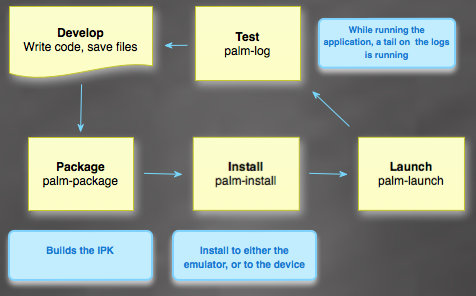
As I develop applications I quickly see repetitive tasks that fit into my workflow. You can quickly iterate when you are developing your application and when I am testing in either the device or the emulator I find myself repeating the following cycle:

palmworkflow

This maps to the command line tools that come with the SDK.

palm-package

The application packager palm-package prepares an application for installation by converting the files in the application directory to an .ipkg file that can be consumed by the emulator or device.

palm-run takes the given directory to package up, or “.”.

palm-install

The palm-install tool installs a packaged application on the device or emulator.

palm-run uses the -d option to specific device or emulator. The default is “tcp” which means emulator. Use -d usb to send to the device.

palm-launch

The palm-launch tool launches (or closes) an application on the emulator or device.

palm-log

palm-log displays log messages from an application on the emulator or USB-connected webOS device. The log output is simpler and easier to read than the output in /var/log/messages, and the timestamp is the local time instead of GMT. You can also use palm-log to display the installed applications, which is useful for getting the ID of the application to log.

So, palm-run is on GitHub. Fork away and share what you do in your cycle.

Usage

palm-run [-d DEVICE] [-L] [-o DIRECTORY] [directory]

-d DEVICE: Defaults to installing to the emulator. Use 'usb' for device
-L : By default the palm-log command is run. This suppresses that
-o OUTPUT: By default the ipk is generated to /tmp

Examples

palm-run ~/myproject # deploy from /tmp to emulator
palm-run -d usb -L -o /packages ~/myproject
palm-run # use the current directory and all the defaults
Dec 17

Project Ares: An awesome mobile web IDE built on the web

Ajax, Palm, Tech, webOS with tags: No Comments »

I am so excited for the Ares team at Palm today as we launch Project Ares a web based IDE for the mobile web.

The full experience packs a lot into the browser: visual designer, code editor, visual debugger, log viewer, source code integration, drag and drop file upload, built-in app preview, and the ability to run your app directly in the emulator or even the device!

I talked more about the details on Ajaxian and the Ares site has more.

I am so jazzed to see this out there. At Mozilla we saw the Ares team building this great product that uses Bespin right now for the code editor, some of the server side, source control and debugger (the first sighting of Bespin debugger!)

The team has worked incredibly hard since then to build what you see now in public beta form.

This also shows how awesome the web platform it is. Because webOS builds on the web we are able to have features like the “preview” feature that shows you how your app will look without even having to go to the emulator or device.

The performance of the app says a lot too. It is incredibly responsive for me, especially since there are a lot of features packed in there. The layout system is really well thought out too and is a dream when you compare to CSS fun. I can’t wait to see what the community has to say about Ares, and I want to hear features that they would like. After using this, I want to be able to build all kinds of web apps from it ;)

I also want to say thanks to my Bespin team mates and community as well as the new friends I have made at Palm. Matt, Scott, Steve, Frankie…. you guys are awesome and it is amazing to see what you have done in short order!

Dec 16

Chrome Extensions and webOS Applications look quite similar

Tech, webOS with tags: 3 Comments »

appsandextensions

“If you squint, Chrome Extensions and webOS applications look similar” — a wise friend

Having now written webOS applications and Chrome Extensions I have been struck by how similar they are, and could be.

It may seem weird to see similarity in a browser extension mechanism and a mobile application runtime, but when you look at it, there is plenty to share at a high level:

Breaking out of the sandbox

Both worlds need to break out of the web browser sandbox. Extensions can’t be restricted to the same limitations and Chrome Extensions have various API that relate to UI elements in the browser, as well as getting access to more.

On webOS we have exactly the same issue. When building native applications on webOS you can’t have the same restrictions and thus new APIs, UI widgets, and services.

This issue goes beyond even these too worlds, and is one of the big challenges for Web runtimes in the near future. I expect my runtime to be able to do a lot more and to get access to my data not just through third party server side services, but locally too. This all brings us to…

Permissions

The Web needs a permissioning model. The sandbox doesn’t give us enough, and although people quickly talk about security (which is critical) we forget what happens if the user can’t do something through the Web. They often will download an .exe to their local computer and will just run it, not knowing anything about what it does.

A big challenge for us is to come up with a model that doesn’t Do A Vista and drive our users nuts. We have to balance the desire to not ask the user for something all the time, while making sure the user knows what is happening. For power users at least, I favour the idea of showing me what is going on. Even if I grant an application a lot of power, if I could see when and what it was doing it would help. Of course, being able to restrict access to APIs is fantastic, especially when you get to layer social trust on top of the technical security. The Mozilla team talked a lot about just this and I look forward to more of their ideas and implementation.

(You can see an example of how Chrome does permissions with Cross site XHR.)

Application Bundle Info

The permissions and other metadata need to live somewhere. We have a appinfo.json file that has you declare info on your app. Chrome has a manifest.json.

On the Web we don’t really have this. You hit a URL and you bootstrap from there. The HTML5 manifest does tell the browser which files are in scope for caching and the like, but that is about it. Applications and extensions can tell the system much more. You have ids, versions, pointers to update, icons, main launching points or not…

Headless Chickens

You don’t often think of a headless web app. You can think of headless applications and extensions though. How many services are running on your computer now that have no UI? On webOS you can noWindow away and still provide value through the various services that we offer, the obvious being the rich and varied notification styles. Background apps are nicely supported.

Chrome Extensions have the notion of a background page as a way to manage a long lived lifecycle. Your background page is a singleton:

In a typical extension with a background page, the UI — for example, the browser action or page action and any options page — is implemented by dumb views. When the view needs some state, it requests the state from the background page. When the background page notices a state change, the background page tells the views to update.

In webOS and the Mojo framework we have a rich MVC system with a detailed lifecycle as well as the simple ability to define models, views and controllers.

And on

The more I look at these worlds, and others like them (e.g. Jetpack) the more I hope we come together. There are similar needs, and when you look from Chrome Extensions to Chrome OS, you can see a potential progression if done right.

Dec 09

Out of the page and into the runtime; Extensions move the Web development model further

Tech, Web Browsing with tags: No Comments »

The Chrome Extensions team had a press event tonight to go over their extensions beta launch that I unfortunately couldn’t make at the last minute. I wanted to be there to see old friends and the good work they have been doing, and support them.

Aaron, Erik, and the team have done a pretty great job with their extension model. They wanted to allow Web developers to develop extensions. Who better to do that than folks who are a) Web developers and b) have written extensions (e.g. Aaron is an old time JS hacker, author of Greasemonkey, and much more since then [Gears etc]).

Of course, over at Mozilla the same idea had been hatched with Jetpack and other equally talented folk are working on that (Aza and Atul and more).

Some of our best Web engineers are on the case, which is great.

Before these new age extension models the world of extensions was tough. On IE you would be mainly a C++ hacker to do anything. Mozilla really raised the bar with its original Add-Ons but even though you could do a lot in JavaScript, there was still a lot of XPCOM and a huge API set since you basically were given the entire Mozilla platform to work with. This was great from a “you can do whatever the crap you want to do” perspective, but it was awfully hard to dive in and get productive.

Thus, most Web developers stayed inside the browser window. We develop applications in our area, and others do the extension thing.

That has changed and we are now breaking out of the browser sandbox in many ways. This is one of them. When we think about delivering experiences to our users we can think of out of the window. What would our users like to be able to do when not on our web site? How can we package our value adds in a way that they can do their thing at any point? How do we interact with the runtime? What can we do if we have more permissions to do interesting things?

We have only just seen the beginning with Jetpack and Chrome Extensions. They are many more APIs to write and for us to then consume. I personally think that Chrome is too restrictive on what you can do in the browser chrome for example. I would love to play around and have my browser morph in interesting ways. If I am on a particular site, new features and functionality could appear if I want them too.

It feels like we are touching the surface on what the Web platform and runtime is versus what a “browser” is as we have envisioned it until now.

2010 will be an exciting year for Web developers as they add extensions to their toolbox in a nice clean way.

Dec 01

Gears has been “dead” for a long time, it’s OK, but a shame

Gears, Google, Tech 3 Comments »

I spent a lot of time advocating Gears. I loved the engineers (folks like Aaron Boodman who is doing great stuff with Chrome Extensions, and Chris Prince who now works on the fantastic Google Voice, and many many more…. many of whom are working on Chrome in some fashion).

Today the press is picking up the fact that Gears is dead, even though Google moved its efforts awhile ago (keeping life support turned on) and Linus talks about the focus on HTML5 and Chrome:

“We’re very focused on moving HTML 5 forward, and that’s where we’re putting all of our energy,” Upson said. “When we started the Gears project, three years ago, maybe three and a half years ago now, we did it because we couldn’t get the browser vendors interested in building offline applications. And so, so we said, okay, we’ll build a plugin that could do it. And lo and behold, once we shipped Gears, suddenly the browser vendors got very interested in adding capabilities to build offline applications.

“And so, I think Gears has accomplished its mission very well, in getting these capabilities into HTML 5,” Upson added. “In fact, the team that designed Gears was also instrumental in designing the HTML 5 versions of those APIs. You can almost think of what’s in HTML 5, with app cache, and database, and those things, as essentially Gears 2, and that’s how we view it.”

Many people are happy to wave good bye to Gears and look to the future of HTML5. I feel that too, but I do have a pang of “what coulda been”. The Gears team was incredibly pragmatic. How can we get Gmail Offline? What about other Google properties? This practical experience delivered Gears and the push for support of real APIs that developers need to deliver compelling experiences through the Web platform.

Although it is true that Google can push the cause through their own browser, their properties still need to deal with other browsers. ChromeFrame is one answer there, the new “Google Plugin”. The browser vendors are kicking into gear nicely now. Mozilla, Google, Apple, Opera, and even IE teams are working hard on new features and HTML5 support. When Gears started we (the Web developers) were in the dark ages of browser development. The IE team had moved on to WPF and Silverlight. The other browsers were fighting the fight against a huge IE6 dominant entry with lots of ActiveX keeping it in style.

Does this mean there isn’t a place for a Gears like solution? Yahoo! has BrowserPlus which has the additional benefit of allowing developers to write services. This was one of the issues with Gears. You got APIs that Google gave you. You had no way to extend the experience. Browser Plus allows that and I hope that Lloyd and team have a good 2010.

There is also JetPack (and Chrome Extensions) that allow you to extend the experience in a different way. If I had my way, Gears and Y!BP and JetPack would all have joined forces. That world would then look like:

  • Gears/Y!BP allow functionality to work cross browser and offer a services framework to allow you to write new components that also work cross browser. This is fairly low level work, with some nice sugar for certain APIs.
  • JetPack would give you access to low level APIs in a nice high level JavaScript API. Since it would run in Gears/Y!BP it would run cross browser too.

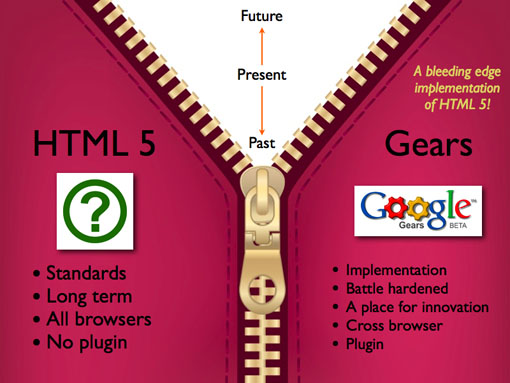
My wish for Santa? Have JetPack and Y!BP pickup and work together. Give developers a platform to create new services on the Web and have them work cross browser. We shouldn’t have to wait for browser vendors to implement APIs. We should be allowed to experiment more. Gears started its job with the zipper running higher, but there is always more room to run. If we worked out a way to get more people playing with the platform we could get so much more done. We saw what came out of “how could we do Gmail Offline” what about your application needs?

I will raise a glass to Gears and the new HTML5 overlord, but I will miss the vehicle for cross browser experimentation and what coulda been.

Nov 28

How to hire; Why don’t we date, get engaged, and only then get married to a job

Tech with tags: 3 Comments »

shotgunwedding

Aaron gave a humane look at how to hire a programmer. It was less about programmers than it was about hiring, and how to judge people. Some have jumped on how this doesn’t scale to BigCorps, and others don’t think it tests the programming side of things at all.

First, the scaling. If you take a look at how big companies recruit their often have legions of sourcers scouring linkedin and the Web, and recruiters on top of them. The law of averages has them weeding out people based on some kind of “bar” which is inperfect but they feel like they need something. Of course, the main problem is that there is a huge amount of nuance in judging someone from their resume. If you can get past the fact that a resume can only tell some part of the tale, you also know that you, the seasoned programmer, can instantly make some kind of judgement on one. “Erm, this guy lists XHTML, HTML, SGML wtf?” Many sourcers will not be able to tell the crap from the truffle. Once you get these people through there are phone screens and the like, and then in person interviews, and suddenly engineers are spending a lot of time in the process. Rather than having them ask how many eggs fit in a mini, maybe there is something more productive.

This directly relates to school exams. We all know the kid that always did well in tests. And we all know the kid that was incredibly bright but never seemed to do as well as he should. Exams and tests are pretty crap depending on what you are going to Be When You Grow Up. If you are a flight traffic control chap, then the fast on the spot thinking will help. If you are an artist? Maybe not.

I am far more interested in seeing a portfolio of education than an exam grade. When Sam and Josh are older I want to talk to them about what they learned, and what they have produced…. not their score out of 10.

I think the same goes for programming. Show me what you have done and let’s talk about it. It is important to understand the scope of that persons role on the project, who they worked with, how long it took, and many other factors, but this can come across with conversation.

Another part of showing me what you have done is doing it with you. The best interviews I have done have been where you get some code out and you hack on it together. This is after all how things will be like in the team, so let’s practice what you will actually be doing. It isn’t about getting every line of code right, or getting the correct big O notation answer to a question.

Ideally of course you would be able to do much more than a quick hack session before you pull the trigger on a hire, and vice versa. So wait, aren’t we just doing this entirely wrong!

Doesn’t it feel like we are jumping into bed before we have rounded the other bases? What I really hope for is that we change the way employment happens. Imagine a world like this:

  • A company has need for someone to come hack on a project
  • A person has the interest and potentially has the skills
  • Person and company come together and start working on the project
  • Over time if things are going well, the person and company do more projects together
  • Much later, if the companies want to make a joint commitment to each other, the person weds the company

If only we had the tools to do this. Oh wait, we do! We can contract/consult right now. There is no rush to bed at all. The only issues seem to be social and perception.

People often want to jump into bed with a company as they want security (which includes items like healthcare in the US which is INSANELY tied to companies, but that is another matter) and upside (e.g. “get me in now so I can get stock and kick off vesting!”).

Companies often want to jump into bed with a person as they want to “lock them in”. There are many legitimate reasons here such as investing in people, getting domain knowledge (including secret knowledge!), and the like.

Some companies and cultures have the notion of “probation”, but that seems rare and feels much different: “company: Just in case you suck I have an easy way out!” vs. “let’s both check each other out and see how this progresses”.

I have some consultants on my team now who are great. I hope it progresses. I wish that culturally it becomes more common to go this route. It is socially acceptable for permanent bed hoppers (consultants) even if they often have a stigma.

Oh, and with Employment 2.0 we will have micro-employment too. Oh wait, we already do.

Insert Google Anecdote

People love to talk about Google hiring. This is one of my favourite anecdotes. It is hard to get into Google (rightly so!) and you get rated out of 4. When you go through “perf” (the review cycle) you also get rated. I remember being in a meeting where someone ran the numbers to see how the hiring ranking matches the end of first year (and beyond) ranking. There was no correlation at all. The higher the hiring rating didn’t mean anything for 1 year performance.

Insert Hiring Anecdote

We are hiring at Palm. My team is looking for developer advocates and the like, and the company is looking for a whole slew of great people, especially engineers!

  • Think the native apps on webOS are cool? They are just HTML/JS/CSS. Help us make more!
  • Think that a Web based device platform could be better? Help us on the framework or beyond!
  • Low level Linux hacker? Got spots there too. Bring it on!
Nov 23

iPhone Developers are not arrogant and stupid :)

Apple, JavaScript, Tech, webOS 8 Comments »

webexp

I love your work and respect you, @ppk, but you just wrote a very naïve post. Guessing @dalmaer slipped you a mickey, so I’ll forgive you.

I did see PPK with a drink, but I didn’t drop anything in it, I promise! :)

What are we talking about here? PPK has written a post commenting on the interesting “Apple’s mistake” essay by Paul Graham.

I love PPK and he is doing great work, but I have to respectfully point out a few things here, especially as some folks thought I put him up to it. For those who are jumping on him in entirety, here does have some things right too! Don’t just get mad at the fact that he called developers arrogant and stupid ;)

There are fantastic web applications on the iPhone. I use Gmail and Google Reader as a Web app, for example. The browser is good, but I have written many times (before being a Palm employee! These are my thoughts… blah blah) about how I wished that Apple let me go the extra mile and access more from the Web side of things.

Although you can do great apps like Gmail, the user experience available to Web developers isn’t anywhere as close to that of the iPhone SDK.

  • APIs: You are unable to access the rich APIs on the device. Sure you can get local storage and appcache, but you can’t get to the compass and the [insert tons of APIs here]. Your app may not need it, but they may be able to greatly benefit from them… let alone the enhanced graphics and performance.
  • Discoverability: There are two worlds. The Web and the App Store. How does a user find out about your Web app? Sure they could use the power of Google etc…. but if they are trained not to do that anymore? Fortunately we have PhoneGap and Titanium and … stepping up here

So, the feeling of “come on iPhone devs, don’t be stupid and just develop a web app!” is going a tad too far. There are very valid reasons to use native. With PhoneGap et al, there are growing reasons to cover various bases.

At Palm I am excited to push the Web stack further by having it as the SDK, not as an option in the browser. I believe that the Web can be the unifying platform across the multitudes of devices that users will have in the future. This world is going to cause a large number of changes to how we develop experiences, and I am excited by the challenge and working with the Web community (companies and individuals) to meet the challenge.

There is so much to be done on both the technology side (html5 on devices, apis, services, gpu, etc) and on the delivery side (future of app stores, richer discoverability, etc). You can also create fantastic applications for many platforms using Web technology TODAY!

Update

Faruk Ateş has written a detailed post on this topic too that discusses similar issues to my post above, but also goes beyond with more details on $, and the SDK experience.

Nov 23

Getting Closure: Don’t just use it, don’t just abuse it

Ajax, Google, JavaScript, Tech with tags: 6 Comments »

closure

“Just what the world needs—another sucky JavaScript library,” he said. When I asked him what made it ‘sucky’, he elaborated. “It’s a JavaScript library written by Java developers who clearly don’t get JavaScript.”

This quote is by Kevin Yank, talking to Dmitry Baranovskiy, author of the fantastic Raphaël graphics abstraction library. He writes up more on the issues they see with Closure. This is the few of one side of the community towards the open source release of Google Closure and its tools.

It was bound to happen. When I started at Google I quickly wanted to learn about how Gmail, Google Maps, and all the revolutionary front ends that helped make Ajax happen. Closure was the heart of it, and I quickly wanted to see a way to get the knowledge out there. This was years ago now, but the same reasons permeate through. Even at the time there were a ton of great JavaScript libraries. It wasn’t that I wanted Google to come down the mountain like Moses and bless the world “thou shalt use Closure!” However, some smart people had worked for some time refining their use of the browser runtime and Closure was the art and science of that ongoing experiment. Having the world able to at least see the experiment would be a good thing. Other libraries could learn from it.

No one from Google has said that you should, or must use Closure!

I realize that we live in a world of heros or zeroes. There isn’t room for much in between. You are either going to be a X killer, or you are killed by X. There is no time to tell the longer arching tale. Closure came to us late in the game, where folks are often perceived to be in their camps. I love JavaScript because it allows a diverse group of libraries to do what they do best. Developers and designers can find what suits both their personalities and their particular project.

If someone asks me (and they often do) “Which Ajax library should I use?” there isn’t a simple answer. It is nuanced. It is complicated. It is frustrating! How many of you have even changed libraries in a project? It is embarrassing to go back in time and see what happened with Bespin. At various times we had MooTools, Prototype, Dojo, and SproutCore. Is that productive? Obviously no.

You build many things on the Web. A web site isn’t a web application, and then blend together so you often can’t tell when you go from one to the other (and it doesn’t of course matter at all). jQuery has made a living starting out as a fantastic DSL for sprinkling behaviour onto web sites and going from there. SproutCore and Cappuccino are the other extreme, and Dojo was the kitchen sink of JS development a long time ago. Speaking of Dojo, I really wish that Dojo and Closure had collided a long time ago. I think that it would have benefitted both sides, even though I know that it would have added some overhead for both too. When you are on an internal framework it is built for your needs. If you take a look at the Closure components they feel very Googley out of the box. At the end of the day though, Dojo and Closure are so similar in many ways, that having them joint at the hip a few years back would have been really exciting. C’est la vie.

One tricky thing about Closure is that you can’t look at all of the widgets and packages equally (same for most libraries to be fair). Some are battled hardened to the hilt as they are on important production systems acting as core functionality. The keyboard handling and localization support is top draw. Others may be cool but placed in via an interesting 20% project that isn’t as mission critical and hence battle hardened. Not all code is equal. In fact, I find the line by line code criticism tiring. It is so easy to take someones code and find fault with it (at least perceived fault). I am sure there is bad code in Closure. That is true for all code. It is much harder to be a creator though. Don’t get me wrong, it is good to point out potential issues, but there is a big difference between:

“I noticed that code X does Y. I think there is a bug there that would affect ….”

and

“Code X SUCKS. Mwhahahahahah. SUCKS!”

My new years resolution for 2010: “Say *sucks* less”.

The criticism that made me laugh hardest was the assertion that the Closure engineers were Java folks who wanted JS to be Java. They are far from it. They are old school JS engineers who have done amazing things on the Web and have just learned a few things along the way as they build huge scale JS systems.

Google is of course a big place with engineers with opinions :) When you have the creators of various languages and platforms under one roof that is always going to be the case (From Python to C++ to Java to Go, and then Closure, GWT, etc on the JS side… even jQuery ;). Many of the frontend engineers aren’t fans of Closure (as in: doesn’t fit them) but they do understand where some of the strengths are. Some of the engineers have even weighed in:

NOTE: The following quotes were taken from a Facebook comment stream. There is context missing (for example, Joel talks below about how he didn’t use the term ‘natives’ for example

Joel Webber, GWT guru: “I’m unfortunately not too surprised to see self-appointed “Javascript natives” pissing all over Closure, because it tells them something they don’t want to hear — namely, that you can’t get enough optimization leverage on large applications without some constraints on your code’s structure. The kind of stuff that you see in many Javascript libraries (e.g. lots of dynamic tests to figure out what to do in a function) pretty much guarantees that you’ll have an unoptimizeable mess.”

Gavin Doughtie, Dojo and Google Photos: “As one of the Javascript natives, I must say after three years of using Closure that it gives you a nice split between development-time dynamism and deployment-time optimization. I have found few Javscript idioms unavailable to me when coding, yet still benefit from static checking and optimizations once I’m ready to ship.”

I am more of a JavaScript native than anything else. I am not going to be rushing to use Closure on a project any time soon. It doesn’t fit many of the projects I work on to be honest, and it doesn’t fit me as well as some of the other libraries.

That being said, I am thankful to Google for putting this code in the commons (and the fantastic tools around it!) so we can all check it out (and some of us use it). I hope that the hard part of open sourcing a project kicks in and we see a community form around it, including taking in contributions. I still also harbor the hope that Dojo and Closure joined forces, but that is hard to do (a lot of people using both code bases!)

When it comes to getting closure, I hope that you don’t jump to the extreme and ignore and abuse it, and I also hope that you also don’t think that you SHOULD use it without checking it out and understanding the tradeoffs.

For example, this is crazy:

“I hate to admit but I “might” have switched from jQuery to Closure strictly because of the Google brand.”

Roundup on Closure

Oct 22

Raindrop announced; Hacking your email again; Getting personal

Bespin, Mozila, Tech with tags: 2 Comments »

I am really jazzed to see the work of the Mozilla Messaging team (Andy Chung, Bryan Clark, Dan Mosedale, David Ascher, Mark Hammond, and James Burke) out there.

Raindrop was so exciting to me, as it allows me to take ownership of how I handle communications.

Gmail is fantastic in that I have been able to extend my experience via Greasemonkey and the Labs tweaks, but it isn’t really open to me.

With Raindrop, you not only get to scrape out some flexibility in the client, but you get to do it the entire stack down. You can write code that changes BOTH frontend and backend. Have you ever wanted to do more than simple filters? Write handlers for particular content in an email? Help you mashup your email in any way? Raindrop will give you that.

It is early days of course. Mozilla is known for getting something out there early so the community can influence it, so jump in.

I am also excited to see that you can hack on things right int he client via an embedded Bespin. Awesome, I can’t wait to see what happens next guys!

There are a slew of interesting videos to check out too: