Dec 17

Project Ares: An awesome mobile web IDE built on the web

Ajax, Palm, Tech, webOS with tags: No Comments »

I am so excited for the Ares team at Palm today as we launch Project Ares a web based IDE for the mobile web.

The full experience packs a lot into the browser: visual designer, code editor, visual debugger, log viewer, source code integration, drag and drop file upload, built-in app preview, and the ability to run your app directly in the emulator or even the device!

I talked more about the details on Ajaxian and the Ares site has more.

I am so jazzed to see this out there. At Mozilla we saw the Ares team building this great product that uses Bespin right now for the code editor, some of the server side, source control and debugger (the first sighting of Bespin debugger!)

The team has worked incredibly hard since then to build what you see now in public beta form.

This also shows how awesome the web platform it is. Because webOS builds on the web we are able to have features like the “preview” feature that shows you how your app will look without even having to go to the emulator or device.

The performance of the app says a lot too. It is incredibly responsive for me, especially since there are a lot of features packed in there. The layout system is really well thought out too and is a dream when you compare to CSS fun. I can’t wait to see what the community has to say about Ares, and I want to hear features that they would like. After using this, I want to be able to build all kinds of web apps from it ;)

I also want to say thanks to my Bespin team mates and community as well as the new friends I have made at Palm. Matt, Scott, Steve, Frankie…. you guys are awesome and it is amazing to see what you have done in short order!

Nov 23

Getting Closure: Don’t just use it, don’t just abuse it

Ajax, Google, JavaScript, Tech with tags: 6 Comments »

closure

“Just what the world needs—another sucky JavaScript library,” he said. When I asked him what made it ‘sucky’, he elaborated. “It’s a JavaScript library written by Java developers who clearly don’t get JavaScript.”

This quote is by Kevin Yank, talking to Dmitry Baranovskiy, author of the fantastic Raphaël graphics abstraction library. He writes up more on the issues they see with Closure. This is the few of one side of the community towards the open source release of Google Closure and its tools.

It was bound to happen. When I started at Google I quickly wanted to learn about how Gmail, Google Maps, and all the revolutionary front ends that helped make Ajax happen. Closure was the heart of it, and I quickly wanted to see a way to get the knowledge out there. This was years ago now, but the same reasons permeate through. Even at the time there were a ton of great JavaScript libraries. It wasn’t that I wanted Google to come down the mountain like Moses and bless the world “thou shalt use Closure!” However, some smart people had worked for some time refining their use of the browser runtime and Closure was the art and science of that ongoing experiment. Having the world able to at least see the experiment would be a good thing. Other libraries could learn from it.

No one from Google has said that you should, or must use Closure!

I realize that we live in a world of heros or zeroes. There isn’t room for much in between. You are either going to be a X killer, or you are killed by X. There is no time to tell the longer arching tale. Closure came to us late in the game, where folks are often perceived to be in their camps. I love JavaScript because it allows a diverse group of libraries to do what they do best. Developers and designers can find what suits both their personalities and their particular project.

If someone asks me (and they often do) “Which Ajax library should I use?” there isn’t a simple answer. It is nuanced. It is complicated. It is frustrating! How many of you have even changed libraries in a project? It is embarrassing to go back in time and see what happened with Bespin. At various times we had MooTools, Prototype, Dojo, and SproutCore. Is that productive? Obviously no.

You build many things on the Web. A web site isn’t a web application, and then blend together so you often can’t tell when you go from one to the other (and it doesn’t of course matter at all). jQuery has made a living starting out as a fantastic DSL for sprinkling behaviour onto web sites and going from there. SproutCore and Cappuccino are the other extreme, and Dojo was the kitchen sink of JS development a long time ago. Speaking of Dojo, I really wish that Dojo and Closure had collided a long time ago. I think that it would have benefitted both sides, even though I know that it would have added some overhead for both too. When you are on an internal framework it is built for your needs. If you take a look at the Closure components they feel very Googley out of the box. At the end of the day though, Dojo and Closure are so similar in many ways, that having them joint at the hip a few years back would have been really exciting. C’est la vie.

One tricky thing about Closure is that you can’t look at all of the widgets and packages equally (same for most libraries to be fair). Some are battled hardened to the hilt as they are on important production systems acting as core functionality. The keyboard handling and localization support is top draw. Others may be cool but placed in via an interesting 20% project that isn’t as mission critical and hence battle hardened. Not all code is equal. In fact, I find the line by line code criticism tiring. It is so easy to take someones code and find fault with it (at least perceived fault). I am sure there is bad code in Closure. That is true for all code. It is much harder to be a creator though. Don’t get me wrong, it is good to point out potential issues, but there is a big difference between:

“I noticed that code X does Y. I think there is a bug there that would affect ….”

and

“Code X SUCKS. Mwhahahahahah. SUCKS!”

My new years resolution for 2010: “Say *sucks* less”.

The criticism that made me laugh hardest was the assertion that the Closure engineers were Java folks who wanted JS to be Java. They are far from it. They are old school JS engineers who have done amazing things on the Web and have just learned a few things along the way as they build huge scale JS systems.

Google is of course a big place with engineers with opinions :) When you have the creators of various languages and platforms under one roof that is always going to be the case (From Python to C++ to Java to Go, and then Closure, GWT, etc on the JS side… even jQuery ;). Many of the frontend engineers aren’t fans of Closure (as in: doesn’t fit them) but they do understand where some of the strengths are. Some of the engineers have even weighed in:

NOTE: The following quotes were taken from a Facebook comment stream. There is context missing (for example, Joel talks below about how he didn’t use the term ‘natives’ for example

Joel Webber, GWT guru: “I’m unfortunately not too surprised to see self-appointed “Javascript natives” pissing all over Closure, because it tells them something they don’t want to hear — namely, that you can’t get enough optimization leverage on large applications without some constraints on your code’s structure. The kind of stuff that you see in many Javascript libraries (e.g. lots of dynamic tests to figure out what to do in a function) pretty much guarantees that you’ll have an unoptimizeable mess.”

Gavin Doughtie, Dojo and Google Photos: “As one of the Javascript natives, I must say after three years of using Closure that it gives you a nice split between development-time dynamism and deployment-time optimization. I have found few Javscript idioms unavailable to me when coding, yet still benefit from static checking and optimizations once I’m ready to ship.”

I am more of a JavaScript native than anything else. I am not going to be rushing to use Closure on a project any time soon. It doesn’t fit many of the projects I work on to be honest, and it doesn’t fit me as well as some of the other libraries.

That being said, I am thankful to Google for putting this code in the commons (and the fantastic tools around it!) so we can all check it out (and some of us use it). I hope that the hard part of open sourcing a project kicks in and we see a community form around it, including taking in contributions. I still also harbor the hope that Dojo and Closure joined forces, but that is hard to do (a lot of people using both code bases!)

When it comes to getting closure, I hope that you don’t jump to the extreme and ignore and abuse it, and I also hope that you also don’t think that you SHOULD use it without checking it out and understanding the tradeoffs.

For example, this is crazy:

“I hate to admit but I “might” have switched from jQuery to Closure strictly because of the Google brand.”

Roundup on Closure

Apr 21

Firefox trunk now has HTML 5 drag and drop code; Time to get clipboard working nicer?

Ajax, Tech with tags: , 4 Comments »

I have already jabbered on about getting the clipboard to work nicely in Bespin and your own Web application.

Johan Sörlin noted the Firefox trunk had an interesting development with new code being checked in for HTML5 drag and drop.

He told me:

I’ve fiddled some with the new drag drop support in FF 3.6 nightly. And I was amazed to find that you can get the plain/text and html/text contents out of the drop event. So in theory this can be used as a method of accessing the clipboard.

However this event doesn’t fire when you paste contents so it can’t be used for now.

But according to the HTML5 spec the drop event should fire when you paste contents.

This is good news because now we have drag and drop support in code, and hopefully soon we will have access to data on paste!

Apr 10

Browser storage: Do we need SQL? Or would a JSON approach be better?

Ajax, JavaScript, Tech with tags: , 17 Comments »

jsondata

Ian Hickson: “I expect I’ll be reverse-engineering SQLite and speccing that, if nothing better is picked first. As it is, people are starting to use the database feature in actual Web apps (e.g. mobile GMail, iirc).”

When I read that comment to Vlad’s post on HTML 5 Web Storage I gulped. This would basically make SQLite the HTML 5 for storage in the browser. You would have to be a little crazy to re-write the exact semantics (including bugs) of SQLite and its dialect. What if you couldn’t use the public domain code?

Gears lead out strong with making a relational database part of the toolbox for developers. It embedded its own SQLite, in fact one that was customized to have the very cool full text search ability. However, this brings up the point of “which SQLite do you standardize on?”

The beauty of using SQL and SQLite is that many developers already know it. RDBMS has been mainstream for donkey’s years; we have tools to manage SQL, to view the model, and to tweak for performance. It has gone through the test of time.

However, SQL has always been at odds with many developers. Ted Neward brought up ORM as the vietnam of computer science (which is going a touch far ;). I was just lamenting with a friend at Microsoft on how developers spend 90% of their time munging data. Our life is one of transformations, and that is why I am interested in a world of JavaScript on client and server AND database. We aren’t there yet, but hopefully we can make progress.

One of Vlad’s main questions is “Is SQL the right API for Web developers?” and it is a valid one. I quickly found that for most of my tasks with the DB I just wanted to deal with JSON and hence created a wrapper GearsDB to let me insert/update/select/delete the database with a JSON view of the world. You probably wouldn’t want to do this on large production applications for performance reasons, but it works well for me.

Now a days, we have interesting APIs such as JSONQuery which Persevere (and other databases) use. I would love to see Firefox and other browsers support something like this and let us live in JSON throughout the stack. It feels so much more Webby, and also, some of the reasons that made us stay with SQL don’t matter as much in the client side world. For example, when OODBMS took off in some Enterprises, I remember having all of these Versant to Oracle exports just so people could report on the darn data. On the client the database is used for a very different reason (local storage) so lets use JSON!

That being said, at this point there are applications such as Gmail, MySpace search, Zoho, and many iPhone Web applications that use the SQL storage in browsers. In fact, if we had the API in Firefox I would have Bespin using it right now! We had a version of this that abstracted on top of stores, but it was a pain. I would love to just use HTML 5 storage and be done.

So, I think that Firefox should actually support this for practical reasons (and we have SQLite right there!) but should push JSON APIs and let developers decide. I hope that JSON wins, you? I also hope that Hixie doesn’t have to spec SQLite :/

Related
It was also interesting to just read this post Abusing Web Storage via Sam Ruby:

Alberto Trivero: The aim of this white paper is to analyze security implications of the new HTML 5 client-side storage technology, showing how different attacks can be conduct in order to steal storage data in the client’s machine.

Apr 08

Google App Engine and The Java Web; The Wrong Java?

Ajax, Google, HTML, JavaScript 6 Comments »

I had the pleasure of being at the Google Campfire event that launched the worst kept secret, App Engine supports Java and Google has a preview for you to check out if you signup in time.

Java is a huge ecosystem, which is a big win, but what interested me was the nuance. The Secure Data Connector feature that gives us a glimpse of “on premise” type functionality (that Microsoft is touting with Azure) is a big one, and something that enterprises need.

The GWT pitch and the Google plugin for Eclipse is another interesting one. I am always so incredibly torn here. GWT is fantastic technology. Because of the way it works, it gets to do things that pure JavaScript libraries would love to be able to do but can’t. The team is great, and the hard core tech is incredibly impressive. I understand why people use it.

My personal issue is that it feels so funny to see the two messages from Google.

Now, these aren’t mutually exclusive of course. GWT can wrap all of the HTML 5 stuff and both can be happy. But it just feels weird to me. The idea that JavaScript is the assembler of the Web, when it is such a high level language is hard to wrap my mind around. It can be moulded to do so much more than Java can with its static nature (which has downsides too of course!)

Another thing. Writing your applications using Java in this world is about the source code and the language but not about the VM. For me this is hard to wrap my head around too. I get to use a language I *personally* don’t like as much (Java the language) and have it run on a runtime that isn’t as good as the Java VM. Hmm. And, since there isn’t the VM there (on the client, there is with App Engine!), I don’t get the pleasure of writing in any of the very interesting languages available on the JVM (Scala, Clojure, JRuby, Groovy, etc). They have picked the wrong Java for my taste!

Now, Paul Hammant has a very detailed post about building a rich Ruby application on top of AppEngine4J. He flips from a jQuery view to a Ruby client using Swiby to a Ruby Shoes app and beyond. Then, at the end, he says something very interesting:

If Google made changes to GWT to make it a viable thick/desktop/offline technology then AppEngine might shift up a gear with online/offline apps.

Since you are writing Java code, why not ship down a jar file for browsers that support Java (still a fair few) and run the application natively within the browser? Kinda bizarre, but imagine if Gears had been done in Java, and people could add functionality easily that way (this is where Yahoo! BrowserPlus is interesting… how you can write services in Ruby and the like). And now you are sending down a jar, you could write the applications using any JVM language you want. Huh. That would be an interesting direction.

Who knows where this ends. When you get practical though, Google have delivered a nice experience for people that like Java, and that is a large group still.

I am still in the camp of DSLs and lightweight and all that jazz, and agree that one great thing about the Web is that some people can come in and make a change here and there at a very high level and make something their own.

Fun times!

Apr 06

Creating custom scrollbars with CSS; How CSS isn’t great for every task

Ajax, Bespin, JavaScript, Web Browsing with tags: , , 7 Comments »

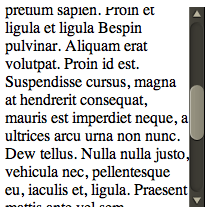
Have you tried to create a nice rich experience and then been fighting the “defaults” to go the extra mile? This reared its head with me recently with Bespin. There are certain commands that pull up divs of content and we need to scroll through it. The problem is that the native scroll bar looks so out of place:

uglyscrollbar

WebKit recently released the ability to style scrollbars in HTML elements (but not the main window, which you have been able to do in IE for donkeys years much to many peoples chagrin).

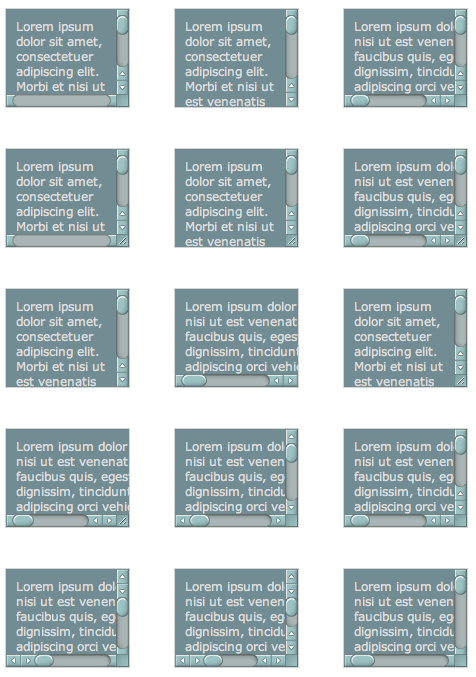
I decided to take it for a spin and loaded up the examples that show you being able to do every type of scrollbar that you can imagine:

manyscrollbars

So, it shouldn’t be so hard should it. From the blog post I see a few magically ::-webkit-scrollbar CSS properties that I can plugin and be on my way. But looking at the example view source you see many pieces like this:

:not(.none):not(.double-start)::-webkit-scrollbar-track-piece:vertical:end:single-button,
:not(.none):not(.double-start)::-webkit-scrollbar-track-piece:vertical:end:double-button,
.single::-webkit-scrollbar-track-piece:vertical:end,
.double-end::-webkit-scrollbar-track-piece:vertical:end,
.double-both::-webkit-scrollbar-track-piece:vertical:end {
    margin-bottom: -6px;
}

Holy pseudo classes batman! To be fair, this is partly due to the example page having many types of scrollbars in one (hence the not this and not that but the other) but there are still nested classes that you need to grok to get this going.

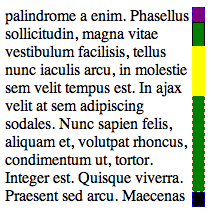
I quickly built a debug scrollbar where I styled the various pieces with simple colors and borders so I can see which was which. I also went about making the scrollbar have one up arrow on top, and one down arrow on the bottom.

debugscrollbar

The parts and pieces of a scrollbar are quite simple:

  • Thumb: This is the piece that shows you where you are in the scrollbar. This is the chap that you can move around
  • Track: This is the area of the scrollbar that you can move the thumb up and down, or along (depending on the orientation). There is both the area between the top and the thumb, and between the bottom of the thumb and the bottom of the scrollbar
  • Buttons: There may be buttons that you can click to increment or decrement the selection (which moves the thumb). There are various styles (single button, double button, etc)
  • Resizer: This can change the are of the element (e.g. enlarge of shrink)
  • Corner: This area may show up with both horizontal and vertical scrollbars open

The debug scrollbar kinda shows these areas off in a simple visual way. Note how using display: block|none enabled me to setup the single button on top and bottom functionality:

/* Turn on a 13x13 scrollbar */
::-webkit-scrollbar {
    width: 13px;
    height: 13px;
}
 
::-webkit-scrollbar-button:vertical {
    background-color: red;
    border: 1px dashed blue;
}
 
/* Turn on single button up on top, and down on bottom */
::-webkit-scrollbar-button:start:decrement,
::-webkit-scrollbar-button:end:increment {
    display: block;
}
 
/* Turn off the down area up on top, and up area on bottom */
::-webkit-scrollbar-button:vertical:start:increment,
::-webkit-scrollbar-button:vertical:end:decrement {
    display: none;
}
 
/* Place The scroll down button at the bottom */
::-webkit-scrollbar-button:vertical:increment {
    background-color: black;
    border: 1px dashed blue;
}
 
/* Place The scroll up button at the up */
::-webkit-scrollbar-button:vertical:decrement {
    background-color: purple;
    border: 1px dashed blue;
}
 
::-webkit-scrollbar-track:vertical {
    background-color: blue;
    border: 1px dashed pink;
}
 
/* Top area above thumb and below up button */
::-webkit-scrollbar-track-piece:vertical:start {
    border: 1px solid #000;
}
 
/* Bottom area below thumb and down button */
::-webkit-scrollbar-track-piece:vertical:end {
    border: 1px dashed pink;
}
 
/* Track below and above */
::-webkit-scrollbar-track-piece {
    background-color: green;
}
 
/* The thumb itself */
::-webkit-scrollbar-thumb:vertical {
    height: 50px;
    background-color: yellow;
}
 
/* Corner */
::-webkit-scrollbar-corner:vertical {
    background-color: black;
}
 
/* Resizer */
::-webkit-scrollbar-resizer:vertical {
    background-color: gray;
}

By moving the scrollbar around I could quickly see how this all worked, and it got me to this point which enabled me to plugin the images to make this puppy work for Bespin:

bespinscrollbar

There were a couple of key tweaks needed to make this work:

Getting the buttons working

I used the same trick used in the debug example to turn on the up area above, and the down area below, and then it was just a matter of targeting the correct area for the arrow images:

/* Turn on single button up on top, and down on bottom */
::-webkit-scrollbar-button:start:decrement,
::-webkit-scrollbar-button:end:increment {
    display: block;
}
 
/* Turn off the down area up on top, and up area on bottom */
::-webkit-scrollbar-button:start:increment,
::-webkit-scrollbar-button:end:decrement {
    display: none;
}
 
/* Place The scroll down button at the bottom */
::-webkit-scrollbar-button:end:increment {
    background-image: url(images/scroll_cntrl_dwn.png);
}
 
/* Place The scroll up button at the up */
::-webkit-scrollbar-button:start:decrement {
    background-image: url(images/scroll_cntrl_up.png);
}

Get the track pieces to show

Next up was getting the gutter to show up. As mentioned early on, there is one track, but two areas that can show…. before the thumb and after. You can target these areas via -webkit-scrollbar-track-piece:start || :end and then it is a matter of using the multiple background ability available in new browsers. First we have the top of the gutter, and then a recurring background (and the same for the bottom). This way it just grows with the area that it gets:

/* Top area above thumb and below up button */
::-webkit-scrollbar-track-piece:vertical:start {
    background-image: url(images/scroll_gutter_top.png), url(images/scroll_gutter_mid.png);
    background-repeat: no-repeat, repeat-y;
}
 
/* Bottom area below thumb and down button */
::-webkit-scrollbar-track-piece:vertical:end {
    background-image: url(images/scroll_gutter_btm.png), url(images/scroll_gutter_mid.png);
    background-repeat: no-repeat, repeat-y;
    background-position: bottom left, 0 0;
}

The Thumb

To get the thumb working, I thought I would do the same background image trick with three images (top of thumb, bottom of thumb, and background for the middle). Unfortunately this didn’t seem to work for me as I couldn’t get the middle to not go through the top and bottom. So, instead, I went with another new CSS trick: border-image. Here I splice the top and bottom of a thumb (the top and bottom 8 pixels) and stretch the rest:

/* The thumb itself */
::-webkit-scrollbar-thumb:vertical {
    height: 56px;
    -webkit-border-image: url(images/scroll_thumb.png) 8 0 8 0 stretch stretch;
    border-width: 8 0 8 0;
}

John Resig has a nice readable post on border-image.

And, there you have it. Now we can have nice Bespin-y scrollbars throughout Bespin. This may not be complete though, as we have the ability to also tie in :active and :hover work if we wish (change the color when selecting etc).

Of course, many people had “custom scrollbars”. There are plenty of comments on the original Surfin’ Safari post, and various rants about Flash versions. I agree that we have all seen bizarre Flash versions of scrollbars that don’t look like them at all, and where the designer didn’t bother to put in support for the mousescroll ability etc, but this is a bit different. It let’s you merge in your look and feel, yet with native scrollbar functionality.

And, with Google recreating the button maybe we can feel a little bit better about tweaking the look of common UI elements as long as they are familiar enough to users to still make natural sense.

Now, the CSS declarative way to do scrollbars seems to get pretty ugly to me with all of he pseudo classes and various magic to get the functionality that you would like. I have to admit to liking Kevin’s demo of Flash Catalyst at Web 2.0 Expo and how it lets designers build out a scrollbar. We should be inspired to do tools like this. What if we had an API that wasn’t CSS, but let us say: “I want a Mac style double on the bottom button scrollbar. And, here is a thumb, here is a track, go for it”.

That being said, at least we do have the ability to do this kind of thing now. I hope that other browsers follow WebKit in this instance.

Mar 30

Dealing with JavaScript scope issues; The tale of Alex kindly indulging me

Ajax, JavaScript, Tech with tags: 8 Comments »

Dealing with JavaScript scope issues; The tale of Alex kindly indulging me

JavaScript is about run-time. Run-time is great and all, but especially when dealing with the browser, and how your Web page has to bootstrap the entire world on every load, Ajax developers have to think about issues that other people don’t. Problems that others can compile away, or know that “that happens once when I start up the puppy on the server” are here for us to stay.

This often seems to mean that we have to deal with writing our applications in ways that aren’t as clean as we may like. We run across problems where for the Nth time someone was bitten as somewhere code did a “for in” that wasn’t guarded with hasOwnProperty and then someone throws up there arms. Never Again. Dojo does a lot of things out of this experience. It is out of real-world pain that choices were made in the toolkit. One of these is how they are very careful not to pollute the global namespace. This is great in that you don’t run into collisions, especially in a world where code is being sucked in from who knows where (e.g. some Ad code is sucking in things). As the author of some JavaScript code, you don’t actually know what else may get into your global area when running, so you need to guard against it.

The problem is that this means that you can lose out. Prototype feels so right to me in many ways as it is less of a “JavaScript library” than a “way in which JavaScript should have evolved”. We have seen some of its goodness get into ES 3.1 (e.g. bind()) but at that rate of progress we will get four more methods in 20 years ;)

"some content   ".trim(); // feels right
dojo.trim("some content   "); // doesn't feel right

I have to take a second to tease here. Did you notice that there are two trim methods in Dojo? dojo.trim and dojo.string.trim. This is a good example of the crazy things that we have to think about. It appears that dojo.trim is lean code, so it gets into base, but dojo.string.trim is more code, but it runs faster. Wow :)

Once you get a lot of code going, you suddenly realise that the word “dojo” appears 50 times per screen of code. It makes me want to create a Bespin plugin that change the shade of that one word. It feels like Java. Unlike Java, you can’t import away some of the pain. You can try to var foo = some.really.big.package; but that gets annoying quickly.

So, to the point of the blog post. When I saw Alex Russell at a nice wine bar in San Francisco last week, I told him how I would die for the ability to have the best of both worlds of Dojo and Prototype:

I want to be able to write code the way that feels right, without the verboseness, but ALSO not run into the scoping issues. I would even take a performance hit for this. What if I could have:

runSomeCodeWithMagic(function() {
    // in here I am in the lovely land where "some content   ".trim() works
    // and I can just forEach instead of dojo.forEach
    // but the outside world isn't affected
});

Well, Alex listened to me blather on, probably thinking I was a total idiot, and then went on to quickly indulge me by giving me a little of my wish by giving me dojo.runWith:

dojo._runWithObjs = [];
dojo.runWith = function(objs, func){
	if(!dojo.isFunction(func)){
		console.error("runWith must be passed a function to invoke!");
		return;
	}
	var rwo = dojo._runWithObjs;
	var iLength = rwo.length;
	// console.debug(func.toString());
	if(!dojo.isArray(objs)){
		objs = [ objs ];
	}
	var catchall = dojo.delegate(dojo.global);
	var fstr = [ "(", func.toString(), ")()" ];
	objs.unshift(catchall);
	var locals = {};
	objs.push(locals);
	objs = objs.reverse();
	dojo.forEach(objs, function(i){
		var idx = rwo.length;
		rwo.push(i);
		fstr.unshift("with(dojo._runWithObjs["+idx+"]){");
		fstr.push("}");
	});
	(new Function(fstr.join("")))();
	// allow us to GC objs passed as contexts, but don't rewind
	// further than we started (allowing nested calls)
	rwo.length = iLength;
	// TODO:
	//		iterate on locals and look for new properties that
	//		might have been assigned. Maybe give the with-caller a
	//		way to handle them or specify a policy like "make
	//		global"?
};

To use it I can do something like this:

<html>
    <head>
        <script src="http://o.aolcdn.com/dojo/1.3.0/dojo/dojo.xd.js"></script>
        <script src="runwith.js"></script>
        <script>
        dojo.addOnLoad(function() {
            dojo.runWith([ dojo ], function() {
                var sum = 0;
                forEach([1, 2, 3, 4], function(i) {
                    sum += i;
                });
                byId("result").value = "The sum is: " + sum;
            });
        });
        </script>
    </head>
    <body>
        <h1>Run with Wolves</h1>
 
        <input type="text" id="result">
    </body>
</html>

Very nice! Only a couple of dojo’s in sight!

Here are some of the thoughts from Alex himself:

Note/warning about the runtime cost: If your browser parses things fully in it’s JS engine up front, this function may hurt. A lot. It de-compiles a function using the toString() method, meaning that it does an uneval + eval + string concat + with() call. Each of these operations alone might be painful in a slow engine. Together they could be fatal. On the other hand, if you’re using these functions in, e.g., Chrome/V8, this could turn out to be relatively cheap, particularly as this is run-once kinda thing. The runtime cost involves namespace misses on locals, and that can be significant. I dunno. You’ll have to test to find out.

Note that you won’t easily be able to define globals from here by dropping a “var”. This might be a feature or a bug, depending on how you think about it.

Anyway, hope it’s useful. I’d imagine that you’d structure your files like this:

// something.js
dojo.provide("thinger.something");
dojo.require("thinger.blah");
 
dojo.runWith([ dojo, thinger ], function(){
       ...
});

What about getting the magic on the core objects? Again, only within the magically land of that scope do we want String to have the trim method…. and code outside of it shouldn’t see it. Can we swap onto the objects and their prototypes? Alex has some thoughts here too:

I think I can proxy intrinsics at some additional cost. I’d like to make it a protocol, though, so that you might be able to have a list or function that handles your extensions. E.g.:

var contextObj = {
    ":intrinsics": {
        "String": { ... },
        "Number": { ... },
            // ...
    }
};
 
dojo.runWith([ contextObj, ... ], ... );

This would give us a way to un-install them later, but I don’t have a solution for aync code as we do with with(){ … } which actually binds definitions at declaration time.

I might try to proxy intrinsic prototypes somehow, but I need to spend more time thinking about how to get that to work well. I’d like these things not to place big constraints on how you think about or use this system.

Wicked. This also ties into Pete Higgins and some of the very interesting work he is doing in similar but different veins with his dojotype and plugd which munge Dojo into interesting forms.

Since Dojo has pretty much everything that any other library has, you can start thinking about how you can bend it to look and feel like others, take on their APIs when it makes sense, and bend it to your whim.

With research like Alex’s we could see an interesting view when you can create worlds which don’t affect each other, let you have a view that makes sense for your code, but doesn’t affect others.

Even if you poo-poo some of it for the performance aspects, this is why it is incredibly exciting to see the latest JavaScript Vm work. With these guys running, they can optimize a lot of this a way, and things that used to be bottlenecks in the code will cease to be.

Thanks to Alex and Pete for indulging me, and taking the time to listen and produce really interesting solutions!

Updated: Using the Dojo Loader

James Burke has a very cool follow up on how to give a solution to this kind of problem using the Dojo Loader itself:

Setup your locals

dojo.provide("coolio.locals");
 
dojo.setLocalVars("coolio", {
 trim: "dojo.hitch(dojo, 'trim')",
 $: "dojo.hitch(dojo, 'query')",
 id: "dojo.hitch(dojo, 'byId')"
});

Now setup your actions that will use the locals:

dojo.provide("coolio.actions");
 
coolio.actions = {
 init: function(){
  $("#trimButton").onclick(coolio.actions, function(evt){
   id("trimOutput").value = trim(id("trimOutput").value);
  });
 }
}

Finally, use HTML to auto load:

<script type="text/javascript" src="dojo/dojo.js" djConfig="require: ['coolio.locals']"><script>
Mar 24

Event Driven Architecture in JavaScript is fun; Bespin Extensibility

Ajax, Bespin, JavaScript, Tech No Comments »

In former times (I love how Germans say that) I spent time working on event driven systems and busses. Those unfortunate enough to work with Enterprise JavaBeans were happy when Message Driven beans were announced as they could tell the pointy hair chaps that they were indeed doing EJB, and would continue working in their MOM architecture.

Now I fast forward to my days with JavaScript, and I remember getting excited to see the common JavaScript libraries support custom events. I now had a very nice way to work with my library to use event driven architecture on the client side, which is actually quite natural to do too. We see this pattern in desktop APIs such as Cocoa, and it helps enforce the practice of responsive applications for end users.

I may have taken this notion to the extreme a little in Bespin.

We have a general event system to put general work and you will also find that most of the components of Bespin also have their own events.js. A component will often load up the events by doing something like this:

// from within the editor itself, pass into the event system so the events are in scope
new bespin.editor.Events(this);

The event class will take in that component, put it in scope, and then an event can just use it. Note the use of editor here:

dojo.declare("bespin.editor.Events", null, {
    constructor: function(editor) {
        bespin.subscribe("editor:openfile:opensuccess", function(event) {
            editor.model.insertDocument(event.file.content);
            editor.cursorManager.moveCursor({ row: 0, col: 0 });
        });
    }
 
    // ... all of the events
});

As new events come into play for the editor, this is where they will naturally be placed.

There have been some really nice fall outs of this approach. It has been really nice to have the notion of “this just happened, if anyone is interested, here is some info.” There is no need to find an object and call a method on it…. the event bus just takes care of it all for you.

There has been a nice side effect in the case of sharing commands across different parts of the application. Take the dashboard vs. the editor itself. Both have a command called newfile that looks a bit like this:

bespin.cmd.commands.add({
    name: 'newfile',
    takes: ['filename', 'project'],
    preview: 'create a new buffer for file',
    completeText: 'optionally, name the new filename first, and then the name of the project second',
    withKey: "CTRL SHIFT N",
    execute: function(self, args) {
        if (args.filename) {
            args.newfilename = args.filename;
            delete args.filename;
        }
        bespin.publish("editor:newfile", args || {});
    }
});

The core piece is that the command basically just sends an event of type editor:newfile. On the other side of the coin, who is listening to this event? Well, in the case of the dashboard, it changes the URL to the editor itself, but if you are already in the editor itself, you don’t need to do that, and can just clear the editor buffer and file state.

Having commands at this high level means that they are easy to share.

We do need to do some more thinking about when it makes sense to promote something to be a full fledged event. In general I like the idea that people can write plugins and extension code that only requires them to grok some events and they are in and out in a jiffy.

However, some team members have brought me down to Earth and I realize that if we go too far here we will be reinventing method dispatch itself, and in a way that is only asynchronous :)

We don’t want to go that far. The no-brainer use cases are for typical call backs such as “a file has opened, care?” Something that an event asking for something to be done (e.g. newfile above) is a more subtle item and shouldn’t be over used.

Another side effect from using this model is that I remember exactly how much I like named parameters, which is why you will see the pattern is publish(eventName, argumentsHash). Dojo allows you to pass in multiple arguments, and in fact makes it harder to only send in one object as you have to dojo.publish(eventName, [ one ]). The [ ... ] looked ugly, so we wrapped the mechanism as bespin.publish(...). We also did this because we wanted to be a layer above the implementation. The Prototype version used Element.observe() and Element.bind() and we had to change all of that work in the port. Hopefully we won’t have to do this if a major change happens in the future.

Fun times! I will also write-up the effects of this, and how extensibility kicks in with Bespin on commands, your configuration, and plugins.

Mar 23

Debug the memory usage of your Ajax application

Ajax, Mozila, Tech with tags: 5 Comments »

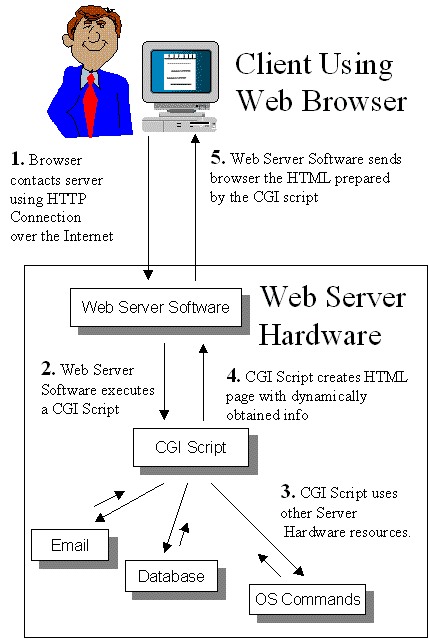
cgi

Do you remember when Web applications were CGI scripts? You had that cheeky bit of Perl that would be exec’d away. It was a haven for the lazy among us. What if you didn’t close the DB connection down perfectly? Didn’t matter. Use too much memory? Who cares. The process would die in seconds!

I then remember the real Web 2.0, when mod_perl and the like came about (yah yah there was NSAPI/ISAPI which I had to deal with too) and you realized that all of that bad programming now came at a price. The applications would be sitting on the server for a long time, so you could share a lot, but if you were sloppy you could cause bad things. Now you have to audit the code and gets thing right (as well as working around mod_perl bugs, but that is another story!)

The same has happened with the world of Ajax. Applications that used to be pages that would be refreshed are now replaced by sites like Gmail that sit in a browser tab all day long. If your application does something a little bad now, it can be noticed.

This is where the post that Ben just made on a new
memory tool for the Web comes in. As we write Bespin and other Web applications we feel the pain where we wish certain items weren’t as much of a black box as they are now in the browser. A first bite is memory, and being able to get some visibility into the heap, or see when the garbage collector is kicking in and how long it is taking.

What other tools like this would you like to see as you write long living Ajax applications in the browser? We are all ears!

Mar 18

Why Open Source is amazing; The story of the Quick Open Bespin feature

Ajax, Bespin, Open Source, Tech No Comments »

Going from hacking away on Bespin before our launch, and now watching it 100% out in the open thanks to open source has been a fascinating transformation. Building a community is so much harder than hacking on code, and very different constraints appear. The past of “get a feature done” is changed to be “make it easy to get features done”. We still have a lot of work to do on extensibility, but it has been fun to see what people have already been able to do.

We have had experienced and junior folks pick up Bespin and help out, and I am trying very hard to strengthen a tough skill… delegation. Instead of picking off some bugs, I try to document them better and explain them so anyone in the community can pick them off. Sometimes it would be easier to hack up a quick fix compared to walking someone through a set of patches. However, that doesn’t meet the goal of getting people fishing away on our code and scratching their itches. Ben, myself, and our team doesn’t scale out to the size of developer tools groups at other huge companies, so we need to do what Mozilla does best….. build honest community. I am having a great time doing just that! The early contributors have been amazing already.

There is one recent experiment that I wanted to share. I was thinking about hacking on a key feature…. the ability to quickly search for and open files. This is the Apple-T feature in Textmate. I use it in the same way that I use Alt/Apple-Tab, or Apple-~ to move around. It is a core way in which I move around my projects. Instead of going right into code, we put together a mockup of how the feature could look:

Then, I spent a bit of time on the general design document itself to explain the feature, both from a use case / design angle, and on the “high level” coding side. I tried hard to give enough detail to explain the feature, while still allowing an implementor the ability to be creative and come up with their own ideas.

A few days later, Julian Viereck (a contributor who has already been incredibly helpful and generous with code) stepped up to the plate to say he would implement this, and in short order with the help of Kevin Dangoor building the server side infrastructure (index to search to find out the file names in this case), they had built a solid first version of the functionality.

It’s phenomenal, and I am so grateful to Julian for putting in time to make it work so well. Not only did he write the feature, but he also create a new Thunderhead component head to allow for moveable windows. Very cool indeed. Here are his thoughts on the implementation:

As described in the DesignDoc Quickopen is a window popping up in the editor to let you choose a file you want to jump to and perform some work on with the editor. This allows you to open a other file without going to the dashboard and back again to the editor => you can stay longer in the editor and have not to reload the whole page just for changing the current file ;) This is a quite important feature when it comes up to work on a “real” project in Bespin as you really stay on the work itself :)

To open Quickopen press ALT + O in the editor.

Quickopen: How it works?

When the user fires up Quickopen the first time it shows a list of the current opened files in the project (quite the same as the Open Session thing in dashboard, but just for the current porject). When tipping a searchkey a request is send to the server and a result list back to the user and displayed.

Kevin did the backend stuff. He says “the server is using a *really* stupid file cache to make searches zippy”. Well, it’s really zippy ;) But here is a list of things I would think that could be improved:

a) the seachindex is not updated at the moment. So once deleted a file, it is still in the seachindex. Try to open this file with Quickopen will cause a strange behavoir. The best solution would be, to have the searchindex in sync with the filesystem, but well, thats maybe a bigger deal. For the moment it would be great to have a command for paver like “paver updateSearch -u <username>”.

b) the search results list also files that cannot be opened by Bespin (e.g. image files…). I would not like to see the backend making a choice which files the user should be able to seen in this result list and which not by certain rules. But I think let the user make that choice is a good point. I’m for example not interessted in the image files BUT also not interessted in all these .py files and these stuff. There should be a new user setting to make this adjustments. But at the moment I have no cloue how this setting has to look like? A regex, or something like “excludeFiles= *\.js|.html|.css” for excluding all files except js-, html- and css-files?

c) the search should remember how often the user picked a certain file from the list and put this file more above in the resultlist.

Other ideas? These is work to be done on the backend. I never wrote one line of python and have not looked really at the backend stuff, so maybe someone else should take over this part :)

But when making so often a switch between the files it also comes up to add other things: the editor should remember the mouse position on the files as the user jumps between them. This makes it easier to continue working on the files. For this I thought about adding a new kind of “settings” that stores such data like mouse positions, window positions and such stuff, but I cannot come up with a name for it.

What do you think?

BUT: There is even more new stuff: th.window!

When implementing the Quickopen window I was thinking: “why is there no such class in th”? Well, there it is: th.window!

th.window brings up a window in the browser, with the same border and window bar as the one used by Quickopen (well, Quickopen uses th.window already, so the Quickopen stuff in quickopen.js is a good starting point to see how to use th.window ;)). Having a th.window class was something Malte asked for and I hope other stuff will provide from this new class as well :)

When creating a new th.window object, a new <div> with a <canvas> is insert. The canvas is used for the th.window::scene, to which is the th.WindowBar added automaticaly as well as the user panel; the place to put in the things that should stand within the window. Some basic functions are added to the window: you can drag them around on the screne, there is a close button within the WindowBar, the window closes automatically the user clicks outside the window (is this prefered in all way, I’m not sure) or press the ESCAPE key, there is a toggle, move and center function. Just the basics, but a good point to build on!

Thanks so much to Julian and the other bright sparks that have made Bespin a fun project to work on. There is so much to be done, but hacking on a tool that you actually use is compelling, so I can’t wait to see more!