May 23

Google Maps says “Take That” to Powerpoint

Google, Tech 3 Comments »

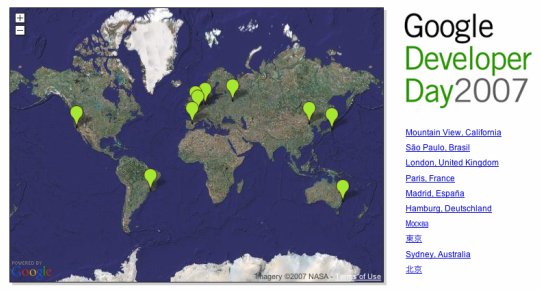
A few of us were laughing at the powerpoint gurus that had fun with animating Google Maps markers for a presentation.

Then I realised that we can of course do animations with the Maps API itself!

I pinged Pamela Fox, who is my goto person for anything Google Map-ish, and with a couple lines of code she made the locations for Google Developer Day spread out.

The tweak took:

Setup the points

The createMarker function now sets up some meta data:

var tempPoint = new GLatLng(37, -122);
var marker = new GMarker(tempPoint, markerOpts);
marker.pt = point;
var latAway = point.lat() - tempPoint.lat();
var lngAway = point.lng() - tempPoint.lng();
marker.latTravel = latAway/50.0;
marker.lngTravel = lngAway/50.0;

Animate the beasts

animateMarkers does the work of moving the marker a little and then calls itself via a setTimeout.

function animateMarkers() {
for (var i=0; i < cm_mapMarkers.length; i++) {
var curMarker = cm_mapMarkers[i];
var curPoint = curMarker.getPoint();
var newPoint = new GLatLng(curPoint.lat() + curMarker.latTravel, curPoint.lng() + curMarker.lngTravel);
cm_mapMarkers[i].setPoint(newPoint);
}

cm_frameNumber++;
if (cm_frameNumber < 50) {
setTimeout(animateMarkers, 20);
}
}

Kick is all off

Then we kick it all off from a simple:

setTimeout(animateMarkers, 1000);

Tweaking the animation

You can mess with the variables for when it starts, how often to redraw (to set the frame-rate), and the amount to move to get different effects. Sometimes on Firefox it stutters. I guess this shows that we don't have a nice concurrent GC as Java 6 does.

Next, we will have hello kitty float randomly around the screen singing in the language of the country.... but in all seriousness, you can do some interesting things on top of the maps. You can even use canvas or SVG.

GDD Animation

May 18

Google Developer Day: Schedule Released, 2 Weeks Out

Google, Tech 9 Comments »

Google Developer Day 2007 is two weeks away.

We have published the schedule for most of the countries, and I am excited for the event.

We have great talks around the world (and some of which will be available live on the web) such as:

  • Keynote by Jeff Huber, Vice President, Engineering
  • Building Better Ajax Applications
  • Extending Google SketchUp: A Developer’s View
  • Google Maps API Introduction
  • Intro to Google Data APIs: Mashing up Google Calendar, Spreadsheets and More
  • YouTube APIs: Where We Are and Where We’re Going
  • Google and the Geoweb
  • Enterprise Search APIs: Making Information Accessible at Work
  • The Google AJAX APIs
  • A Computing System for the World’s Information: A Look Behind the Scenes at Google
  • Mashups the Easy Way
  • KML on Earth – Advanced Topics
  • New Features in the Google Maps API
  • Fast, Beautiful, Easy: Pick Three — Building Web User Interfaces in the Java Programming Language with Google Web Toolkit
  • Testing Distributed Systems with AJAX, XML – Lessons Learned from Google Checkout
  • Making Maps Mashups Discoverable
  • Advanced Topics in Gdata
  • Google Desktop Gadgets – Access, Share and Personalize Information
  • Python Design Patterns
  • KML Search and Developing Maps Mashups Using KML/GeoRSS
  • Custom Search Engine – Google Search in Your Hands
  • Distribute Your Content With Universal Gadgets
  • Building Better AJAX Applications: Nuts & Bolts
  • Open Source Development
  • BBC Backstage
  • The GWT Bet: Google Web Toolkit
  • From Mashup to Business (Nestoria.co.uk)

And this is just the half of it. The registration turn out has blown us all away, and now we just want May 31st to come around so we can get this community together.

May 16

Google Search: Unified toolbar and more

Google, Tech 2 Comments »

The small things matter. When you hit Google, you will see that the results look a little different.

New dynamically generated navigation links have been added above the search results to suggest additional information that is relevant to a user’s query. For example, a search for “python” will now generate links to Google Blog Search

May 14

Google Developer Podcast: First Episode on Guice

Google, Tech No Comments »

It is great to kick off a new set of Google Developer Podcasts.

It is a lot of fun to be working with Dick Wall and Carl Quinn (both of the Java Posse and fellow Googlers), and getting to chat with the talent inside of Google.

We have started off with a Guicey conversation with Bob Lee, and will soon be talking about our other products, apis, and cool open source work that we get to do.

Expect to see content on GData, GWT, Ajax APIs, and much more. If there is something you would like to hear about, let us know.

May 09

The Death of the Desktop and iGoogle Zoom

Google, Tech 1 Comment »

We invited Aza Raskin to talk on the death of the desktop at The Ajax Experience, and it went down very well.

Google brought him in last week to discuss this topic more, and has posted the talk (inline below).

These are fun topics to think about… not only how to make your work usable today, but how to think about the future.

When I think about the zoom metaphor, and how we need to do a better job with space so our users can easily take search and navigation to make the optimal experience, I think about how sites such as iGoogle could be poised to be there.

Aza shows a demo of his Zoom work where you can obviously zoom in and out to find your data. The objects are real. You see a hyperlink and you can zoom in to see the page itself. You don’t need to go somewhere else.

iGoogle can be the jumping off point. Already I have portlets that surface high level content such as feeds with the Google Reader gadget, maps, Gmail, etc. These are the high level view, and I can click through to zoom in.

Right now this is a primitive process, but you could see how it could be expanded to be more of Aza’s vision.

May 04

Creating a Google TechTalk Showcase with the AJAX Search API

Ajax, Google, Tech 4 Comments »

One of the great parts of working at Google is that every day there are tech talks that I really want to listen too. More than I can spend the time to actually see.

Last week I talked about Philip Wadler of Monad / Generics / general functional fame. Yesterday, Linus showed us his strong opinions. Next week, G. LaForge is in to chat about Groovy. This is a strong subset of the great talks.

We record these talks, and place them on Google Video for anyone to see. This is great content, and most don’t know it exists.

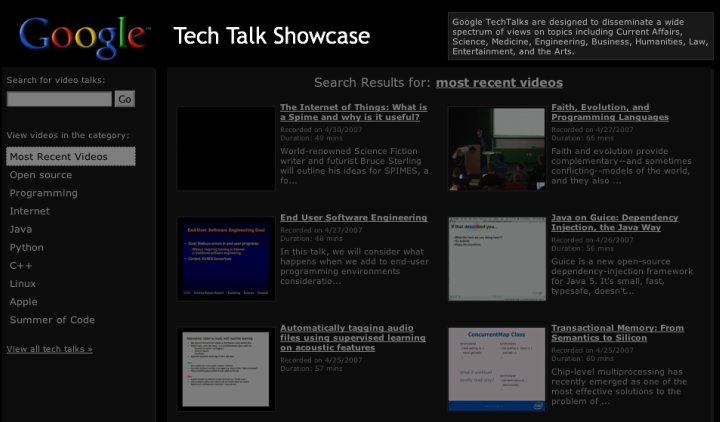
I wanted to build a nicer landing page for the tech talks, and built it entirely with the AJAX Search API.

The following is a mockup of what this can look like. If we launch it on Google Code it will have to be white, but I was having a black day:

techtalkshowcase.jpg

If you view-source you will see how it is powered by GvideoSearch, a nice low level JavaScript object that lets you programatically search our video content.

showcase.js has the JavaScript meat, and you will see that there isn’t much too it. In fact, the majority of the code is for setting up a lightbox overlay for when you play the inline videos, and other ugly DOM things.

There is a common misconception that the AJAX Search APIs are these widgets that you put on a page. In fact, the APIs give a full set of building blocks from the low level searchers such as GvideoSearch, to controls that wrap the searchers such as GSvideoSearchControl, and finally to wizards that will generate widgets for you.

Until I dove deep into the APIs I had no idea how much you could do, and it is fun to come up with use cases that allow me to build on top of them. You will see in this example that I have full control on the layout itself, and you do too.

Apr 19

Unobtrusive JavaScript, Microformats, and the Google AJAX Feed API

Ajax, Google, Tech 12 Comments »

I have been having a lot of fun working with unobtrusive JavaScript, and using microformats to define rich behaviour that both degrades nicely, and keeps the code clean.

Since we just released the Google AJAX Feed API, I can discuss one little example.

I wanted to create a Feed Billboard that would show entries from friends feeds in a small portlet. Kinda like the Feedburner chicklet, but using JavaScript, and able to access more than just your burnt feed.

The end result was the Feed Billboard, with an example here:

The microformat

The interface to building the billboard is an HTML unordered list. For example, the above example is:

<ul class="feedbillboard access:randomly">
<li><a href="http://code.google.com/">Google Code</a> (<a href="http://code.google.com/feeds/updates.xml">RSS</a>)</li>
<li><a href="http://ajaxian.com/">Ajaxian</a> (<a href="http://ajaxian.com/feed">RSS</a>)</li>

<li><a href="http://almaer.com/blog">techno.blog(Dion)</a> (<a href="http://almaer.com/blog/index.xml">RSS</a>)</li>
</ul>

The magic class is feedbillboard, and there are a bunch of options that you can pass in that cheekily use the form of name:value. This is cheeky as that it isn’t polite to use ‘:’ in a CSS class name. I have tried to make this microformat/mini-DSL as english-y as possible.

The current full options would contain feedbillboard numberofentries:4 access:randomly timeinterval:4.

You can guess why the unordered list was chosen. If JavaScript isn’t allowed to come out and play, your widget will show your friends and their feeds, which isn’t half bad as a billboard anyway. If the C-LISP is enabled, it will rip through looking for feedbillboard, and replacing them with fancy-pants versions.

A bit about the implementation

The meat of the operations is split between two classes: FeedBillboardFinder and FeedBillboard.

The job of a FeedBillboard is to represent a single billboard widget. It will replace the UL with the real widget, will go out and get the feeds using the Google AJAX Feed API, and will choose which element to rotate too next.

Getting the feeds using the Feed API is so simple. If you take a look at the load call you will see:

load: function(feedSettings) {
var self = this;
new google.feeds.Feed(feedSettings.rssURL).load(function(result) {
if (!result.error) {
self.feedOutput.push(result.feed);
}
});
},

In one fail swoop, we asynchronously grab a new feed out of the feedSettings bucket. The asynchronous piece is important here. You wouldn’t want to have to load all of the feeds before you started to show entries would you. What if it was taking awhile to get one of the feeds? As soon as the first feed is read the billboard can get to work, and as new feeds are loaded the pie gets bigger.

One of the fun little problems was how to loop through the entries (when not using random access of course). The FeedBillboard keeps track of the number of entries it has shown, and given that number, you need to pick the correct entry. For example, if you have four feeds each with four entries, then if you are told “five” you will return the first post from the second feed added to the system. I took the easy way out and created a hash lookup that returns the matrix:


this.placement[count++] = { feed: i, entry: j };

The FeedBillboardFinder handles the microformat. You could create FeedBillboard objects directly to create the widgets, but the finder will go out there hunting down the ul’s and build FeedBillboard objects:

find: function() {
var count = 0;
document.getElementsByClassName('feedbillboard').each(function(node) {
FeedBillboardFinder.build(node, ++count);
});
},

There are a lot of improvements to be made. I would like to have a headline mode that shows a configurable number of headlines instead of one headline and a snippet, and I need to do a better job with consistent sizing.

Conclusion

It is great to be able to very easily create unobtrusive components, and fun to try to come up with a nice microformat. The Google AJAX Feed API made this entire thing possible, and so easier to work with.
Apr 13

Calling and comparing the UI for GOOG-411

Google, Tech No Comments »

The UI for voice systems often bugs me, so after the GOOG-411 launch I wanted to see if the lean, user driven UI of other Google products had made it through to this one.

Below I compare it to another 411 solution in the same space, and whatever happens, I think it is safe to say that 411 service will be changing for the better because of the Google offering. I admit to being someone who: a) rarely uses 411, and b) normally just dials 411 itself.

One related observation is that using letters for numbers (e.g. GOOG-411, FREE-411) can be great, but if you are on a real keyboard such as a Blackberry, it is a pain in the backside as you have to work out the number!

Here I am sitting in a garden next to a lemon tree playing with my phone:

ps. I forgot to mention that I tried to get Carrot Top to do this youtube video but he wanted to charge $70k for it.

Apr 11

Blogger supports enclosures via the GData API

Google, Ruby, Tech 6 Comments »

I am producing a new podcast and since I was using Blogger for the podcast blog, I really wanted to be able to throw enclosures right into the feed.

I had thought that Blogger didn’t support enclosures, but I found that this wasn’t the case. Although there isn’t an area in the UI to upload files to a blog post, the GData Blogger Data API does allow you to attach an enclosure to an entry.

Since the GData API works with Atom feeds, you will need to attach a correct link tag (as opposed to an <enclosure> tag from RSS) to the blog entry that you want to attach the podcast.

E.g. a simple enclosure can be added as

<link rel=”enclosure” type=”audio/mpeg” title=”MP3″ href=” http://foo.com/episode2.mp3 ” length=”19283″ />

You can also add other types such as BitTorrent.

To implement adding an enclosure I created a ruby script to do the work called addenclosure.

This script takes a bunch of arguments:

  • Blog ID: If you don’t know your blog id, simply go to your feed at http://yourblog.blogspot.com/ /feeds/posts/default and look for the id field. It should look something like tag:blogger.com,1999:blog-4808741160899251111
    . The numbers are the id that you need to plug in (4808741160899251111)
  • Entry ID: To find this id, you can either look in the same feed and hunt for the correct entry: <entry><id>tag:blogger.com ,1999:blog-4808741160899251111.post-5004114743910071111</id>... and the numbers after the ‘post-’ are for the entry (5004114743910071111). You could also view the entry itself and look for the comment feed ( http://yourblog.blogspot.com/feeds/5004114743910071111/comments/default ) or various post links, that have the post id.
  • Enclosure URL: You need to tell the script the location (URL) of the podcast itself ( e.g. http://foo.com/episode2.mp3)
  • Enclosure Length: How big is that file? Let me know.

I fully admit that it is a little ugly to have to scrounge for the various IDs, but once you run this script you can visit the feed to see a brand new enclosure link. Throw this into a podcatcher such as iTunes and Bob’s your Uncle.

How the script works

The script itself uses my, alpha quality, GData Ruby library. The library was first factored out of gspreadsheet and consists of:

  • GData::Base: The base library knows how to talk GData, including being able to authenticate to Google and use X-HTTP-Method-Override for HTTP methods such as PUT. It has the low level GET, PUT, POST API that other service specific libraries will build on
  • GData::Blogger: The Blogger code knows how to speak to blogger and get and modify feeds and entries. It includes high level methods such as add_enclosure(..)
  • GData::Spreadsheet: Likewise, the spreadsheet module has high level methods such as add_to_cell and evaluate_cell

Along with the library, scripts are also packaged to show the library usage:

  • addenclosure: what we have been talking about
  • bloggerfeed: view the entire feed
  • gspreadsheet: run formula
  • removeenclosure: nuke an enclosure from an entry

In the future I want to work with more GData folk to have a fully fleshed out API for Ruby-folk to talk to any GData service. A couple of people have already contacted me asking to add features ( e.g. high level support for the new Picassa APIs).

Mar 13

Hpricot is great

Google, Ruby, Tech 1 Comment »

I used to cringe at having to work with XML. These days there are nice ways to work with it… from E4X to Groovy builders, and of course with Hpricot.

I wanted to take my OPML file and grep out the URLs so I could create a custom search engine that would search over my buddies (from the OPML file).

It is basically a one-liner with Hpricot:

require 'rubygems'
require 'hpricot'

filename = ARGV.first || 'mysubscriptions.opml'

doc = open(filename) { |f| Hpricot(f) }

(doc/"outline[@htmlurl]").each do |url|
puts url.attributes['htmlurl']
end

In my case the OPML file is just sitting on disk there, but I could easily have it grab the file from a URL:

require 'open-uri'
doc = Hpricot(open("http://almaer.com/mysubs.opml"))

Not bad until we implement JsDOM ;)

Oh, and here is my nice custom search engine:

Google Custom Search