Aug 21

Why opening up a project while it is beta is a good thing.

Google, Tech No Comments »

As you may have heard, Zoho Writer was released, which is the first phase for Zoho to offline their office suite.

Michael Arrington said:

Zoho, which competes head-on with Google Docs & Spreadsheets, managed to launch offline functionality on their product before Google did. The fact that they are using Google software to do this makes the story somewhat ironic.

I actually see this as a good thing. By opening up Gears early on in the process, through open source, everyone gets to play. It is a big show of faith for Gears. Of course, Google could have held Gears back and released it at the same time as a bunch of offline Google applications, but that isn’t the point. Gears is about making the Web a better place through offline, and we want the Web to be able to benefit.

That is why I am excited to see Writer join the list of developers that use Gears.

Jul 17

Forget the Feed URL

Ajax, Google, JavaScript, Tech No Comments »

Having to type in feed URLs, or grep them from view source (as you don’t use the browser specific system) can be a pain.

The Google AJAX APIs team has created a simple way to find feeds, and to locate feeds in a URL.

findFeeds will do a Google search and return entries and feeds related to the search.

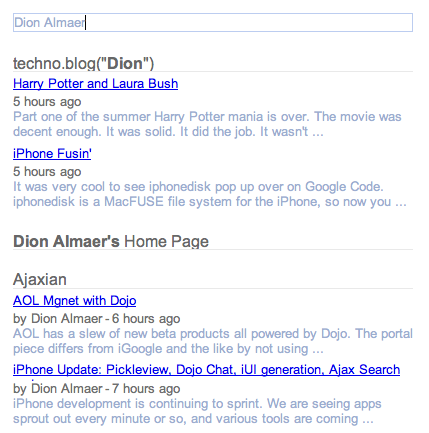
Here is an example at work:

findfeeds.png

The code you will write will look like this:

google.feeds.findFeeds(query, function(result) {
var el = document.getElementById("feedControl");

if (result.error || result.entries.length <= 0) {
el.innerHTML = 'No Results Found';
return;
}

// create a feed control
var feedControl = new google.feeds.FeedControl();

// Grab top 4..
for (var i = 0; i < 4; i++) {
feedControl.addFeed(result.entries[i].url, result.entries[i].title);
}

feedControl.setLinkTarget(google.feeds.LINK_TARGET_BLANK);
feedControl.setNumEntries(2);
feedControl.draw(el);
}

lookupFeed takes a URL and returns the feed. E.g.

function newSlideShow(user) {
showStatus('Resolving feed for ' + user);
var url = 'http://www.flickr.com/photos/' + user;
google.feeds.lookupFeed(url, lookupDone);
}

function lookupDone(result) {
if (result.error || result.url == null) {
showStatus('Could not locate feed for user');
return;
}

showStatus('Found Photo Feed');
// We need to switch over from Atom to RSS to get Yahoo Media for slideshow..
var url = result.url.replace('format=atom', 'format=rss_200');
showSlideShow(url);
}

Very nice indeed.

Jun 28

Google Gears Manifest Generator

Google, Tech 1 Comment »

One of the modules that makes up Google Gears is the LocalServer that allows you to capture web resources so they can be served up when a user is offline.

The ManagedResourceStore component allows you to declare which resources you want the LocalServer to capture for you. You use a simple JSON manifest file that you can maintain with any text editor.

However, if your application gets large (lots of resources) you may not want to manage it in this way, so I created an open source Ruby library that allows me to generate this file given some rules:

For example, this will generate the manifest as a json string, and create entries using the current directory and sucking in everything apart from files starting with a ‘.’.

json = Google::Gears::LocalServer::Manifest.new do |m|
m.version = 'MyNewVer'
m.add_entry({ :url => 'main.html', :src => 'foo.html' })
m.add_extra_info :to => 'main.html', :redirect => 'foo_redirect.html'
m.find_entries :in => '.', :ignore => Google::Gears::LocalServer::Manifest::LEADING_PERIOD
end

find_entries is the real meat here:

# Defaults to '.'
find_entries :ignore => Google::Gears::LocalServer::Manifest::LEADING_PERIOD

# Only capture HTML pages
find_entries :include => '\.html'

# Look in the resources subdirectory, but use the URL 'static'. This is useful if your directory on disk doesn't match your URLs
find_entries :in => 'resources', :root => 'static'

Once you have created the entries, you may want to add some metadata to a few of them. This is where add_extra_info comes in:

# Find the 'main.html' entry and add a redirect. You can also use a different :src or :ignore_query.
add_extra_info :to => 'main.html', :redirect => 'foo_redirect.html'

You can also create a manifest object (instead of using the block version) if you need to add a few things, get the output, add a few more, etc etc.

If you find yourself not wanting to manage your Manifest file, check out the project.

Jun 27

Google Gadget Ventures

Google, Tech No Comments »

Want to build a business around Google Gadgets? Google is looking to help with Google Gadget Ventures:

Google Gadget Ventures is a new Google pilot program dedicated to helping developers create richer, more useful Google Gadgets. Inspired by the success of iGoogle, which has been driven by the creation by 3rd-party developers of a broad range of gadgets, Gadget Ventures provides two types of funding:

  1. Grants of $5,000 to those who
Jun 21

Base diving with Google Gears

Ajax, Google, Tech 1 Comment »

I have been having a really good time building some apps with Pamela Fox. We are now creating a series of howto articles, and the first one is out: Base diving with Google Gears which shows a simple application that lets you search Google Base, and keep the info offline.

Many more fun things are coming, including some games ;)

Jun 13

GSpreadsheet: JavaScript Helper for Google Spreadsheets

Google, JavaScript, Tech 10 Comments »

I am finding that more and more little applications that I have use Google Spreadsheets to store some data that I use in an Ajax app. After using the core API, you find yourself looking at fun code like foo.$t.

Most of the time I want a simple tabular view over a spreadsheet that has the first row as a header, and other rows as the data.

To do this I created GSpreadsheet which lets me do:

GSpreadsheet.load("pSYwzniwpzSFnt8Ix3ohQQA", { index: 'firstname' }, function(gs) {
// display all
document.getElementById("displayall").innerHTML = gs.displayAll();

// show one
var row = gs.select('Bob');
document.getElementById("onebyindex").innerHTML = row.email;

// show by row number
row = gs.select(1);
document.getElementById("onebyrownum").innerHTML = row.email;

// display one row
document.getElementById("displayrow").innerHTML = gs.displayRow('Bob');
});

You will see that you call GSpreadsheet.load(..., callback(takesAgsObject))

This is because of all of the asynchronous work going on. To get the JSON from the Spreadsheet back end you are always using the json-in-script output, and getting it by dynamically creating a script tag. The real dirty hack in this code is how to do that, and have the callback give you back the info to create the new object. To do this, I am creating a static method on the fly with eval() and calling into it passing in the right info. It’s real ugly:

GSpreadsheet.load = function(key, options, callback) {
if (!options['worksheet']) options['worksheet'] = 'od6';
var worksheet = options['worksheet'];

var callbackName = "GSpreadsheet.loader_" + key + "_" + worksheet;
eval(callbackName + " = function(json) { var gs = new GSpreadsheet(key, json, options); callback(gs); }");

var script = document.createElement('script');

script.setAttribute('src', 'http://spreadsheets.google.com/feeds/list/' + key + '/' + worksheet + '/public/values' +
'?alt=json-in-script&callback=' + callbackName);
script.setAttribute('id', 'jsonScript');
script.setAttribute('type', 'text/javascript');
document.documentElement.firstChild.appendChild(script);
}
Jun 04

GearsDB: A simple abstraction for the Google Gears Database

Ajax, Google, Tech 2 Comments »

I have been having fun playing with Google Gears. As I build applications with it (such as RSS Bling) I find myself repeating a few things on the database side.

Just wanting objects back

Instead of working with result sets, I just want to think in objects / hashes coming back.

To grab one fella I can:

bob = db.selectRow('person', 'id = 1');

or

bob = db.selectOne('select * from person where id = 1');
bob = db.selectOne('select * from person where id = ?', [1]);

console.log(bob.name); // write out 'Bob'

It is more interesting when you return back a bunch:

db.selectAll('select * from person where name like ?', ['bob%'], function(person) {
document.getElementById('selectAll').innerHTML += ' ' + person.name;
});

The callback gets passed in an object representation of the row. You can get back all of the results, but you should favour dealing with a row at a time instead of waiting around.

Inserting and updating

You often have an object that you want to fling in. This is easy to do via:

var bob = {name: 'Bob', url: 'http://bob.com', description: 'whee'};
db.insertRow('person', bob);
db.insertRow('person', bob, 'name = ?', ['Bob']);

The last form will only do the insert if another Bob isn’t already in there.

You can then update via:

db.updateRow('person', person); // assumes that 'id' is the id, else you pass it in

or force the row in via insert or update (if it exists update, else insert):

db.forceRow('person', person);

To round things off you can db.deleteRow('person', bob);, db.dropTable("person");, and db.run('create table....');.

run() is a simple wrapper around execute() that handles logging and such for you.

To get started with the database you just need to:

var db = new GearsDB('gears-test'); // db name

All of this is in an open source project gears-dblib, and you can see simple tests/examples running.

The project also runs with Firebug Lite so you can play with simple console.log type things even if you don’t have Firebug installed (e.g. want to test on IE). Very nice indeed.

Of course, someone will rewrite ActiveRecord and Hibernate in JavaScript shortly to work with Gears ;)
Jun 01

Google Feedburner: I am really excited about this one

Google, Tech 5 Comments »

The rumours have been out for awhile, but it is great to see that Google has bought FeedBurner.

I am actually really excited about this. There are so many natural fits:

  • Google Analytics – FeedBurner stats
  • Google Reader – FeedBurner
  • Blogger – FeedBurner: this is going to be really nice!
  • Ads – Ads

Congrats to the FeedBurner team, and welcome. I am now going to use FeedBurner for the Google Developer Podcast :)

May 31

Waking up to the green, red, and the throbbing

Google, Tech 2 Comments »

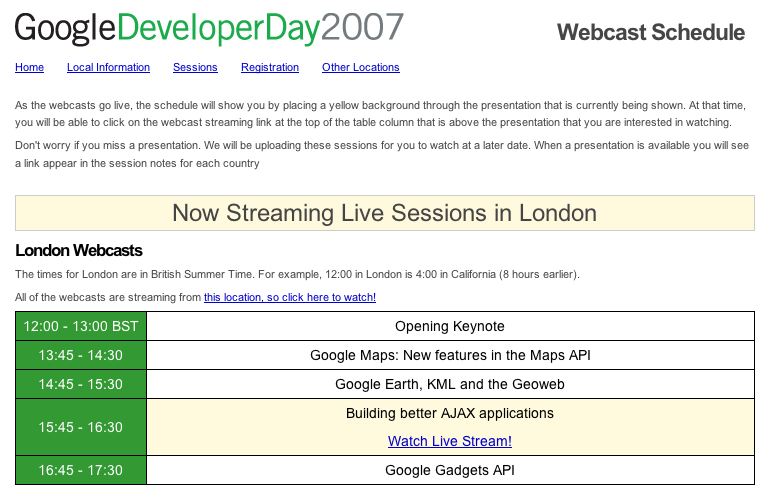
It was really cool to wake up and check the site to see where we are in dev day:

throbbing.png

livestream.png

May 31

Google Developer Day: The website using our tech

Google, Tech 4 Comments »

I have been very much heads down for Google Developer Day.

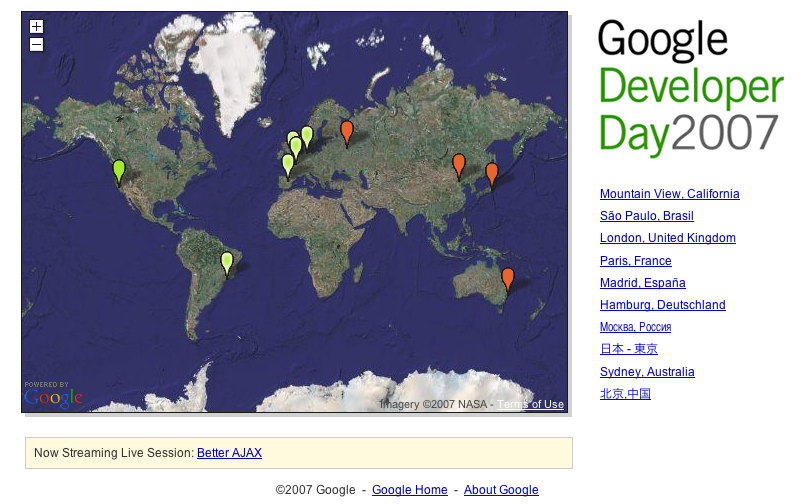
We finally got to launch the website, which uses:

  • Google Maps API: Of course
  • Google AJAX Feed API: Showing blog entries on the location home page, and in a lightbox on the main page
  • Google Picasa API: Showing photos on the location pages
  • Google Spreadsheet Data API: We are using this as a pseudo database that people at the various locations use to control their site

There are fun hacks galore, such as using cron to update a google spreadsheet with the current time in various locations, and then accessing that spreadsheet from JavaScript to get the data.

The best part though, is the throbbing:

I want to say thanks to my partner in crime on this. Pamela Fox. She may be scared of PacMan, but she can sure hack JS :)