Mar 07

BMW Assist: Send map to car

Google, Tech 17 Comments »

Very cool integration of maps and car navigation. I am currently always finding the address on the web or maps mobile, and then typing it into the car when I get there.

They just need to get Prius Assist and even more Google engineers will be on the case ;)

Mar 01

Building a Desktop Shell around a Web page for Apple Mac OS X with Cocoa

Apple, Google, Tech 7 Comments »

gmailgcaldock

As we use web applications more and more on core tasks (email, calendar, office) I have found that I sometimes get frustrated when some annoying piece of Flash on a random web page brings down my entire browser process (including the web applications that I care about).

Some browsers allow you to run multiple instances in their own world. For others you could hack around that by having multiple copies of the browser. I have gone through phases of compartmentalizing my work on various browsers.

  • Development work on a Firefox instance because I want to use Firebug
  • Fluffy browsing on WebKit nightly (to try to be a tester too)
  • Apps in Safari

My main problem with this is that I normally also want Firefox for certain apps because I make heavy use of Greasemonkey. I couldn’t do Gmail without at this point (let alone the other sites).

I am used to having my calendar on window 2 of VirtueDesktop (iCal). I am not experimenting with Google Calendar, and I want to do the same. Instead of just having an instance running Google Calendar over there, I decided to try to built a wrapper around a browser component.

I am trying this in both Mac OS X Cocoa, and Adobe Apollo.

Today we will discuss the OS X version.

In theory the hard work is definitely already done for us. The WebKit component is nicely done for us, and the documentation is thorough.

I decided to try to follow the “Multiple Windows” example:

You can implement multiple windows in a Web Kit application easily by beginning with a Cocoa document-based architecture as follows:

  1. Using Xcode, create a document-based Cocoa application. Your new project file will already contain the needed classes and interface files to support multiple windows (namely MyDocument.h, MyDocument.m, and MyDocument.nib).

  2. Add the Web Kit frameworks to your project.

  3. Open MyDocument.nib using Interface Builder and drag a WebView from the Cocoa

Feb 14

gspreadsheet: running formulas from the command line

Google, Ruby, Tech 8 Comments »

I am spending time hacking away on Google APIs to really see what it is like.

I remember seeing the Google Spreadsheet Data API that allows you access to spreadsheets in Google Docs & Spreadsheets.

There is a full API that gives you access to create and modify spreadsheets even to the level of REST requests for each cell.

I was also surprised at the number of formulas available.
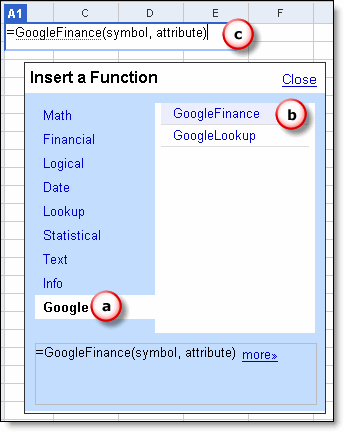
Suddenly I realised that I could create a spreadsheet and use a cell to do various calculations for me, so I hacked up a ruby script to do this:

% gspreadsheet [insert formula]
e.g.
% gspreadsheet ‘GoogleFinance(”GOOG”)’
467.3
% gspreadsheet ’sin(0.2)’
0.19866933079506

Behind the scenes the script used the Google APIs to put the formula in a cell, and then read from that field to get the calculated output.

Writing the script

To get this all working I just had to:

  • Find a Ruby library to the Google APIs
  • Work out how to authenticate using the Google ClientLogin API
  • Work out the location for the REST requests
  • Work out why I was getting a 404 error

Find a Ruby library to the Google APIs

I was surprised to not be able to find a nice API to Google Spreadsheets. I did find this script that helped a lot though.

I am working on packaging a gdata-ruby module that I will place in rubyforge soon. It will start out with just APIs such as ClientLogin and Spreadsheets, but hopefully we can grow it to cover more of them.

Work out how to authenticate using the Google ClientLogin API

The key to authentication is using the ClientLogin API to get the auth token, and hiding it away in a member variable so other requests will add it to the headers:

response = Net::HTTPS.post_form(https://www.google.com/accounts/ClientLogin,
{'Email'   => email,
'Passwd'  => password,
'source'  => "formula",
'service' => 'wise' })
@headers = {
'Authorization' => "GoogleLogin auth=#{response.body.split(/=/).last}",
'Content-Type'  => 'application/atom+xml'
}

Work out the location for the REST requests

To find out the location for feeds it helps to GET the feeds themselves and look for the post URLs in link tags.

To get the A1 cell (a.k.a. R1C1) you would use something like:

/feeds/cells/#{@spreadsheet_key}/1/#{@headers ? “private” : “public”}/basic/A1″

  • The spreadsheet key is the magic key for each of your spreadsheets that looks something like: pSYwzniwpzSFfn0KFRg9oWB.
  • The 1 right after that is the worksheet id.
  • The private/public check get changed in this based on if the code is authenticating you or not (and if you have allowed public access to the spreadsheet in question).
  • The ‘basic’ is a projection value. basic means just basic atom. ‘values’ means a full feed minus formula data, and ‘full’ means a full read/write feed with everything
  • Finally we give the A1 cell info

For reading this cell we just used basic projection, but for writing data into the cell we need to use the URL:

“/feeds/cells/#{@spreadsheet_key}/1/#{@headers ? ‘private’ : ‘public’}/full”

Notice that we use full here (as we want full access) and yet we do not put in the cell in question. This is because we will POST or PUT an entry piece of XML:

<entry xmlns='http://www.w3.org/2005/Atom' xmlns:gs='http://schemas.google.com/spreadsheets/2006'>
<gs:cell row='1' col='1' inputValue='=sin("0.2")' />
</entry>

This has the row and column and input value (in this case a formula).

Work out why I was getting a 404 error

At first I was getting 404 errors when I posted data up. The reason was that I wasn’t putting the full namespaces in the entry doc:

<entry xmlns='http://www.w3.org/2005/Atom' xmlns:gs='http://schemas.google.com/spreadsheets/2006'>

vs.

<entry>

XML always seems so frustrating and when these things happen. Really? You couldn’t work out what to do without that namespace? Really? Nice and forgiving. Give me JSON or YAML ;)

The full code

It was fun to be able to be productive with these APIs immediately because they are just basic REST actions that just require Net::HTTP to access. I will work on getting some nice helper libraries so the low level stuff doesn’t even need to be done.

For those that are interested, here is the quick hack as one script file. The code is ugly… I am sorry. The library version is a lot nicer (and is just a few lines of code after the require’s). You can also get weird behaviour if you use single ticks. For now use ” and all is well.

gspreadsheet

#!/usr/bin/env ruby

require 'net/http'
require 'net/https'
require 'uri'
require 'rubygems'
require 'hpricot'

#
# Make it east to use some of the convenience methods using https
#
module Net  class HTTPS < HTTP
def initialize(address, port = nil)
super(address, port)
self.use_ssl = true
end
end
end

class GoogleSpreadSheet
GOOGLE_LOGIN_URL = URI.parse('https://www.google.com/accounts/ClientLogin')

def initialize(spreadsheet_key)
@spreadsheet_key = spreadsheet_key
@headers = nil
end

def authenticate(email, password)
$VERBOSE = nil
response = Net::HTTPS.post_form(GOOGLE_LOGIN_URL,
{'Email'   => email,
'Passwd'  => password,
'source'  => "formula",
'service' => 'wise' })
@headers = {     'Authorization' => "GoogleLogin auth=#{response.body.split(/=/).last}",
'Content-Type'  => 'application/atom+xml'
}
end

def evaluate_cell(cell)
path = "/feeds/cells/#{@spreadsheet_key}/1/#{@headers ? "private" : "public"}/basic/#{cell}"

doc = Hpricot(request(path))
result = (doc/"content[@type='text']").inner_html
end

def set_entry(entry)
path = "/feeds/cells/#{@spreadsheet_key}/1/#{@headers ? 'private' : 'public'}/full"

post(path, entry)
end

def entry(formula, row=1, col=1)
<<XML
<?xml version='1.0' ?>
<entry xmlns='http://www.w3.org/2005/Atom' xmlns:gs='http://schemas.google.com/spreadsheets/2006'>
<gs:cell row='#{row}' col='#{col}' inputValue='=#{formula}' />
</entry>
XML
end

def add_to_cell(formula)    #puts entry(formula)
set_entry(entry(formula))
end

private
def request(path)
response, data = get_http.get(path, @headers)
data
end

def post(path, entry)
get_http.post(path, entry, @headers)
end

def get_http
http = Net::HTTP.new('spreadsheets.google.com', 80)
#http.set_debug_output $stderr
http
end
end

if __FILE__ == $0
formula = ARGV.first || 'sin(0.2)'

gs = GoogleSpreadSheet.new([INSERT YOUR SPREADSHEET KEY])
gs.authenticate('[email protected]', 'your password')
gs.add_to_cell formula
puts gs.evaluate_cell('A1')
end
Feb 14

Spanning Sync: iCal and Google Calendar

Apple, Google, Tech 2 Comments »

I was ready to get frustrated. I wanted it all.

If an event is sent to my Gmail account I want to be able to just click ‘add it’ and see conflicts.

I want to have iCal up to date for offline / nice rich app use.

I want to be able to create events in iCal OR Google Calendar and for everyone to be happy.

I was ready to sigh and just have iCal as a read-only offline view, or to not use Google Calendar, when I stumbled on Spanning Sync which does the hard work to get true two-way syncing. It is still in beta (which is worrying with a tool that can nuke your data) but it is working nicely, and backups are happening frequently.

Jan 08

100 Best Companies

Google, Tech No Comments »

I am often the first to make fun of these lists.

It is nice to hear that the company you are about to join is top of a 100 Best Companies to Work For 2007 list.

Context is a huge thing, and it may be the worst company to work for depending on what your criteria are. I am excited to get going.

It is interesting to see the results mashed up nicely too:

topcompanymashup.png

Jan 04

New Gmail Mail Fetcher Feature

Google, Tech 2 Comments »

When I first heard that Gmail now lets you fetch mail via POP I wondered why it was important.

For a long time I got around this issue by forwarding email to a gmail account.

E.g. either:

This has worked fine until recently. When gmail put foo.com on the blacklist.

At this point all email being forwarded over was getting rejected. No more email.

The new mail fetcher feature means that this will never happen again. Ergh.

Jan 02

Gmail Mobile Feature Request: Phone number calling

Google, Tech No Comments »

You are in the car. You get an email via Gmail for Mobile that has conference call dialin info for that important call that you don’t want to miss.

Do you:

  • a) Start speaking the number outloud repeatedly to try to remember it. You may ask others in the car to help out if you have friends (hey Bob, remember 414)
  • b) The phone number is underlined and you can simply click on it and gmail kicks out to the phone to make the call.

For the finishing touch, it would grok participation codes and “,,,,,,928496″. Else you end up having to remember that darn code too. The Zimbra-esque context specific features like this are real winners IMO.

Dec 31

Google in 2007

Google, Tech No Comments »

People are talking about a sour note on Google as we end the year.

When I look at the items that people are talking about, many of them do not seem like a huge deal to me. Granted, I wouldn’t want to lose my email.

As I see things as a new Google guy joining the game, I get excited to see integration, and true mashups happen.

With integration we are finally seeing the myriad of services work together more and more.

With mashups not only Google engineers get into the game. This is truly exciting. There will always be MANY more coders outside of the googleplex than within, and we get to see their great work as they come up with great ideas.

Here is to some fantastic product launches from Google and beyond in 2007.

Dec 26

I am now a Noogler

Google, Tech 15 Comments »

I am really pleased to be able to post that I am soon to be a Noogler.

I am taking up a new position with Google’s Open Source program, and will be working with a growing open source community.

This is exciting to me as I love developers, and I have a passion for community. Being able to help out developers is going to be a dream.

It is interesting to accept this position at this time of year, as one of my tasks will be helping to see useful code and products within Google, and open sourcing that work for the world at large to use. That feels very much like being Santa to me!

I will be leaving a fantastic company in Seeking Alpha, and will truly miss working with Rob Sanheim and Jim Halberg.

If you want to work on a great Rails platform that needs to scale, maybe you want to give them a ping.

Dec 25

Gmail for Desktop: Come on Romain

Google, Tech 1 Comment »

I really like Gmail. The last piece of the pie for me is offline mode.

Since Romain will be heading to Google after his done with school, maybe he can work on beautiful wrapper in Swing? (Come on Romain! :)

Or maybe someone will do the wrapper with Adobe Apollo?

I don’t think that Google will be buying Jetbrains, although you never know.