May 26

Icky? Using strings to add legacy features in languages

JavaScript, Tech 6 Comments »

strings

A contingent in the JavaScript community is pretty much solely focused on securing the language. Security is always important, but even more-so when you are dealing with a language that runs in a user agent to run the Web.

Whenever you try to add a feature to a language you are instantly dealing with legacy and backwards compatibility.

Perl has a strict mode that is very popular in the community. I remember projects where if I checked in a module without use strict; and -w I would get beaten up.

Back to JavaScript, how can we apply stricter rules on what we do in the JavaScript runtime after the face? One solution that the ECMAScript Edition 5 folks came up with is borrowing use strict but since they couldn’t add it to the language itself, they have you put it in a string "use strict";. You can place it at the top of the file, or even as the first statement in a function.

I find it incredibly ugly, yet pragmatic. It works.

However, then I saw some new items:

"use strict,cajita";

And currently you can’t switch the order around? It looks for absolute keys? That seems a little crazy. Surely all of these should be possible:

"use cajita,strict";
"use strict,cajita";
"use strict";
"use cajita";

Then this little pragmatic hack starts to get real messy. I start to joking imagine a ludicrous world like this:

(function() {
  "use strict";
  "use let"; // let's get let in there!
  "use cramda"; // I love Alex's cramda, let me use it!
  "use e4x"; // XML inline. Screw templates
 
  // If I see a var with the same name, REALLY use let instead
  "let x;"
  var x;
 
  // Now I can use the cramda
  "x = #(a, b) { "\
  " ... logic here ... "\
  "};"
 
  // And the let... ironic that it is in a string now
  "let y = <xml></xml>";
 
  // Annotations come to JavaScript!
  "@Serializable"
  function someThing() {}
})();

I like to think of myself as pragmatic, but why do I feel so cranky about "use strict";? :)

May 20

Write Once, Pwn Everywhere…. oh and Jetpacking around

Java, JavaScript, Tech with tags: 3 Comments »

By now you have probably read about the critical Java vulnerability and how easy it is to take over a machine from a web page via a Java applet.

Apparently, Sun fixed it fairly quickly, but even then some people say their fix was too specific and thus there are still problems. Apple on the other hand, were not diligent and are still yet to provide a fix. Ouch.

Painful news as JavaOne approaches and Sun tries to push JavaFX. I was trying to think of a Java applet that I have used (knowingly) in the recent past, and I think the only candidate is the Facebook photo uploader.

I have been watching some research for a talk on JavaFX and I am really torn. In theory, the Java platform is phenomenal and should be a great choice for doing this kind of development. The scene graph work in JavaFX is very nicely done, but the implementation seems to be a touch off in much of what I have seen. Scrolling causing the applet to go blank? Browser crashes? Ouch. But, JavaFX is new, and has a chance to get better. Their problem is that they are squeezed from both sides. The browser platform itself is accelerating quickly, and it has the advantage of being native. Once you go to plugin land you are competing with Flash with its large share and proven ability.

Getting webby

I find myself wanting to get more and more webby. This is why I was excited to work with the Jetpack project that we just launched today at Mozilla Labs. Being able to extend the browser using Web technology itself is going to open the door for more playing. People have created 7000 addons for Firefox alone, but as someone who has done a touch of XUL, I am happy to stay in my familiar territory of HTML, CSS, JS. Jetpack has just been born, and is incredibly early stage, but I can’t wait to see it grow and get the APIs that people want in a secure extensible model.

You will see a lot of Bespin in there too. Below is a screencast where I create a Jetpack feature on the fly (no reloads!) using Bespin, and once you install Jetpack it embeds the puppy into the tutorial and the developer area too. Much more than can be done though!

May 15

Bespin gives you some Pie and will do more Web Work for you

Bespin, Tech, UI / UX with tags: , , 2 Comments »

There have been a couple of things that have been really fun to see and work on in Bespin recently.

First up, is our new Pie Menu that Ben just posted on. The short reasons why I like the new look are:

  • Giving as much area to your code as possible. Why show a command line all the time when you only need it when you run commands? Why have headers and subheaders?
  • Pushing the boundaries on subtle animated effects that full screen change the bits “on the glass”

The implementation is interesting too. We took the nice animation and easing functions that Dojo already provides, but instead of it powering the DOM, we hook in and have it power our Canvas animations instead.

For example, to show an incoming animation we use a fadeIn effect with the backOut easing. In onAnimate we use the opacity setting that the animation provides to render our own animation:

var anim = dojo.fadeIn({
    node: { // fake it out for Dojo to think it is changing the style :)
        style: {}
    },
 
    duration: 500,
    easing: dojo.fx.easing.backOut,
 
    onAnimate: function(values) {
        var progress = values.opacity;
        renderPie(progress);
    }
}).play();

Here you can see it in action in video form:

Or, go to the live sample.

We are excited to pump up the “fun” in the UI (with options to tone it down of course). Once nice side effect is that the editor component will have this all baked in, so where ever you see a Bespin, you will be able to access the features you want.

Web Workers; Not having them do too much

Malte Ubl continues to do much appreciated interesting work for the Bespin project. His facade around Web Workers is good stuff.

Since we are trying to push the boundaries of the Web hard, and giving some sexy to the UI, we need to make sure that we keep responsiveness as the highest priority, else users will go nuts.

Web Workers give us the ability to do a lot more in Bespin, but outside of the main browser “thread”. For example, doing real-time analysis on the code itself (e.g. setsyntaxcheck all). The problem that we ran into as we started to use Workers for this type of thing, was making sure that we weren’t killing the poor CPU. It is all well and good to fire off work to a Worker, but how many are running crunching? Malte has done work to make sure that the CPU fan doesn’t go nuts if you are doing a lot of work, and this is something that people will have to generally work around as they start to do more and more in their Web applications. It may be nice in the future to have a richer API that you could use to time slice your background tasks in a better way, as there is a lot of work that fits into the “kick this out and run at your convenience” mould.

Malte recently posted on how added support for the Bespin event loop into the Workers themselves. This is really nice as a Bespin developer as you can use the same publish/subscribe event metaphor, and the Worker facade handles it all for you, so you can talk across the boundaries. This hugely changes the amount of code that you have to write.

He also added support to help the asynchronous issues around “Can you fire this, but make sure that it only fires after foo, bar, and baz are all fired”. We will probably need to cache certain published events so we don’t get into a situation where you run this code after a main initialization event has fired, and thus you will never see it again.

Building a Web application using the latest and greatest HTML5 features is a lot of fun, and we hope that developers will like it too.

May 07

Who do I trust with my Identity? Erm, how about me? OpenID Weaves into the browser!

Tech 1 Comment »

my profile

I was incredibly excited to see Dan Mills of the Weave team show off OpenID in the browser thanks to Weave. I have wanted this from long before joining Mozilla and Dan has done a great job and doing something smart to make it happen.

The key to this all is the notion of “logging into the browser.” With the Weave project this is exactly what you do. Although the first service that Weave offered was the ability to sync bookmarks, all along it has been setup for much much more, and this is a perfect example of what the integration of a browser with a service backend can mean. One thing to note is that the Weave team really cares about privacy. The way the Weave system works right now is that the server has encrypted bits that it can never look at and understand. Instead, the client itself has the private keys that it needs to do the real work of holding the data, thus the browser, which is a natural extension to yourself the user, has full control. Think about how that differs from many services up in the cloud that make a lot of money off of your data (not that making money is bad!)

Back to the point at hand. Dan shows us how, once you are logged into Weave (and thus the browser) it will watch out for input’s that match the openid spec (openid_identifier, openid_url) and replaces it with a simple button that tells you that you can just log in! With a click on the button you get logged in automatically via Weave and you are on your way. Now Ben will be able to login to the Web 2.0 Expo site with one click instead of a series of nightmare steps. I think this is a pretty big deal.

Here it is in action:

Weave ID video screencast

In one fell swoop we get:

  • A usable login procedure that is trivial!
  • We don’t have to give trust to some third party site that we are giving the keys to the treasure too. Imagine if you used OpenID to login to your bank… would you trust your OpenID provider enough for that?
  • It is important to note that they also integrated the Firefox password manager into the mix. This means that you can set auto login right from the URL bar widget (with your password, as well as with OpenID!)

Of course, this is early days, as Dan says in his post

Keep in mind that this is just a prototype that we hacked together in a few of days, so there are some very rough edges. But we’re super excited about the possibilities already. When demoing it to people, they said things like “whoa! how did you do that?” and “I want this! How do I get it?”

The answer is, “soon”, or if you’re brave enough you can try it out right now by installing the latest Weave development snapshot. Please let us know what you think by posting on the Weave forum!

People and Places

Now we are getting the notion of “people” and Identity in the browser, and we also have “location” too, we are really getting somewhere. A great week!

Apr 28

Why I am excited for the iPhone Tablet? My son.

Apple, Tech with tags: 12 Comments »

iphonetablet

I am really excited to see what comes out of all of the iPhone Tablet rumors.

My son is three years old now, and knows how to use my iPhone. When using the computer, he instinctively started to think of it like the iPhone and would start to touch (and smudge!) the screen.

In the real world we touch things. We grab them. We manipulate them. We don’t often have an abstract notion of moving X to get Y.

Well, there is one that Sam knows well:
cranevendingmachine

These machines are pure evil when you have a young’un as they say “Daddy! Daddy! I want the pink one there!” and you have no chance in hell of ever getting it :)

Anyway, so Sam knows how to use multitouch, and is at an age where we are thinking about setting him up with his own computer. I don’t want to go through the pain to teach him a mouse and keyboard quite yet though, so what if there was a computer he could hold and could use his normal skills to access? The iPhone tablet could be that device!

As a side effect, it would also be the PERFECT home automation device, as well as an eBook reader, and a casual browser, and email checker, and the list goes on and on and on. The computer is changing in front of our eyes isn’t it.

Apr 24

Expectations: When to be automagic, and when it makes sense to be explicit

Tech, UI / UX with tags: 8 Comments »

expectations1

Have you ever noticed how the odd subtle feature here or there has profound impact? You can either inspire the “wooah, I can’t believe this app just did this!” for good or ill.

When I try new Twitter clients for example, the lack of a certain feature that I am used to can be the game changer for me. One simple example is expanding short URLs. I don’t want to see http://tinyurl.com/aaaa. I want to see http://bbc.co.uk/..... The fact that Twitter has the URLs part of the space limitation is their issue, not mine. I have a greasemonkey script that auto expands through the 301 redirect stack. When I tried Tweetie for the Mac, I looked for that feature. It gets a passing grade as you can turn on a feature that onclick does a popup with the full URL and “sure you want to go here?” Not bad, but not what I really actually want. The same goes for writing a message. Let me put in the full URL and if the message is too long, at that point auto shorten for me.

So, subtle features can make or break my enjoyment of a tool. On paper, two competing tools can look the same, but you find that one user base loves it, and another doesn’t. We have run into that a little with Git and Mercurial. On the surface they are both very similar DVCS, but subtle usage differences have resorted in very different reactions from our community. Also, the fact that Github exists (even though Bitbucket is doing well too) makes a huge difference.

One common problem that I constantly find myself grappling with is that I sometimes try to do too much “automagically” for the user. Surely, if I do all of this stuff for a user, they will love me! That is what computers should be doing, make them do less.

Although this is very true, and comes up in the Twitter examples above, and also in the fact that Google does an amazing amount of work behind the search box, it is a tricky balance.

One case that everyone has experienced is auto correction. I remember when this feature first appeared in Word and it drove me batty. I always felt like I was fighting the machine. No! Don’t capitalize that for me! I actually get that feeling with the iPhone to this day. The only reason that I keep autocorrect on in the iPhone case is that the keyboard is so fat-finger-constant that you have too. Still, a day doesn’t go by when I don’t type something that puts a capital letter in and then I have to back up to it and then remember to un-select SHIFT. Ugh. This is the kind of thing that makes your blood pressure up every time you do it, and you curse the fact that computers are still so dumb.

Autocomplete

I made the same mistake myself with Bespin and the command line. Early on I thought to myself:

“since I know all of the possible commands that the user can run, if they have typed enough that there is only one choice, automatically fill it in!”

This seemed great. No need to even hit the tab key! In practice though it was silly indeed. I found myself at a command line with value such as “listst” (as it auto filled to “list” but I didn’t notice and kept typing the end). With years of command lines under my belt, this new functionality went against all of my training. Having to do a TAB myself turned out to be a feature. It gave me control. What I did do though was add a filtered list of commands above the command line which gives the user information on what is available, and when you are down to one you know that TAB will get you there.

This made me realise the subtle difference between autocorrection, and say Google results when they suggest “Did you mean ‘Hilly Mit’?” If Google just thought it was so much smarter than you and changed the terms automatically you would be as frustrated as Word autocomplete. This way, you get control, and when Google is right (90% of the time) you are one quick click away from your answers. Of course, Google is so good at searching that even if your term was a bit off, often the result is right there anyway so you don’t even need that click.

Another more subtle feature of the command line that tries to be smart, is the fact that if you have typed in a command that has no other options, and the command requires a parameter, a space is automatically added. This means that you skip a SPACE BAR hit and you get a visual cue. In reality it normally means two spaces in between the command and first argument (which is of course fine and is no different). It is still enough to bug people.

Of course, this all pales in comparison to the grand daddy of all, Clippy. Clippy offered no value, was wrong 90% of the time, and was incredibly in your face. All pain and no gain.

In conclusion, whenever I think about adding a feature that seems borderline too smart I stop and think:

  • Is this too smart for its own good (like auto correct)
  • Would it be better to subtly give the information to the user so they can act on it (like Google search “did you mean?” and Google Suggest)
  • Should I make this a setting that the user can easily turn on and off (as in command line completion)

Have you noticed features like this?

Apr 21

Firefox trunk now has HTML 5 drag and drop code; Time to get clipboard working nicer?

Ajax, Tech with tags: , 4 Comments »

I have already jabbered on about getting the clipboard to work nicely in Bespin and your own Web application.

Johan Sörlin noted the Firefox trunk had an interesting development with new code being checked in for HTML5 drag and drop.

He told me:

I’ve fiddled some with the new drag drop support in FF 3.6 nightly. And I was amazed to find that you can get the plain/text and html/text contents out of the drop event. So in theory this can be used as a method of accessing the clipboard.

However this event doesn’t fire when you paste contents so it can’t be used for now.

But according to the HTML5 spec the drop event should fire when you paste contents.

This is good news because now we have drag and drop support in code, and hopefully soon we will have access to data on paste!

Apr 20

Rebooting your social network; When is it time? And how can you garden?

Tech with tags: 5 Comments »

bluescreen1

After talking about the “Social Web” over the weekend, I heard about how the young’uns often reboot their social network every year or so. It becomes too unwieldy for them, they may have switched groups (high school to college for example) and they kick off a new account and start afresh. After getting all of those friends????? Hmm.

I have noticed something similar myself. I find that the gardening that you have to do once your social network evolves can be as intense as dealing with your RSS subscriptions. A lot of people are ignoring feed readers and instead just rely on the social streams and “friends” to tell them what is happening. Social aggregation really helps keep down the flow without making you think that you are missing out on something. I personally look forward to a day when I hang up the feed reader hat for awhile. It can be too heavy for my neck these days.

Anyway, back to the gardening. The problem that I have is that when I start on a new network, I plant a lot of seeds. People who connect to me will get connections back, as why not? However, if I get a follower on Twitter now, unless I recognize the username, chances are that I won’t make the time to follow them back. This is unfortunate, and is due to the fact that I perceive myself to be at the upper limit of the number of people that I can follow and still stay sane.

The problem though is that this new chap may have a lot more interesting things to say that someone who I followed on day 10. I just don’t unfollow enough (weed the garden).

I mentioned not taking the time to follow the person back and you may think “time??? to click on a link???” but that isn’t really where the time is. To do it right, I should either go back and read their past tweets and/or follow them and “give them a few days”.

One small change by Twitter itself that I would appreciate, and would help me follow back, would be to change the email notification that you get when someone follows you. Instead of the simple:

Hi, Dion Almaer (dalmaer).

Zaphod Beeblebrox (DaBeebiest) is now following your updates on Twitter.

Check out Zaphod Beeblebrox’s profile here:
http://twitter.com/DaBeebiest

You may follow Zaphod Beeblebrox as well by clicking on the “follow” button.
Best,
Twitter


Turn off these emails at: http://twitter.com/account/notifications

How about showing me the goods. Let me know what I am missing by NOT communicating:

Hi, Dion Almaer (dalmaer).

Zaphod Beeblebrox (DaBeebiest) is now following your updates on Twitter.

You may be interested in following him back, and to help you decide, here are some of his recent tweets:

“I love catz”
“My cat is the cutest”
“@arthur can we leave!”
“Tie me kangaroo down sport is the best song evar!”
“@arthur uh uh!”
“Giggling. It’s sunny.”
“@arthur DON’T PANIC!”

Check out Zaphod Beeblebrox’s profile here:
http://twitter.com/DaBeebiest

You may follow Zaphod Beeblebrox as well by clicking on the “follow” button.
Best,
Twitter


Turn off these emails at: http://twitter.com/account/notifications

On a side note, I got to meet Alex Payne of Twitter who had some good insights on Bespin. Very helpful, and an all round great chap.

Apr 17

Raw Data Now; The big fight for the Social Web

Tech 3 Comments »

walledgardens

Watching Sir Tim ask the audience at TED shout RAW DATA NOW may be a bit much, but I thought back to the talk this weekend as I went through an exercise that had me cursing for integration. I wonder if you have ever had these experiences:

  • You look at an address on Google Maps and get directions. Later, you do the same on your phone, and when I finally get to the car I plug it all into the built in car GPS (or Sat Nav for my British mates, which is more correct, but still sounds funny to me).
  • You find a new TV show that you like and think about buying a season pass on iTunes. You try to remember about this when at home so you can tell your DVR to just record the bugger, so you skip the iTunes $. However, your DVR fills up with kids shows just before the actual showing, and thus you have to go back to iTunes and grab the show.
  • You drive yourself nuts with your calendar as you try to share an item that is on your work calendar with the wife, and you end up with duplicates, and your calendar program isn’t smart enough to merge the darn items
  • FriendFeed nicely sucks in your delicious tagging and you try to work out how to also get it to Twitter and you run around chasing your tail as you try to work out who will aggregate whom, and how
  • You have an email alias that you send photos from your phone too, hoping to put them in the right places (Flickr!, Facebook, etc). Facebook then turns around and tells you “sorry, if you are using an iPhone use our Facebook application and you curse as the point is that you don’t want to do something different for each service! I still keep the Facebook alias and email it every time just because I am mad at the buggers.

You could go on and on with this list. Once you think about it, as you go throughout your day you find that you are repeating yourself again and again. I want to say “I like this URL” once, and have anyone who cares know that (delicious, FriendFeed, Facebook, Twitter). I want to say “I want to see this show” and have it waiting for me at home on the TV, or on my computer via iTunes, and on my iPhone. My intent is there, I consume it wherever.

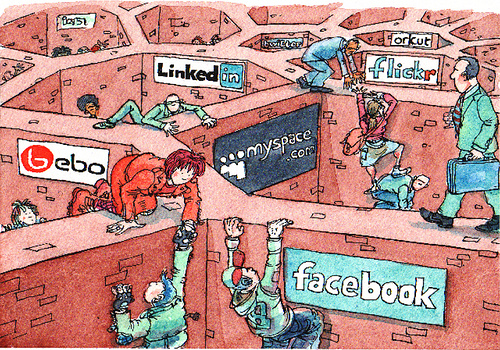
The real battle of the “social Web” isn’t just about where your put your friends or eye balls, but where your data lives. Is one centralized source going to “win”? That sounds pretty darn scary doesn’t it. Even if that source was always a “good guy” (a big leap) they will always do something that doesn’t let you work on the data the way you wish (e.g. Facebook changing their mind on how to accept photos and blocking email).

I want to take control of my data. I then want to let services use it as *I* wish. I may lease out a service to someone who does a great job and who also has top notch policies and APIs for import/export. Lot’s of small players feels a lot better than the walled gardens of some of the social networks.

This is where Weave has me excited. Right now it may look like an experiment on sync, but what if it could be my broker. It feels different because Weave is a very different beast. You own your data. The browser can be your broker. The server can be a dumb bucket and if the client is encrypting it doesn’t even know what it stores in its buckets, let alone dip in to sell ads and make money off of the data that it knows about you, your connects, and your habbits.

It seems quite obvious that the future will be a lot more usable as we work out how this integration thing can actually work out. How do the business models fit in this world. Once industries see this new world as an opportunity instead of hanging on to their old models, the walls will break down and users will be free and have ownership. I would be happy to have micropayments happening constantly as I move around my data.

When this all happens, will a company or two own the experience? Or will you. That makes me want to shout RAW DATA NOW too, Tim.

Apr 14

New tabs, top sites, and how you learn to not be a hater

Mozila, Tech 5 Comments »

topsites

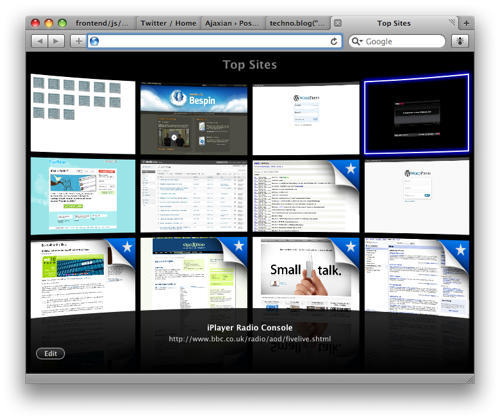
When I first saw the top sites feature that Safari took to the extreme (look wise) I jumped up and down shouting about how I wouldn’t want this feature at all. I am the king of about:blank.

Why would I want to waste time for this new tab page to come up when I normally want to just go somewhere (often the “where” is in my clipboard).

Well, after a week of using Safari 4 I realised that I hadn’t switched it off, and it hadn’t bothered me even though I knew it would bother me!

The reason is of course due to the speed. The reason I always hated setting my “home page” to anything but about:blank was because of the time it would take to grab and render the page. I have never been a “put iGoogle there!” kinda guy. Too slow, and not in my flow at all.

I don’t find that I often USE the top sites to get somewhere because the way I get to common sites is that I put them into tabs and I use APPLE-# (where # is a number of the tab) to get there. Thus, the whole notion of top sites doesn’t make much sense for me. The history area has been used once or twice and coverflow is waaaay too much here.

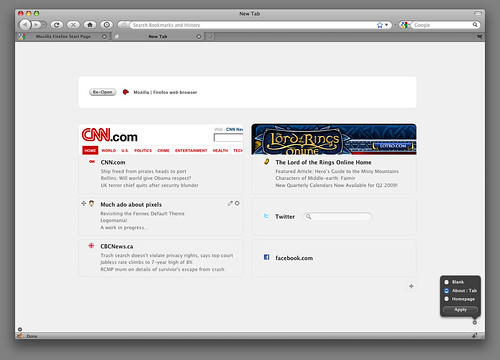
Now, Aza and company have been doing fun work with what this would look like in Firefox. It is a lot more subtle, especially the latest visual update. I love the subtle things such as knowing that I often go to my clipboard to having an action right there.

I also have really enjoyed how this has all been done as a plugin itself, and the process has happened very much in the open. Imagine if you could talk to the Apple engineers and help them do the best job they could for Safari? You can’t. With us, you can.

Also, this being Firefox, you can tweak the hell out of this puppy by greasemonkeying the page, setting the page to your own beast, or writing your own plugin to do something really fancy (like being able to tie into the same places database to do cool things).

You may think that you will hate these new pages, but as long as they load up just as fast as an empty page (perceived to be) you may find that, like me, you don’t actually care at all.