Dec 18

Ajax Feed Partner Bar

Ajax, Google, JavaScript, Tech with tags: , 5 Comments »

The Google Ajax API team has given us some new magic to sprinkle on our sites. This time we have a PartnerBar, which is “a control designed to enable contextual cross linking and promotion of sites within or across network. You configure the control with an array of Partner objects which include a feed url, partner name, etc. and the PartnerBar takes care of the rest.”

Here is an example:

It is very simple indeed to setup. The bulk of my bar is in the JavaScript:

google.setOnLoadCallback(function() {
var partners = [
        {
          feed: "http://ajaxian.com/index.xml",
          moreTitle: "More Ajaxian news",
          link: "http://ajaxian.com/",
          logo: "logo-aj.png",
          classSuffix: "extra"
        },
        {
          feed: "http://devphone.com/index.xml",
          moreTitle: "More devphone news",
          link: "http://devphone.com/",
          logo: "logo-dp.png",
          classSuffix: "extra"
        },
        {
          feed: "http://google-code-updates.blogspot.com/atom.xml",
          moreTitle: "More Google Code",
          link: "http://code.google.com/",
          logo: "logo-gc.png",
          classSuffix: "extra"
        }
      ];
 
      var options = {
        linkTarget: google.feeds.LINK_TARGET_BLANK,
        numEntries: 3
      }
 
      new PartnerBar("partnerbar", partners, options);
});

There are many options for you to tweak your bar. You can use CSS to entirely change the look, and you can even do really smart things, such as grab the image for the particular section dynamically. You do this by configuring a resolver callback, such as this one that grabs the image from the RSS feed itself:

// tie the option to the resolver: { logoResolver : logoResolverCallback, ... }
 
function logoResolverCallback(partner) {
  var url = "";
  var n = partner.result.xmlDocument.getElementsByTagName("rss")[0];
  if (n) {
    n = n.getElementsByTagName("channel")[0];
    if (n) {
      n = n.getElementsByTagName("image")[0];
      url = n.getElementsByTagName("url")[0].firstChild.nodeValue;
    }
  }
  return url;
}

You can also see this running on Entertainment Weekly’s online presence. It is nice to see that this came out of Mark and his team working with EW.

Dec 17

“Guess who’s back, back again.”

Ajax with tags: , No Comments »

Marc is too young to sit back and play golf (XBox 360 that is), and he has put his hat back in the ring. Well, maybe not his entire hat, but rather a small part of his Beret. He is now an advisor at Appcelerator, an RIA company that came out of the consulting world:

So let’s go, I will be helping with as much visibility as I can bring them, mainly PR and this blog. They will need visibility. I am helping with messaging a bit, I am helping with the business model a bit but really all I do is listen to them and what they do and then repeat to them what they told me.

That has worked already. I did a quick search and we have never covered them on Ajaxian. Marc himself says that the market is crowded. This is a different time compared to EJBoss, when he was the first real guy on the block. Having to spin Appcelerator as some sort of better open source is going to be harder. It is one thing to compare to Adobe and Microsoft, but there are many others who have been fighting the good fight wrt open source and the Open Web as a whole.

Welcome back Marc. I hope to not see any astroturf on Ajaxian (water under the bridge) ;)

Dec 16

GWT and Flex at JavaPolis

Adobe, Ajax, Google, Tech with tags: , 3 Comments »

JavaPolis is a fantastic conference. Denver is a city that feels like a town, and JavaPolis is a large conference (3200 this year) that manages to feel like a community. It all comes from Stephan and his great team, all volunteers, at the top.

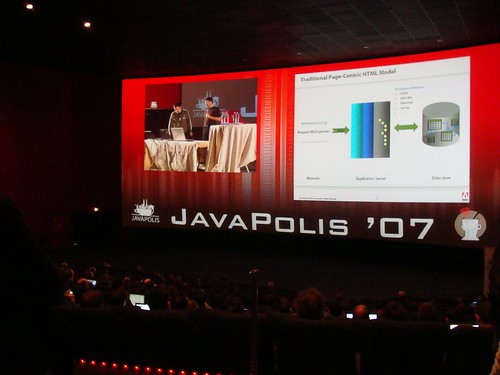
One advantage of speaking at the conference is that you get to talk in a movie theatre. This year, they perfected the experience by having a picture in picture situation that showed speakers and slides together. Like this:

When you go to the same conference year after year, you get to pick up on memes. This year I was a little surprised by some of them.

GWT

I have seen that GWT is successful (way over 2M downloads now for example), but at last years show most of the people talking to me about it were doing so in a “I think I will check that out soon” manner, with a few users.

This year though, people from all over were talking to me about fine details, and about their many projects in production and development. At this point they had gone through a couple of the GWT releases too, and I was often told something like this:

I love the fact that every few months a new GWT comes out with a compiler that makes my applications significantly faster.

The compiler updates from 1.3 to 1.4 and to the bugging 1.5 are quite impressive. Quite a few folks were running on head and I was told “I am so glad that someone just checked in support for Enums at last!”.

I also found it interesting that the majority of people were using GWT-Ext, and that Mattias Bogaert was funding the update to Ext 2.0, which I am excited about (I worked on an Ext 2.0 toy on the plane trip home that I will blog about shortly).

Now, some of the usual suspects were talking about GWT such as Didier Girard, who I got to finally meet. He is such a nice bloke, and told me about a few GWT related libraries that I need to check out. He also interviewed me on video, where I gave an honest account about my Ajaxian feelings. I also met Cyprien Noel, of JSTM4GWT, which is an interesting object replication framework for GWT. I am interested to see how it would work with Gears.

But apart from these season vets, I also talked to companies that have poo-pooed GWT in the past, and are now picking it up, or thinking about doing so.

This all being said, this is a Java conference, so you would expect to see a higher number of “give me Java not JavaScript” folk, but I was still astounded by the numbers. I really think that GWT has reached a tipping point.

Flex my Java guy

One of the morning keynotes was a split session, with the best piece actually being Stephan and Ben showing off their new Flex/AIR-based parlays.com. I got to interview them about it, and will get it up on Ajaxian at some point soon.

It is really well done, and although Stephan bleeds Java, he realised that for what he wanted, Flex was a good choice. He even tried JavaFX but of course, it is too early.

This wrapup of this keynote tells the story on how truly poor the Sun session was. Wow.

Adobe had a booth, a keynote slot, and lots of talks, but there was no better advertising than seeing this application.

Of course, it was a pleasure seeing the usual suspects in Europe, and having a fun time with all.

Au revoir et voyez-vous l’annĂ©e prochaine.
Het goed tot ziens en ziet volgend jaar u.

Oct 09

Dynamic Feed Control with the Ajax Feed API

Ajax, Google 2 Comments »

The Ajax API team has taken the Ajax Feed API and created a simple Dynamic Feed Control that lets you input some feeds, and you get a nice control in a few styles (vertical, vertical stacked, and horizontal).

The Ajax APIs often show the pattern of giving you a very low level API, a simple control and then finally a wizard to generate all of the code for you.

The wizard also uses the new feed discovery mechanism itself, and here it is in action:

Jul 17

Forget the Feed URL

Ajax, Google, JavaScript, Tech No Comments »

Having to type in feed URLs, or grep them from view source (as you don’t use the browser specific system) can be a pain.

The Google AJAX APIs team has created a simple way to find feeds, and to locate feeds in a URL.

findFeeds will do a Google search and return entries and feeds related to the search.

Here is an example at work:

findfeeds.png

The code you will write will look like this:

google.feeds.findFeeds(query, function(result) {
var el = document.getElementById("feedControl");

if (result.error || result.entries.length <= 0) {
el.innerHTML = 'No Results Found';
return;
}

// create a feed control
var feedControl = new google.feeds.FeedControl();

// Grab top 4..
for (var i = 0; i < 4; i++) {
feedControl.addFeed(result.entries[i].url, result.entries[i].title);
}

feedControl.setLinkTarget(google.feeds.LINK_TARGET_BLANK);
feedControl.setNumEntries(2);
feedControl.draw(el);
}

lookupFeed takes a URL and returns the feed. E.g.

function newSlideShow(user) {
showStatus('Resolving feed for ' + user);
var url = 'http://www.flickr.com/photos/' + user;
google.feeds.lookupFeed(url, lookupDone);
}

function lookupDone(result) {
if (result.error || result.url == null) {
showStatus('Could not locate feed for user');
return;
}

showStatus('Found Photo Feed');
// We need to switch over from Atom to RSS to get Yahoo Media for slideshow..
var url = result.url.replace('format=atom', 'format=rss_200');
showSlideShow(url);
}

Very nice indeed.

Jun 21

Base diving with Google Gears

Ajax, Google, Tech 1 Comment »

I have been having a really good time building some apps with Pamela Fox. We are now creating a series of howto articles, and the first one is out: Base diving with Google Gears which shows a simple application that lets you search Google Base, and keep the info offline.

Many more fun things are coming, including some games ;)

Jun 04

GearsDB: A simple abstraction for the Google Gears Database

Ajax, Google, Tech 2 Comments »

I have been having fun playing with Google Gears. As I build applications with it (such as RSS Bling) I find myself repeating a few things on the database side.

Just wanting objects back

Instead of working with result sets, I just want to think in objects / hashes coming back.

To grab one fella I can:

bob = db.selectRow('person', 'id = 1');

or

bob = db.selectOne('select * from person where id = 1');
bob = db.selectOne('select * from person where id = ?', [1]);

console.log(bob.name); // write out 'Bob'

It is more interesting when you return back a bunch:

db.selectAll('select * from person where name like ?', ['bob%'], function(person) {
document.getElementById('selectAll').innerHTML += ' ' + person.name;
});

The callback gets passed in an object representation of the row. You can get back all of the results, but you should favour dealing with a row at a time instead of waiting around.

Inserting and updating

You often have an object that you want to fling in. This is easy to do via:

var bob = {name: 'Bob', url: 'http://bob.com', description: 'whee'};
db.insertRow('person', bob);
db.insertRow('person', bob, 'name = ?', ['Bob']);

The last form will only do the insert if another Bob isn’t already in there.

You can then update via:

db.updateRow('person', person); // assumes that 'id' is the id, else you pass it in

or force the row in via insert or update (if it exists update, else insert):

db.forceRow('person', person);

To round things off you can db.deleteRow('person', bob);, db.dropTable("person");, and db.run('create table....');.

run() is a simple wrapper around execute() that handles logging and such for you.

To get started with the database you just need to:

var db = new GearsDB('gears-test'); // db name

All of this is in an open source project gears-dblib, and you can see simple tests/examples running.

The project also runs with Firebug Lite so you can play with simple console.log type things even if you don’t have Firebug installed (e.g. want to test on IE). Very nice indeed.

Of course, someone will rewrite ActiveRecord and Hibernate in JavaScript shortly to work with Gears ;)

May 21

Sun and Ajax

Ajax, Java, Tech 2 Comments »

After seeing the Gosling Outlines the Trouble With Ajax in a Sun feed, I glanced and found it funny to see NetNewsWire showing me:

  • Sample Ajax Components in Java Studio Creator
  • Using Ajax With Non-HTML Markup in JavaServer Faces
  • Gosling Outlines the Trouble With Ajax
  • Screencast Demo of the Java BluePrints Ajax Components
  • All About Ajax and Java Studio Creator
  • What Is Project jMaki?
  • Java Petstore 2.0 Reference Application
  • Ajax Impact News: Mix and match JavaScript widgets from different Ajax frameworks with jMaki
  • W3C Works on API Spec for HTTP Functionality
  • Giving jMaki a Whirl
  • Build Ajax-based Web Apps with Java Studio Creator (zip)
  • jMaki Google Ajax Search Component
  • jMaki Demo Screencast
  • Sun’s Tim Bray Discusses "AjaxBehaving Badly" and Other Misconceptions
  • Sun Joins the OpenAjax Alliance and Dojo Foundation
May 04

Creating a Google TechTalk Showcase with the AJAX Search API

Ajax, Google, Tech 4 Comments »

One of the great parts of working at Google is that every day there are tech talks that I really want to listen too. More than I can spend the time to actually see.

Last week I talked about Philip Wadler of Monad / Generics / general functional fame. Yesterday, Linus showed us his strong opinions. Next week, G. LaForge is in to chat about Groovy. This is a strong subset of the great talks.

We record these talks, and place them on Google Video for anyone to see. This is great content, and most don’t know it exists.

I wanted to build a nicer landing page for the tech talks, and built it entirely with the AJAX Search API.

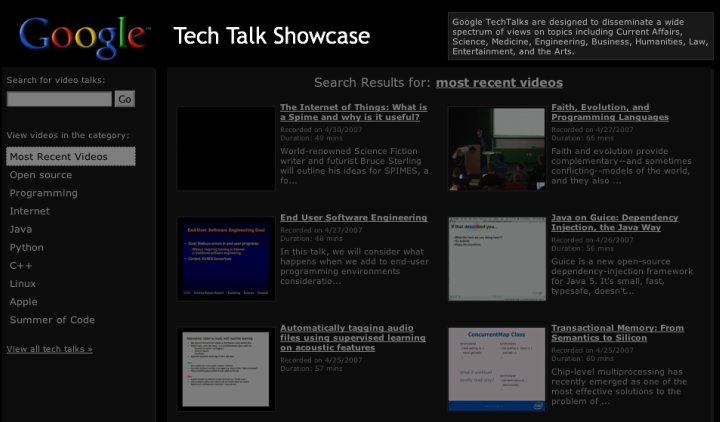
The following is a mockup of what this can look like. If we launch it on Google Code it will have to be white, but I was having a black day:

techtalkshowcase.jpg

If you view-source you will see how it is powered by GvideoSearch, a nice low level JavaScript object that lets you programatically search our video content.

showcase.js has the JavaScript meat, and you will see that there isn’t much too it. In fact, the majority of the code is for setting up a lightbox overlay for when you play the inline videos, and other ugly DOM things.

There is a common misconception that the AJAX Search APIs are these widgets that you put on a page. In fact, the APIs give a full set of building blocks from the low level searchers such as GvideoSearch, to controls that wrap the searchers such as GSvideoSearchControl, and finally to wizards that will generate widgets for you.

Until I dove deep into the APIs I had no idea how much you could do, and it is fun to come up with use cases that allow me to build on top of them. You will see in this example that I have full control on the layout itself, and you do too.

Apr 19

Unobtrusive JavaScript, Microformats, and the Google AJAX Feed API

Ajax, Google, Tech 12 Comments »

I have been having a lot of fun working with unobtrusive JavaScript, and using microformats to define rich behaviour that both degrades nicely, and keeps the code clean.

Since we just released the Google AJAX Feed API, I can discuss one little example.

I wanted to create a Feed Billboard that would show entries from friends feeds in a small portlet. Kinda like the Feedburner chicklet, but using JavaScript, and able to access more than just your burnt feed.

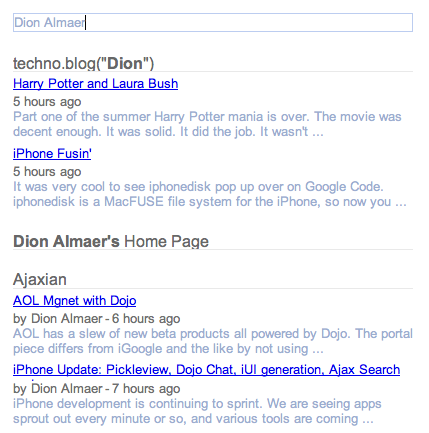
The end result was the Feed Billboard, with an example here:

The microformat

The interface to building the billboard is an HTML unordered list. For example, the above example is:

<ul class="feedbillboard access:randomly">
<li><a href="http://code.google.com/">Google Code</a> (<a href="http://code.google.com/feeds/updates.xml">RSS</a>)</li>
<li><a href="http://ajaxian.com/">Ajaxian</a> (<a href="http://ajaxian.com/feed">RSS</a>)</li>

<li><a href="http://almaer.com/blog">techno.blog(Dion)</a> (<a href="http://almaer.com/blog/index.xml">RSS</a>)</li>
</ul>

The magic class is feedbillboard, and there are a bunch of options that you can pass in that cheekily use the form of name:value. This is cheeky as that it isn’t polite to use ‘:’ in a CSS class name. I have tried to make this microformat/mini-DSL as english-y as possible.

The current full options would contain feedbillboard numberofentries:4 access:randomly timeinterval:4.

You can guess why the unordered list was chosen. If JavaScript isn’t allowed to come out and play, your widget will show your friends and their feeds, which isn’t half bad as a billboard anyway. If the C-LISP is enabled, it will rip through looking for feedbillboard, and replacing them with fancy-pants versions.

A bit about the implementation

The meat of the operations is split between two classes: FeedBillboardFinder and FeedBillboard.

The job of a FeedBillboard is to represent a single billboard widget. It will replace the UL with the real widget, will go out and get the feeds using the Google AJAX Feed API, and will choose which element to rotate too next.

Getting the feeds using the Feed API is so simple. If you take a look at the load call you will see:

load: function(feedSettings) {
var self = this;
new google.feeds.Feed(feedSettings.rssURL).load(function(result) {
if (!result.error) {
self.feedOutput.push(result.feed);
}
});
},

In one fail swoop, we asynchronously grab a new feed out of the feedSettings bucket. The asynchronous piece is important here. You wouldn’t want to have to load all of the feeds before you started to show entries would you. What if it was taking awhile to get one of the feeds? As soon as the first feed is read the billboard can get to work, and as new feeds are loaded the pie gets bigger.

One of the fun little problems was how to loop through the entries (when not using random access of course). The FeedBillboard keeps track of the number of entries it has shown, and given that number, you need to pick the correct entry. For example, if you have four feeds each with four entries, then if you are told “five” you will return the first post from the second feed added to the system. I took the easy way out and created a hash lookup that returns the matrix:


this.placement[count++] = { feed: i, entry: j };

The FeedBillboardFinder handles the microformat. You could create FeedBillboard objects directly to create the widgets, but the finder will go out there hunting down the ul’s and build FeedBillboard objects:

find: function() {
var count = 0;
document.getElementsByClassName('feedbillboard').each(function(node) {
FeedBillboardFinder.build(node, ++count);
});
},

There are a lot of improvements to be made. I would like to have a headline mode that shows a configurable number of headlines instead of one headline and a snippet, and I need to do a better job with consistent sizing.

Conclusion

It is great to be able to very easily create unobtrusive components, and fun to try to come up with a nice microformat. The Google AJAX Feed API made this entire thing possible, and so easier to work with.