Aug 03

Bad Email UI

Apple, Tech, UI / UX 2 Comments »

It is so easy to nitpick on UI…. but this one gets to me everytime, and doubly so that it comes from Apple (known for user experience).

Season Pass Email

There are two links in the email. One is at the top, and the other is after the header showing the name of the show. The one next to the show sends you to preferences rather than downloading the darn thing! Both are “click here”.

How about a big link/button: “Download your show now”.

Is this just me?

Jul 26

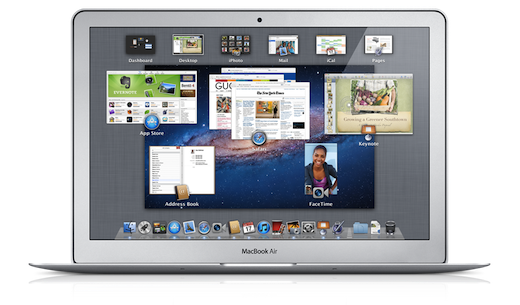
Lion wimpers on Spaces

Apple, Tech, UI / UX No Comments »

overview_osx_lion

There have been a slew of posts on Lion since launch. As with any new change of experience, there are bound to be detractors as well as well wishers. Just look at the new Facebook groups that jump to light whenever Facebook changes a pixel on the screen.

Lion has been somewhat buggy for me, and slower than its leaner leopard friend. The “natural” scrolling was a pain for a few minutes, but a couple of days in and your brain flips. In fact, even when I hit the up and down keys my mind considers them working on the paper as opposed to the scroll bar (and thus it goes the wrong way).

Sometimes one step forward can be one step behind. I just witnessed this over the weekend when voice mail was installed on the land line at my families cabin in Colorado. Before-hand, we had an old digital answering machine system. How archaic! As we setup voicemail we consider the improvements:

  • “Now we can check this from anywhere!”
  • “If the phone line isn’t working, voice mail can still be left by the caller!”

However, you then realize that you lose benefits:

  • “How do we see if someone has left a call?” Before-hand you could glance at the phone to see if there are new messages. We would need to purchase something that could do that for us now. Instead, you have to pick up the phone and listen for the tell tale voice mail beep.
  • “How can I screen a call?” Before-hand if someone called and you didn’t know / didn’t want to pick up right away… you could listen to them leaving the message and even jump in to pick it up mid way

This feeling of “step forward or step back?” is how I feel about the whole mission control / spaces overhaul. I really enjoy putting some apps full screen. However, that breaks my workflow. You see, I have a series of spaces that are configured for different use cases. I access them via Apple-1, Apple-2, etc. If Apple-2 has been my “calendar” space, I could wish to instead have a full screen calendar in that place. Unfortunately, as soon as you full screen an application it lives in its own space, and one that you can’t directly access via a quick key like that. So, I am now forced to keep Calendar out of full screen mode, and it becomes a tease.

When plugged into a monitor, I am further teased with full screen. It doesn’t take into account anything more than the one main screen. I can no longer have my email full screen on the main screen with my calendar staring at my from my laptop screen.

Ah shucks. I look forward to a world where I can neatly configure my various use cases (if plugged in, keep X, Y, and Z over on my secondary screen, else put them on these spaces).

Although we hear more about the visual changes within Lion, it appears that the under the hood changes are really the most important (security sandboxes, versions, etc).

Jun 24

An Epic conversation between Steve Jobs and developers from WWDC 97

Apple, Tech with tags: , 6 Comments »

It is always fantastic to get a blast from the past, and DHH linked to a conversation between Steve Jobs’ and developers from WWDC in 1997.

I find it fascinating. Steve was back as an advisor, but not in as CEO yet, so he talks about Apple in a very specific way…. and all throughout his time he keeps saying “my opinion is …. but I am not in charge”.

At one point, he mentions the frustration that people can have when they are perceived in one way, based on an old version of themselves. Or maybe an incorrectly perceived old version. The context for this is how the press or wall street was looking at Apple with year old glasses.

In this video, we get to see an older Steve, with immense skills. It is enjoyable to pick out the genesis of the Apple transformation, and visionary aspects of what happened. It is equally interesting to see where the vision didn’t bear fruit.

My highlights were:

  • It was fun to see Steve talk about Rhapsody and how developers can go cross platform! In response to a developer asking why they should write for Mac he said: “If you could write that software 5 to 10 times faster, and you could deploy it to Mac’s and PCs, would that be of interest to them?” Of course, Rhapsody didn’t work (which is why Steve may have flipped the bit on cross platform?)
  • Steve was spot on when he discussed the “Mythical Man Month”, and how he feels a new stack needs to help you abstract so small teams can do amazing things. He discussed how you can compete with Microsoft with apps as large software becomes hard to scale. He also talks about Lighthouse (bought by Sun, with Jonny Schwartz) and how a small team of 18 people produced an amazing suite of products.
  • Steve was coming out of a world where he had a personal T1, and his home directory lived in the cloud via NFS. He talks about having a computer that is just a keyboard and mouse. The “network computer” was strong in him (and Larry Ellison, and Sun) and he talked about it in a way that is much closer to Chrome OS than to iOS. iCloud is finally getting there, but in a different way.
  • Newton and focus. Focus came up frequently. Steve talked about how he thinks Newton should be shot NOT because it sucks… but because he couldn’t see a way for Apple to maintain MacOS, Rhapsody, and Newton’s OS. He did also talk about how the fact that Newton wasn’t network connected made it useless for him. “The high order bit of connectivity. Being in touch to a network. I don’t think the world is about keeping my life on this little thing and IRing it to a base station. It needs a keyboard, and you need to be connected to the net. So if someone would make a thing that is connected with a keyboard I would love to buy one! I don’t want a little scribble thing.”
  • CLONE WARS: “I believe that Apple should license everything. But I think they should get a fair price for it.” Funny to see Steve talking about licensing.
  • “Being proprietary in everything we do has really hurt us, a lot of smart people don’t work at Apple too.” Love see him talking about proprietary.
  • Steve talked about how engineering management was broken, and so great engineers were not working on the right things. Great technology isn’t the high end bit either. You have to work from the product backwards.
  • Steve cares about productivity. He mentioned how he sees Apple using crap tools (Eudora for email) and that if they would give the org a decent email system they could be 30% more productive.
  • Steve kept saying “it doesn’t matter what I say”. A funny time, before he was CEO, but you can see it unravelling.
  • Fun to see Steve pimping and trying to get devs excited, at a time where they didn’t have the marketshare. Now the game is quite different.
  • Steve is someone with great taste…. but even he wore patched jeans!

A great chat, and I am glad it was recorded for us to see the master at work. I hope that we have many more years of this.

Jun 20

iOS as the perfect projector? More fun mobile design thinking

Mobile, Tech, UI / UX 1 Comment »

projector

I have to say it, I love AirPlay. Being able to use any device (phone, tablet, laptop) to project something to your lovely flat screen is fantastic. Up until now, the focus has been on media (which makes sense) and being able to send anything from a funny YouTube clip, to a movie you have purchased on iTunes, if solid.

But, with an improved AirPlay, the app developer can project whatever they want onto an AirPlay aware screen (or just audio for non-screen output). This has entered my mind into its latest “woooah, how cool would it be if [insert app here] used that feature to project [insert cool idea here]!”

The obvious ideas that people talk about first is gaming. iOS is already a force in gaming, but now that your devices are controllers and can teleport their views to a screen at a whim? Wow. I can’t wait to see the game that personifies having iPhone and iPad form factor controllers and helpers.

There is much beyond media and the games though. TV’s now come as weak app platforms. I have got a Twitter app on my Samsung. It sucks. I never use it. It is also not needed. I should be able to sit down with the Twitter iPad app open on my lap, and display tweetigoodness to my TV. I could have a simple view, but also, isn’t the TV a perfect TweetDeck?

As well as having the iPad as a controller but using the TV as the main display, you can also go with different modes. As you work on an image, you can see throwaways, or old versions, up on the TV for you to look at. The Echofon Twitter client has a Photofon app that shows you images from your Twitter stream, but that could be embedded and a screensaver kicks in.

Now you have these lenses on, I dare you to open up an app and not think about a cool visualization for another screen!

I hope that PhoneGap has a plugin in the works for this in their iOS 5 support (ASIDE: A birdy may or may not have told me that full screen WebViews run with the JIT which is good too) so Web folk can take care of this too. It would be fantastic to have Web views available to project over there.

There is still so much that will be coming too: More TV’s will be AirPlay enabled (so you won’t need an Apple TV); Other operating systems will start to support these modalities (read: industry standard AirPlay please :/); The browser is an ideal projector too, and cross platform; And, then the other screens will also start to accept touch input.

So, I now have another question to ask when I start a new mobile project…. to go with others such as:

  • What goodies can I hide in the scroll over space?
  • What could we put in landscape view here?
  • (hardware keyboard) What shortcut keys could we use, and what action can we type first to
Jun 13

The “I” in iCloud and the “We” in Web

Apple, Mobile, Open Web No Comments »

iOS 5 is a big release for Apple. It is their move away from the PC being the hub, and now we can talk to the big old iTunes in the sky. Android and webOS folk may scoff a little at this. “We have had over the air updates for ages!”, “Those notifications look familiar”, “In fact, my notifications are still far superior!”

It is great to see systems competing, and non iOS systems having advantages, but they shouldn’t get carried away. iOS is still the king. That is where the best apps can be found (ironically even though it is so restrictive), and the UI is still the most responsive and easy to use. Android is looking good and getting better rapidly, and is superior in real ways (e.g. navigation, deep integrations, etc) but again, it has room to grow too.

I was recently watching a tablet user study, and one of the users talked about how they thought that their tablet apps were so much better than the phone counter-parts. Really? Why did they think that? The reasons given were: easier to use, more stable, more responsive, and much more beautiful. Huh? Well, it turned out that this user had an iPad and an Android device. Ahhhhhh.

What struck me about the “cloud” side of iOS 5, was how it squarely goes after helping you manage your devices. The big pain point mentioned was getting content onto your laptop, tablet, and phone. What it lacked was the “we” part of sharing. I am very curious to see if this is a point of view, or a baby step. It is much easy to scale out the problem of “I”…. much easier to shard.

I have the pain that Steve mentioned with my devices, but I also have much more. For one, I don’t just have iOS/Mac devices, so how do I get them in on this action? For two, I have a family, and I want to help manage their world too. The tablet is a very social and shared device for some people. It gets passed around the family table. The same device could have your work email and calendar, as well as games for the kids.

One of the reasons that I bought an iPad 2 was because I could hide it, and the first generation could be the “family one”, leaving me my own. Now, you may think that Apple won here since I got a new device, but it feels natural that another tablet system will actually cater for the user here. I would be shocked if at some point in time, you don’t just pick up a tablet, the camera sees who you are, and you are shown your view into the world.

Beyond sharing a physical device, there is sharing data. Apple thinks in a very app-centric model (which has done very well for them!) and it is hard enough to share between apps, let alone beyond that.

Joshua Topolsky discusses Apple’s truth on the iCloud which hits this home.

While I won’t argue that Apple and others have had tremendous success with native apps and services, it’s also impossible to downplay the importance of the web and what it brings to applications. It’s not just that many of the applications we use are actually intimately tied to the web (even Apple’s own products are able to make quick changes like the switch to iCloud services in iOS 4.3 thanks to markup being used in place of native code), it’s that the web provides something native applications cannot. There is no native application for the Mac or iOS that replicates the shared document editing of Google Docs; there’s no mail application that exists for the Mac which will allow me to access my important information from anywhere in the world with or without a device in hand; there is no photo sharing service for iOS or the Mac which is as flexible or accessible as Flickr. When I need to access music with my Rdio account, I can do it from a plain old web browser, or an Android, iOS, or even BlackBerry application — and the ability to shift between those portals is incredibly powerful.

When it comes to Apple, it feels to me like the company views the web as a technology which undermines rather than enriches its products. It wants you to talk to the cloud, but only through its portals and its gateways, in closed loops and private networks. Is it possible that for the company Apple has become — the lock-in PC-maker, the gatekeeper, the retailer — there’s still a little too much Wild West in the web? Is Apple’s failure with or aversion to web services a byproduct of the desire for complete control over its ecosystem and products? Or is the gang in Cupertino just not that good at the internet?

The Web, though very simple standards (HTTP, URL, HTML, etc) is very much about connecting. This results in applications that can share data (even in the same UI such as mashups), and it is very natural to have a group aspect to the data. This means that we need permissions models around such data, and along with that we have the base APIs being built around URLs.

iCloud APIs on the other hand have an SDK that is built top down. The center of the world is Objective-C, now low level network primitives. This is a very different way to look at the problem, and you end up with obviously iOS-centric (if not “only” right now) views.

Wil Shipley himself links to questions on the Apple Dev Forum around how this system can work. The questions themselves can’t be questioned due to the restrictive systems in place.

There are a couple of social aspects of iOS shining through. Game center is one, but the biggest news here is the integration of Twitter, which is absolutely massive. Having the throne as the only integrated account (and most importantly, not having Facebook there) means that Twitter can take a huge run at social APIs that it maybe wouldn’t have cared as much about before hand.

It continues to be a great time to be in tech. Apple has made many small but important strides in iOS 5. Android “ice cream” is coming. And then we have the other mobile operating systems (Windows, webOS, etc) who are embracing the Web heavily.

When I think about the “we”, I definitely think back to my former thought that HTML5 is a jewel that we need to cut into a weapon.

Jun 09

Helping Set Direction at Walmart; Ben and I and our (surprising!) new role

Tech, Walmart 7 Comments »

walmart

Ben and I, and the entire Set Direction team are now part of Walmart. We are now leading the mobile engineering effort and have set off on a journey to revolutionize mobile commerce at the largest company in the world.

Now, you may be a touch surprised. “You just started!”, “Walmart?”

To be honest, if you had told us that our career would take this turn 5 months ago, we would have been surprised too.

Here is what happened. After leaving Palm/HP, we had some hypotheses around the difficulty that developers were having in a modern world that contains a diversity of platforms. Not too long ago, most businesses were building Web sites, and the diversity was around the number of Web frameworks. Many companies are now in a post-Java malaise and there are a huge number of very viable server solutions for developers to choose from.

On the client, you need a Web presence, but may also need to get onto iOS, Android, and even Blackberry, WinPhone, webOS and friends. These new platforms are amazing for developers in that they come with low-friction monetization affordances, but they are very different technically. The Web has the opportunity to be a great cross platform solution (again!) but there are real trade offs between Web vs. native, and it very much depends on the type of experience you are going for, your business needs, and even your personnel.

We set out to explore the entire stack, from the clients all the way to service creation that fits in to the unique needs of mobile. To test out the hypotheses we took on a small number of clients ranging from small startups to the Fortune 50. One of these clients was Walmart where we teamed up with Paul Cousineau (former product director for webOS), someone we rated highly from our time at Palm.

We quickly learned that Walmart was very serious about a quest to use the mobile revolution to make commerce a fantastic experience for their customers: whether that is helping to get the most out of their store visit, or buying goods from Walmart.com (or the many worldwide properties that are part of the Global eCommerce group). We had conversations with executives all the way to the top, and we heard a strong message: there is a belief that the advent of mobile could be larger for commerce than the years where the automobile enabled true reach to even rural America…. a time that launched Walmart on its path to the top.

We got to know other members of the team over the last few months, and a conversation started around Walmart acquiring the Set Direction team to accelerate their vision. We had discussions about the way that we think product should be created, about the role of open source, on how we like to build teams, and Walmart was very much aligned. They really want to build something special here.

This all culminated with us signing up to build a world class mobile group, backed by the fantastic resources of Walmart. We are joined by some other new faces. The Kosmix crew are top notch engineers with careers building mechanical turk, various search engines, and most recently a real-time social genome. Social and mobile can fit hand and glove, and we are very excited to work with them as part of Walmart Labs.

What does this mean for our other activities?

  • We recently launched FunctionSource to cover the Web and mobile space. We have a passion for being part of the community and that won’t change. It has been fantastic to get back into the game post-Ajaxian, and we look forward to doing some fun experiments on f{}. We will be open sourcing the technology behind it, which includes a particular fun “view server” that allows us to enjoy writing the application using CoffeeScript, Backbone, and modern client Web technology…. but serializing that out to “legacy” browser such as…. the Google Bot.
  • Conferences? We love being part of the community. That can be on Twitter, FunctionSource, but very much speaking and participating at conferences and user groups. We have a lot of exciting work to do at Walmart, but we want to share some of that with you and learn from you too!

We have a mammoth task to make the most of the amazing devices that consumers have, and the massive amount of data (internally from Walmart itself, but also externally across the Web). We want to build delightful products using the best technology possible. Walmart also has a global reach, so we need a developer platform that scales.

I am obviously excited to continue to work with my friend and long time partner-in-crime Ben Galbraith as we take on this new challenge. Here you can read his thoughts on our new roles.

Finally, we are looking for like-minded developers to join us on this mission. If you look to take on some hard problems using leading technology surrounded by fellow technologists, we are looking for people like you. We care equally about: the craft of software, building great products, and having great fun along the way.

You will have access to real scale. Our iOS application has millions of downloads, and we recently released an Android application that jumped into the top shopping applications list in short order. And of course, don’t forget the mobile website, with an epic number of users as customers. We have big plans for that experience.

Please reach out to talk more about joining the team.

May 14

Multi-cloud; Preparing yourself

Tech with tags: , , 1 Comment »

multipleclouds

There has been another rise of the “can we trust the cloud!” type articles recently. They normally come from two perspectives:

Consumer

“See what happened with Sony! Nothing is safe!” Or, “can you really trust your data on a cloud such as Google’s? If you use a Chromebook and everything is up there, you are just a subpoena away from the government seeing that data!”

There are valid issues to think about, but we also quickly forget the last time the hard drive crashed and your data was lost.

Enterprise / Companies Building Software

The Amazon meltdown sent shocks around the Web on this one. A friends company had just migrated from their own servers to Amazon and suddenly the business was wondering if that was a smart choice. Much like in the consumer space, we often forget about the time that someone hacked into your operations, or some other issue occurred.

The thing is, if you can help it, you should trust any one thing. If you are on a “cloud” make sure that you are in multiple regions.

The LearnBoost crew were one step ahead of the Amazon issue and posted about their redundancy, how they used regions, and how they used mongo replication to make sure the data was there.

Ideally though, you should think about going beyond one provider. At some point it would be nice to have insurance policies between these providers so you can hot swap if there is an issue.

This is why I was a fan of CloudFoundry when I first heard about it from the VMWare crew a few months back. They have managed to provide a stack that is high level enough (e.g. you have apps and services and you choose how they talk together) but open in many dimensions: you can use different languages, platforms, and frameworks….. but the core underlying system is also able to run on multiple clouds. This is huge. One chap wrote a piece on the fact that open sourcing the system is a gimic, but having vcap out there has enabled a slew of people to port it on top of their systems.

At the end of the day, this means that I can run on top of vcap with my nice vmc scripts, but behind the scenes I am a mere vmc target othercloud.com away.

We haven’t talked much about how we use CloudFoundry for FunctionSource, but it has been a real pleasure and we are early customers! Being able to vmc instances +10 makes me feel like I am in the future, and the developer ergonomics are very strong. I love being able to cd into an existing node app and vmc push the puppy up in a second.

The cloud isn’t a silver bullet, but being able to seed network and sys-admin duties has been a pleasure. Thanks to the open source nature of the product, the core system runs all over the place (including on Amazon) which means I can get my redundancy and failover with massive pain.

Feels like the best of all worlds…. the cloud is here to stay folks, just give yourself some backup.

Apr 01

CoffeeScript, Whitespace, and Coffee

JavaScript, Tech 2 Comments »

I enjoy learning new languages. I am not on the yearly diet as the Pragmatic folks would desire, but when I can…. I enjoy expanding my mind as I have definitely experienced the fact that learning a new language makes me program differently in all of my other languages.

Clojure and Scala are interesting to me in the land of Java, but that isn’t where I have been spending time (until recently). I have been very much enjoying Jeremy Ashkenas’s CoffeeScript. What’s not to like? Jeremy has managed to create a language that cleans up many of the issues in JavaScript, and codifies much of the Good Parts into source form. Ruby is my favorite language, and this gets really close to my ideal mental model.

When talking to Brendan Eich about the language, he very much appreciates it, and also the fact that it maps nicely to the JavaScript model (versus something like GWT and Java mapping on top of JavaScript say).

In some ways it feels bizarre to write in a high level language which gets converted to another high level language. One thing that has been enjoyable though is learning this language. The killer features for me are:

  • Jeremy takes care of things like documentation. The main site is the best introduction and documentation for any language.
  • Source code as byte code. I don’t enjoy reading byte code. I do enjoy reading JavaScript code (a language I know well) though. It is fantastic to be able to play with a new language and instantly be able to see the JavaScript output, whether it be small things via the inline site, or via -w / cake watch.

Try CoffeeScript

One feature that I am not a huge fan of is the pythonic importance on significant whitespace. Notice the image above, and how the ordering of elements made a difference to the output.

It is very cool that Firefox is going to “natively” support loading up CoffeeScript, and I think that someone needs to create Coffee and do to Java what CoffeeScript has done to JavaScript.

You could argue that this has already been done….. Groovy? Oh and thanks to the great work of Charles, Tom, Ola, and friends…. I can even use JRuby over there…..

Mar 17

Give me a REST, I just want to get my Message across

Tech 2 Comments »

messagesgami

2011. HTML5^H. JavaScript everywhere. Cross platform mobile. The “Post-Java malaise”. The user experience bar.

It is an exciting time to be developing software. We have multiple stacks that make building the server side easier, and we are on the precipice of pushing into real Ajax. Real modern clients. We are going beyond the world of sprinklin’ some JavaScript into an HTML page.

Progressive enhancement used to be the only viable option because most (by percentage) of the browsers hitting your site kinda sucked. Thus, it made sense to give them an experience of some sorts but enhance that experience for those that could deal with it.

Now, we even have a decent browser from the IE family. It feels like the days of IE5 :)

Since the tables have turned, we then get this crazy idea that we can build for the rich majority…. and regressively degrade for the poor buggers who aren’t able to up their browser due to crazy IT departments or illegal Windows versions. Lord of the shims and polyfills. We have been doing some fun work to make this work in an automated fashion, but that is for another time.

When you start building applications on top of WebSockets (and degrading) you also start to think about different architectures. WebSockets gives us a rich, fast, bi-directional pipe between the client and server. Whether you are a Socket.IO lover with Node++, or an Enterprise sort on Kaazing, you can start to deal with a very simple messaging API (that degrades).

Suddenly, you are building with a rich client MVC framework (enjoying Backbone and the like) but instead of mapping back to REST (which Backbone makes easy) why not deal with publishing and subscribe to topics?

No more polling. Instant real-time. These messages can piggy back and even go straight to the land of MOMs (JMS, Stomp-iness, etc). Now on the server you have loosely coupled processes that consume messages and do their work. Scaling out with a loosely coupled messaging infrastructure is so much easier to deal with that RPC madness.

I am having some fun with this type of infrastructure, and I am curious indeed to see where it leads. You?

Mar 07

The balance of UI elegance; Learning from the Dickbar

Tech, UI / UX 2 Comments »

The iOS Twitterati came out in full force once once they had upgraded to the latest 3.3 version. The new version has a ton of great features, such as autocompletion of @usernames and hashtags, better photo uploading, and some UI cleanup. This has all been over shadowed by the addition of a “trending topics” bar that appears at the top of your view.

I am sure that some users love the feature (the quiet ones) but a vocal community quickly came about and:

  • a) complained
  • b) reverted to 3.2 or even to try other clients (e.g. Echofon)
  • c) built and installed software to “fix” the issue (e.g. Twizzler).

Those who are vocal wanted a way to turn this off. An option. Even if it is buried in the settings (a few taps into the app).

To this, Dick Costello (CEO) responded:

dickcquote

This is very interesting, and where we can learn. I have found that one key art in software development is when and how to abstract your code. I have seen developers go down a common path:

  • Phase 1) Minimal abstractions. Spaghetti code ensues. Everything is coupled to everything else
  • Phase 2) Crazy abstractions. Ravioli code ensures. Everything is wrapped as one method with an abstract class and an Interface (picking on Java here!)
  • Phase 3) The balance. Working hard to make the right balance, enabling readable and modular code without losing the ability to see how it all fits together.

ASIDE: I tend to enjoy the like of Ruby (and even JavaScript and CoffeeScript) as I always feel like every line of code is doing something.

There is a similar balance in the world of UX. You want to offer just enough knobs and switches to get people working in a beautiful way, but not too many (so they can’t work out how to do a darn thing [e.g. original desktop linux days]) or too few (so they feel like they can’t get anything done!).

I find it fascinating to watch this balance. As a power user, I find it interesting to know what I personally want to be able to tweak about a system. For example, going back to Twitter. I switched to Echofon from Tweetie back in the day. I loved much about it:

  • The way that you click on something and a gutter shows you more, but you don’t lose your context
  • It was an early consumer of the streaming API so data showed up sharply
  • It showed when people interacted with my tweets (other RT, favorites, etc).

One feature that people will scoff at as minor, is the fact that it has no way to display the real name of the tweet author, and instead I am stuck with a username. Now, I happen to have a bunch of folk who I follow who have fun handles. However, I don’t have the full mental map to remember that @monkeyape23 is my old mate Bob from England. I just want to see his name. Please. This silly little feature lead me away from Echofon believe it or not (please add it guys!).

I liken my Twitter client to my Email client. Some people love their stock Gmail/Mail.app/Outlook experience, but many very much like to tweak it. Some may want a three-pane view (I use “Multiple inboxes” on Gmail for this), some want to change the number of lines in the preview, and others trick the hell out of their system with scripts and extensions. You are in this software daily, and some folks like to sharpen their tools.

pinstripes

Now, I get that the official Twitter client is a “base level experience”, but that doesn’t mean it has to be simplistic and rigid. I also find it hilarious that, although there isn’t an option to hide the Trendbar, there IS an option to turn pinstripes on and off :)

You can easily go too far with “options” as Alex Faaborg (Firefox UX…. highly respected) mentions:

Screen shot 2011-03-07 at Mar 7 @ 12.48.24 AM

Now, I mentioned extensions above. This is another important thing to think about as a release valve for your users. Firefox took something that “had too many options” (Mozilla Suite) and stripped it to something much more bare bones, but XUL/XPCOM were still there (and even about:config was good in that extensions could target it). Developers could create fantastic additional experiences that users could enjoy. To me, this was one of the key items of Firefox that made it #winning in the old days. IE actually had add-ons too, but they were painful to write and the platform was nowhere near as approachable and available. We got amazing functionality such as Firebug and Greasemonkey.

Ah, Greasemonkey! The Web turns out to be a fantastic extension platform. When I load up twitter.com itself, a few Greasemonkey scripts kick in for me to customize the experience, and I get things how I want them. You can mine for great user scripts out there, and now that browser such as Safari and Chrome also not only offer extension support, but do so in a very HTML (and Greasemonkey) friendly way, you will find them packaged there too. Chrome and Safari had to create extension systems to compete. How many of you waited for that one extension to full switch from Firefox to Chrome?

In my ideal world, Twitter would not only add an option to get rid of the #dickbar, but would also offer an extension API that would enable folks to build extensions that flow from their awesome communication ESB in the cloud, all the way to the client platforms that access it.

Our users are human and have different needs. It is fine and dandy to want to “do a Steve Jobs” and create something that is so perfect that you can hand it down to the fellows, but how about a one-two punch. A fantastic default experience, with hooks to enable developers to offer up fantastic experiences to your end users.

I couldn’t move to Chrome without Adblock and ….

I can’t move to Sparrow until Rapportive is supported.

If you create a great plugin system, there will be no reason not to move on. #thewebrocksatthat #firstworldproblems